

Most AI tools wait for you to type. OpenAI’s dots don’t. A dot is an always-on agent inside ChatGPT that takes ongoing responsibility for work and keeps going between your conversations. It runs on its own cloud computer, connects to your apps, and messages you in ChatGPT, Slack or Teams when it needs a decision.
OpenAI launched dots on September 29, 2026. Six weeks in, the three questions everyone asks are: how much does it cost, what are the usage limits, and what can it actually automate? This review answers all three, then tells you whether it’s worth paying for.
Quick verdict: 3.5 / 5
- Price: no separate fee. Your first dot comes with ChatGPT Pro (from $100/month) or a Business Premium seat ($100/user/month billed yearly, $125 monthly). Not on Free, Go or Plus.
- Usage: chatting with your dot is free of limits. Background work uses a plan allowance, and tasks it starts in ChatGPT Work or Codex count toward your normal limits. The free first month ended around October 29, and OpenAI hasn’t published the new terms yet.
- Best at: recurring work that changes over time, like monitoring, follow-ups, research updates and first drafts.
- Weak spots: early users report it can be slow and not very proactive, and costs after month one are unclear.
- Worth it? Yes if you already pay for Pro. Not worth upgrading from Plus just to get one, yet.
What Is an OpenAI Dot?
A dot is a personal AI agent that lives inside ChatGPT. The simplest way to think about it: regular ChatGPT answers when you ask, while a dot keeps working when the conversation stops.
- Runs on OpenAI’s top models. Dots launched on GPT-6 Astra. On November 3, OpenAI added GPT-6.1 Terra, and a dot can now use different models for different parts of a job.
- Has its own computer. Every dot gets its own cloud computer and browser. You can open it any time and watch it work.
- Connects to your apps. Through ChatGPT plugins, a dot can work with more than 4,000 apps, such as email, calendars, docs and project tools.
- Remembers. It starts with your ChatGPT memories and builds its own as it works.
- Works in the background. When you’re not talking to it, it does “proactive research”: it reads your connected apps (read-only) looking for ways to help. In this mode it can’t send messages or change anything.
- Talks where you work. Message or call it in ChatGPT on desktop, web or mobile, or in Slack and Teams. Context carries across all of them. Texting is a limited US beta.
- Runs on a schedule. You can set recurring jobs, like a morning calendar review.
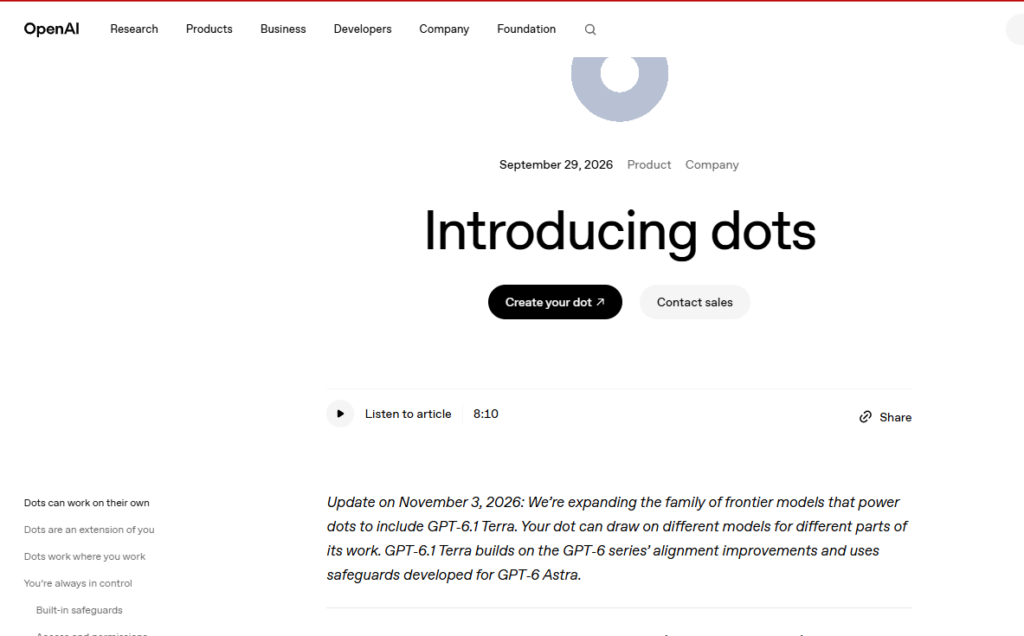
How you set one up
- Open the ChatGPT desktop app or ChatGPT on desktop web. You can’t create a dot on mobile.
- Name your dot and pick an avatar.
- Connect the apps you want it to use.
- Set your Custom Rules: what it can do alone and what needs your approval.
- Connect Slack or Teams if you want it there too.
After setup, you can talk to it from the ChatGPT mobile app.
How Are OpenAI Dots Priced?
Dots have no price of their own. Your first dot is included with certain ChatGPT plans. The cheapest way in is $100 a month.
| Plan | Price | Dot included? | Notes |
|---|---|---|---|
| Free | $0 | No | |
| Go | Low-cost tier | No | |
| Plus | $20/month | No | No announced date for Plus |
| Pro 100 | $100/month | Yes, first dot | Cheapest way to get a dot. Billed monthly only |
| Pro 200 | $200/month | Yes, first dot | More usage than Pro 100 |
| Pro 500 | $500/month | Yes, first dot | Highest usage, plus OpenAI’s fastest model tier |
| Business Premium seat | $100/user/month yearly, $125 monthly | Yes, first dot | 5x the usage of a Standard seat, no five-hour limit. Workspaces usually need at least 2 seats |
| Enterprise, Edu, Healthcare | Custom | Yes, in eligible workspaces | Billed from November 18, 2026, at rates OpenAI hasn’t published |
Sources: OpenAI’s dots announcement and pricing as reported by eesel AI, Layer3 Labs and Toolcolumn. Check ChatGPT’s pricing page before you buy.
The two-seat trick for small teams
A Business workspace needs at least two paid seats, which can be any mix of Standard and Premium. For a small agency where only one or two people want a dot, mixing Premium and cheaper Standard seats can work out better than buying Pro for everyone. For example, eesel AI worked out that a 10-person agency with 3 dot users would pay about $440 a month on yearly billing, using 3 Premium seats and 7 Standard seats.
Extra dots: not available yet
You get one dot per plan right now. OpenAI says you’ll later be able to add more dots and pay to make each one faster or able to take on more work per month. Those add-ons haven’t been priced.
Where dots are available
- Pro: users aged 18+ outside the European Economic Area, the UK and Switzerland. Rollout is gradual, so it can take days to reach your account.
- Business Premium: all supported ChatGPT regions, including Europe.
- Enterprise, Edu and Healthcare: generally available in eligible workspaces. From November 18, access is on by default unless the admin opts out.
If you’re in Europe or the UK and want a dot, a Business Premium seat is currently the only route.
Not sure Pro is worth it at all? Our ChatGPT Plus review compares the plans.
OpenAI Dots Usage Limits Explained
“Always-on” doesn’t mean unlimited. Dot usage works in three layers:
| What your dot is doing | Does it count toward limits? |
|---|---|
| Chatting or calling with you | No. OpenAI says conversations with your dot don’t count toward your ChatGPT usage limits |
| Deeper background work on its own computer | Yes, it draws on a separate “allowance for deeper work” included in your plan |
| Tasks it starts in ChatGPT Work or Codex | Yes, these count toward your normal Work and Codex limits |
What happened after the first month?
At launch, OpenAI said dots usage wouldn’t count toward Pro, Business and Enterprise allowances for the first month, and that it would share usage terms for each plan after that.
That month ended around October 29, 2026. As of early November, OpenAI’s help pages still only describe the launch month’s extended limits, and the promised per-plan terms haven’t been published.
What this means for you:
- You can’t budget precisely yet. Nobody outside OpenAI knows exactly how much background work each plan allows.
- When you hit your included allowance on Pro, OpenAI’s Pro help article says your credit balance is used next. Credits also cover Work and Codex, so heavy dot use can eat into them.
- Plans can change. OpenAI recently lowered the usage allowance for new Pro 200 subscriptions at the same $200 price, and existing subscribers kept the old allowance only through October 29.
How to keep your dot from burning through limits
- Give it narrow jobs. “Check my inbox every morning for unpaid invoices” uses far less than “manage my business.”
- Be careful with Work and Codex hand-offs. Each one counts toward those limits.
- Use scheduled runs instead of letting it research constantly.
- Check its activity view weekly to see what it’s actually spending time on.
Our guide on how not to waste your AI agent credits goes deeper on keeping agent costs under control.
What Tasks Can OpenAI Dots Automate?
OpenAI’s examples all follow the same pattern: the dot learns your standards, watches for a trigger, does the work, and brings it back for you to review. It’s best at recurring work that changes over time, not one-off questions.
OpenAI’s launch examples
| Area | What the dot does |
|---|---|
| Software development | Watches customer feedback for recurring requests, scopes small fixes, builds and tests them, and returns finished pull requests with videos of the change |
| Product launches | When the scope changes, works out what it means for positioning and prepares updated assets and docs |
| Research | Reruns analyses as new data arrives, investigates surprises, updates figures, and flags what needs your review |
| Enterprise sales | Checks customer requirements against product docs, builds a proof of concept, and suggests a colleague who handled a similar deal |
| Content production | From a new interview transcript, finds clip moments, prepares show notes and drafts social posts, carrying your edits across all of them |
| Admin and finance | One early tester’s dot noticed he’d forgotten to invoice a client, prepared the invoice, and sent it once he approved |
Source: OpenAI’s announcement, summarized by DataCamp.
Practical tasks for freelancers and agencies
Based on what dots can do with connected apps, here are jobs worth handing one:
- Invoice and payment follow-ups. Spot unpaid invoices in your email and draft polite reminders for you to approve.
- Morning briefing. A scheduled run that summarizes today’s calendar, urgent emails and open client requests.
- Client research before calls. Pull the latest news, website changes and past emails about a client before each meeting.
- Content repurposing. Turn a new podcast or webinar transcript into clips, captions and a blog outline.
- Proposal updates. Keep a proposal current as client requirements change in email or Slack.
- Competitor monitoring. Check competitor sites or pricing pages weekly and flag what changed.
- Lead follow-up. Track which leads haven’t replied and draft the next touch for you to send.
What it can’t do (yet)
- Create a dot on mobile
- Call you (you have to call it)
- Have its own email address (it uses your connected account)
- Change your passwords or handle the most sensitive steps, which are always handed back to you
- Delete its own memories without deleting the whole dot
And remember, OpenAI itself says dots can make mistakes, so review anything consequential before it goes out.
Interested in other agents that automate work? See our top 10 AI agents in 2026 and our Hermes agent review.
What Users Are Saying
Early reactions are mixed, leaning negative. Two common complaints from Reddit threads collected by Emergent:
- “What is it actually for?” One user said dots seem to overlap with ChatGPT Work and Codex, and wasn’t clear what dots do better or which use cases they’re meant to replace.
- “It’s slow and not proactive.” A Pro 100 subscriber said his dot was slow, gave up on searches quickly, kept losing permissions, and wasn’t proactive at all, even though proactivity is the main selling point.
There’s also a reliability question. MSN reported that OpenAI’s own system card shows nearly 1 in 5 extended task chains ending with a scope error, meaning the dot drifted beyond what it was asked to do. That’s exactly why the approval controls matter.
To be fair, it’s six weeks old, and early agents usually improve fast. But right now, don’t expect it to run your business unsupervised.
Is It Safe? The Controls You Get
Dots have more layered controls than most consumer agents:
- Custom Rules. For each type of action, choose one of four behaviors: act without asking, act only if you requested it, ask first, or hand it to you.
- Auto-review. A separate check reviews any action that could affect your accounts or share information against your instructions and OpenAI’s safety rules. You can’t turn it off.
- Read-only background research. When it researches on its own, it can’t send messages, edit content or control your browser.
- Hard hand-offs. The most sensitive steps, like changing a password, always come back to you.
- Your computer stays off-limits unless you connect it through the desktop app, which is off by default.
- Passwords aren’t shown to the model. It signs in with saved passwords without exposing them.
- Pause anytime from the dot’s profile menu.
Data use: OpenAI says content from Business, Enterprise and Edu workspaces isn’t used to train models by default. On personal Pro plans, you control it in your data settings, so check it before connecting client accounts.
Two things to watch: disconnecting an app doesn’t erase what your dot already learned from it, and the only way to delete its own memories is to delete the whole dot.
For general advice on what to share with AI agents, see our guide to using AI responsibly.
Dots vs ChatGPT Work vs Meta Muse
| OpenAI Dots | ChatGPT Work | Meta Muse | |
|---|---|---|---|
| What it is | Always-on agent with ongoing responsibility | Agent for finishing a specific deliverable | Personal agent for everyday errands |
| Works between conversations | Yes | No, task by task | Yes |
| Cheapest price | $100/month (Pro 100) | Included on Plus and up, limited on Free and Go | Free tier, then $20 or $100/month |
| Where it talks to you | ChatGPT, Slack, Teams, voice | ChatGPT | Muse app, web, WhatsApp |
| Availability | Most countries except EEA, UK and Switzerland on Pro | ChatGPT countries | US, Canada, Japan, Singapore |
| Best for | Recurring work projects | One-off deliverables like reports and decks | Personal tasks like bookings and forms |
Our take: if you don’t need ongoing, background work, ChatGPT Work already handles one-off tasks without the $100 price. If you want a free personal agent and live in a supported country, Meta Muse is the cheaper experiment. Dots make sense when you have recurring, multi-step work that’s tied to your work apps. See our Meta Muse review and best ChatGPT alternatives.
Are OpenAI Dots Worth It?
Yes, if you:
- Already pay for ChatGPT Pro or Business Premium, since the first dot costs nothing extra
- Have recurring work like follow-ups, briefings or monitoring that nobody gets around to
- Work in Slack or Teams and want an agent there
Not yet, if you:
- Are on Plus and would only upgrade for a dot. $100 a month is a lot for a product with unclear limits and mixed reviews
- Need to budget AI costs precisely, since post-launch usage terms aren’t out
- Handle client-confidential or regulated work and need strict data controls
Our advice: if you’re curious, the cheapest test is one month of Pro 100. Give your dot one narrow, recurring job with strict Custom Rules, check its work daily, and decide at the end of the month.
If you relied on custom GPTs, note that dots aren’t a direct replacement. Read what to do before custom GPTs retire.
FAQ
What are OpenAI dots? Always-on AI agents inside ChatGPT that keep working between conversations. Each dot has its own cloud computer, connects to your apps, and can message you in ChatGPT, Slack or Teams.
How much do ChatGPT dots cost? There’s no separate fee. Your first dot comes with ChatGPT Pro ($100, $200 or $500 a month) or a Business Premium seat ($100 per user per month billed yearly, or $125 monthly).
Can I get a dot on ChatGPT Plus? No. Dots aren’t available on Free, Go or Plus, and OpenAI hasn’t announced a date.
Do dots count toward my ChatGPT usage limits? Chatting with your dot doesn’t. Background work uses a separate plan allowance, and tasks your dot starts in ChatGPT Work or Codex count toward those limits.
What happens now that the free first month is over? The launch month ended around October 29, 2026. OpenAI promised per-plan usage terms but hadn’t published them as of early November. On Pro, once your included usage runs out, your credit balance is used next.
Can I have more than one dot? Not yet. OpenAI says extra dots and paid speed or capacity upgrades are coming, but hasn’t priced them.
Are dots available in Europe or the UK? Not on Pro. Business Premium seats can get dots in all supported regions, including Europe.
What tasks can a dot automate? Recurring, multi-step work: monitoring feedback and fixing small bugs, updating research or proposals, preparing content from transcripts, invoice follow-ups, briefings and similar jobs, with your approval for anything important.
Final Verdict: 3.5 / 5
OpenAI dots are the most ambitious personal agent ChatGPT has shipped: always on, connected to thousands of apps, and wrapped in strong approval controls. For Pro and Business Premium users, the first one is free to try, and recurring jobs like follow-ups and briefings are a natural fit.
But the $100 entry price, unpublished usage terms after month one, and early complaints about speed and proactivity hold it back. Try it if you’re already paying for Pro. If you’re not, wait for clearer limits or a Plus option.