

Recording a podcast is the fun part. Everything after it, like cutting the episode, finding clips, writing captions and show notes, and posting everywhere, is what eats your week.
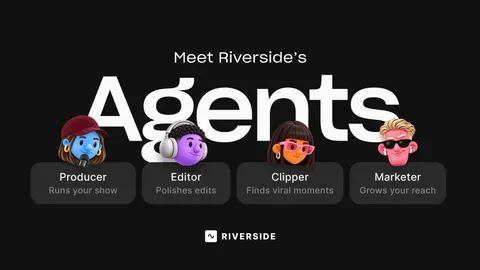
Riverside Agents, launched on October 26, 2026, tries to take that work off your plate. Instead of one AI assistant, you get a small AI production team: a Producer, an Editor, a Clipper and a Marketer. Each handles one stage and passes the work to the next. Nothing goes live until you approve it.
We looked at what each agent does, what it costs, where it falls short, and whether it’s worth switching to if you’re a podcaster or video creator.
Quick verdict: 4 / 5
- What it is: four AI agents inside Riverside that prep, edit, clip and publish your recordings.
- Price: Riverside has a free plan; the full agent workflow sits with paid plans from $24/month (billed yearly). AI credit features still use credits.
- Platforms: web and iPhone.
- Best for: solo podcasters and small teams who record talking-head or interview shows and post clips every week.
- Weak spot: it only works inside Riverside, and clip quality depends on AI taste you’ll still need to check.
What Is Riverside Agents? Meet the Four Agents
Riverside is a recording platform used for podcasts and talking-head videos. It’s used by Spotify, NBC and The New York Times, according to Forbes. It already had AI tools like Magic Clips, filler-word removal and chat-based editing. Agents ties those tools together into a team that works in order.
| Agent | What it does | When it works |
|---|---|---|
| Producer | Preps your session and supports you while you record | Before and during recording |
| Editor | Builds an editing plan for the full episode and works through it with you | Right after recording |
| Clipper | Finds the moments worth sharing and preps them as social clips | Right after recording |
| Marketer | Writes captions and show notes, then publishes or schedules episodes and clips | Once clips and the edit are approved |
How the handoff works
- You finish recording.
- Before you’ve even watched it back, the Clipper has flagged the best moments and the Editor has a plan for the cut.
- You review and approve the edit plan and the clips.
- Finished clips go to the Marketer with a suggestion of where to post them.
- You approve the captions and posts. Only then does anything go live.
You never have to move files between steps. The agents pass work to each other.
Three things that make it different
- Built only for video. Riverside says each agent runs on its own AI tuned for that job. They won’t help with general tasks like writing an email.
- They learn your style. The agents build a memory of how you like things done, like your cut pacing or caption tone, and it improves the more you approve or correct them.
- Works on your phone. Everything works on web and iPhone. Record on your laptop, then approve clips from your phone between meetings.
Riverside Agents Pricing: Which Plan Do You Need?
Riverside doesn’t sell Agents separately. They come with your Riverside plan.
| Plan | Monthly | Billed yearly | Good for |
|---|---|---|---|
| Free | $0 | $0 | Trying Riverside (720p, watermark, limited high-quality tracks) |
| Pro | $29 | $24/month | Most solo podcasters. Includes the AI editing and repurposing agent |
| Grow | $39 | $34/month | Shows that want live call-ins and more distribution features |
| Webinar | $99 | $79/month | Hosting and repurposing webinars |
| Business | Custom | Custom | Teams needing SSO, roles and support |
Prices from Riverside’s pricing page as reported in October 2026. Paid plans include a 14-day free trial.
The catch: what “included in every plan” means
Coverage is a little confusing here, so let’s be clear:
- Forbes and Neural Brew report the agents are included in every plan, and what they can do depends on the plan.
- But Riverside’s pricing page lists the “AI editing & repurposing agent” under Pro and doesn’t name the four agents or publish any usage limits per plan, as the GTM Power-Ups newsletter pointed out.
- AI credits still apply. Features that use credits, like video enhancement, still use them when an agent runs them.
Our advice: start the 14-day Pro trial, run two or three full episodes through the agents, and watch your credit balance before deciding. If you’re already paying for Pro, the agents are essentially free extra help.
AI agents can burn through credits quickly. Our guide on how not to waste your AI agent credits applies here too.
What Works and What Doesn’t
Pros
- It thinks like a production team. Splitting the job into producer, editor, clipper and marketer mirrors how real video teams work, so the steps happen in the right order without you managing them.
- Work starts before you ask. Clips and an edit plan are waiting as soon as you stop recording.
- You stay in control. Nothing publishes without your sign-off, which matters when the Marketer can post to your channels.
- It gets better with use. The agents remember what you approve and reject.
- One tool, start to finish. Record, edit, clip, write show notes and schedule posts in one place, instead of juggling three or four apps.
- Mobile approvals. Reviewing clips on your iPhone is genuinely handy for busy hosts.
Cons
- Locked to Riverside. The agents only work on content inside Riverside. If you record in Zoom, StreamYard or your own camera setup, you’d need to upload it there first.
- AI taste is the real test. Picking which moment is truly great is the part reviewers expect AI to struggle with. Early reactions on Digg were mostly positive, but some worried it could trim the authentic moments that make a show feel human.
- Unclear limits. Riverside hasn’t published how much agent work each plan includes, and credit-based features still cost credits.
- Video only. Built for conversations and talking-head videos, not general editing like b-roll-heavy vlogs or animation.
- Brand new. It launched in late October, so there’s no long-term track record yet.
A Weekly Podcaster Workflow With Riverside Agents
Here’s how a solo host could use the agents for one episode a week:
| Day | You | The agents |
|---|---|---|
| Before recording | Share your topic and guest notes | Producer preps the session |
| Recording day | Record the episode | Producer supports you live. Clipper and Editor start as soon as you stop |
| Same evening | Review the edit plan and clip picks on your phone, approve or tweak | Editor finishes the cut. Clipper finalizes your clips |
| Next day | Approve captions and show notes | Marketer schedules the full episode and clips across the week |
Time saved: the hours you used to spend scrubbing for clips and writing captions. You still spend time reviewing, but reviewing is much faster than doing.
Tip for clipping businesses and agencies: if you edit for several creators, the approval step is your quality control. Let the agents do the first pass, then spend your time on picking and polishing the clips that actually perform.
Riverside Agents vs Other AI Podcast Tools
Riverside isn’t the only way to get AI help with podcasts. Here’s where it fits.
| Riverside Agents | Descript | Opus Clip | CapCut | |
|---|---|---|---|---|
| Main job | Full pipeline: prep, record, edit, clip, post | Text-based editing of audio and video | Turning long videos into short clips | Editing short-form video |
| Records for you | Yes, remote studio built in | Yes | No | No |
| Finds clips automatically | Yes (Clipper) | Yes | Yes, its core feature | Some AI tools |
| Writes captions and schedules posts | Yes (Marketer) | Partly | Partly | Captions, yes |
| Works on footage from other tools | Upload into Riverside | Yes | Yes, paste a link or upload | Yes |
| Best for | Shows already recording on Riverside | Hands-on editors who want control | Clipping existing long videos fast | TikTok and Reels creators |
Features change often, so check each tool’s site for current plans and pricing.
Our take: if you already record on Riverside, the agents are the easiest upgrade you can make. If you record elsewhere and only want clips, a dedicated clipping tool is simpler. If you want full manual control of the edit, Descript is still a strong choice.
For more creator tools, see our best AI tools for content creators. Need AI voiceovers or video? Check our best AI voice generators and best AI video generators.
Who Should Use Riverside Agents?
Good fit:
- Solo podcasters who record weekly and never get around to posting clips
- Interview shows and video podcasts with talking-head footage
- Small marketing teams turning webinars and customer interviews into social content
- Clipping agencies and freelance editors who want a fast first pass to review
Not a good fit:
- Creators who record outside Riverside and don’t want to switch
- B-roll-heavy, cinematic or animated content
- Anyone who wants to publish without reviewing (you’ll always need to approve)
FAQ
What is Riverside Agents? A team of four AI agents inside Riverside, a Producer, Editor, Clipper and Marketer, that prep, edit, clip and publish your podcast or video. It launched on October 26, 2026.
Is Riverside Agents free? The agents come with Riverside plans rather than as a separate product, but the full editing and repurposing agent sits with Pro ($24/month billed yearly, $29 monthly). Credit-based features still use credits. There’s a 14-day free trial on paid plans.
Can Riverside Agents post to YouTube or TikTok for me? The Marketer can publish or schedule episodes and clips, but only after you approve them.
Does it work on mobile? Yes, on the web and iPhone. You can approve clips and posts from your phone.
Can I use it on recordings from Zoom or my own camera? The agents work inside Riverside, so you’d need to bring your footage into Riverside first.
Will the AI cut out the best parts of my show? It can happen, which is why every edit and clip needs your approval. The agents also learn from what you approve and reject.
Is Riverside Agents better than Descript? For an end-to-end, hands-off workflow inside one platform, Riverside Agents is ahead. For detailed manual editing control, many editors still prefer Descript.
Final Verdict: 4 / 5
Riverside Agents is the most complete AI production setup for podcasters we’ve seen so far. Splitting the work into a producer, editor, clipper and marketer is a smart design, and the approval step keeps you in charge of what goes out.
The weak spots are the lock-in to Riverside, unclear usage limits, and the simple fact that AI still isn’t a great judge of what makes a moment special. But if you already record on Riverside, or you’re a solo host who never gets around to clipping, it’s worth trying on the 14-day trial.
Looking at AI video from another angle? See our Kling 4 review and Is Synthesia worth it?, or browse our top 10 AI agents in 2026.
