

The short answer
AI agents burn credits on three things: how many steps they take, how much context they re-read on every step, and which model does the thinking. Control those three and most freelancers and small businesses can cut their agent bill by half or more without losing output.
Here is the fast version if you only have a minute:
- Cap every task. “Find 10 leads” instead of “find leads”. Open tasks are the number one credit leak.
- Use the cheapest model that passes. On Claude’s API, Haiku costs a fifth of Sonnet per token.
- Start fresh threads. Long chats get re-read on every step, so old history costs you again and again.
- Stop polling. A Make scenario checking every 5 minutes uses about 8,640 credits a month even if nothing ever happens.
- Turn on spending alerts and caps. Several platforms ship with no cap switched on.
The rest of this guide shows what each major platform actually charges as of November 2026, the 11 fixes in detail, copy-paste prompts that limit spend, and a worked example where one daily n8n agent drops from about $105 a month to under $4.
Why agent credits disappear so fast
A chat subscription like ChatGPT Plus or Claude Pro is a flat fee. An agent is metered. It plans, opens a page, reads it, calls a tool, checks the result and decides what to do next, and each of those steps costs something.
The part most people miss is that the cost of a step grows as the task goes on. Every time the agent thinks, it re-reads the whole conversation so far: your instructions, every page it scraped and every tool result. Step 20 of a research task can cost ten times as much as step 1 because it carries everything from steps 1 to 19.
So your bill is roughly this:
\text{Cost} \approx \text{steps} \times \text{context per step} \times \text{model price}Every fix in this guide shrinks one of those three numbers.
What burns credits, roughly from most to least expensive:
- Open-ended web research. The agent decides how many pages are “enough”, and it rarely picks a small number.
- Retry loops. When a step fails, many agents try again and again. On Lovable you pay for work done, even when the fix does not work.
- Long threads and big files. Old messages and pasted PDFs ride along on every step.
- Premium models on easy jobs. Using a top model to rename files or check formatting.
- Schedules and polling triggers. They run whether or not you use the output.
What each platform actually charges (November 2026)
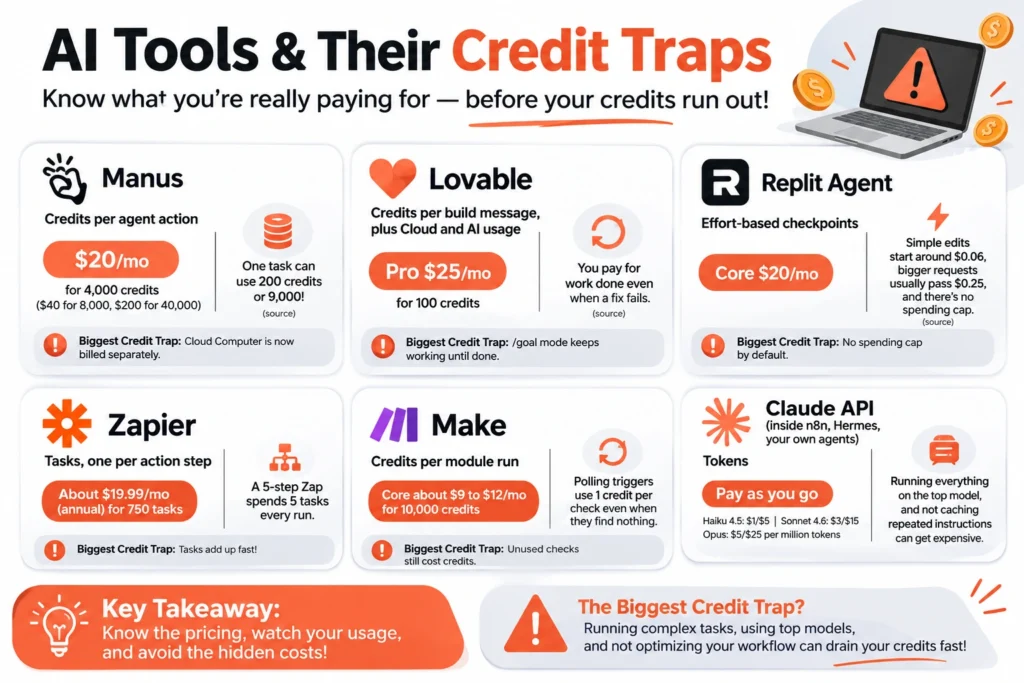
Every platform uses a different unit, which is why bills feel random. This table puts them side by side. Prices change often, so check the vendor page before you buy.
| Platform | What you pay for | Entry paid plan | Biggest credit trap |
|---|---|---|---|
| Manus | Credits per agent action | $20/mo for 4,000 credits ($40 for 8,000, $200 for 40,000) | One task can use 200 credits or 9,000 (source). Cloud Computer is now billed separately. |
| Lovable | Credits per build message, plus Cloud and AI usage | Pro $25/mo for 100 credits | You pay for work done even when a fix fails, and /goal mode keeps working until done (source) |
| Replit Agent | Effort-based checkpoints | Core $20/mo | Simple edits start around $0.06, bigger requests usually pass $0.25, and there is no spending cap by default (source) |
| Zapier | Tasks, one per action step | About $19.99/mo annual for 750 tasks | A 5-step Zap spends 5 tasks every run |
| Make | Credits per module run | Core about $9 to $12/mo for 10,000 credits | Polling triggers use 1 credit per check even when they find nothing |
| Claude API (inside n8n, Hermes, your own agents) | Tokens | Pay as you go: Haiku 4.5 $1/$5, Sonnet 4.6 $3/$15, Opus $5/$25 per million input/output tokens | Running everything on the top model, and not caching repeated instructions |
The pattern is the same everywhere. The plan price is the easy part. What you actually pay depends on how many steps your tasks take and how much the agent re-reads each time.
11 fixes that cut agent credit use
They are ordered by how much they usually save. The first four fix most bills on their own.
1. Put a number and a stop rule on every task
An agent stops when the job is done, and if you do not define done, it does. “Research competitors” can run 40 steps. “Find 5 competitors, one line each, stop after 15 searches” runs a fraction of that. Add a hard limit on searches or pages, not just on output.
2. Do the thinking in chat, the doing in the agent
Drafting, brainstorming and summarizing text you already have are cheap in a flat-fee chat app like ChatGPT Plus or Claude Pro. Save the agent for things only an agent can do: logging into a site, filling a form, reading your inbox, running on a schedule. Plan the task in chat first, then hand the agent a short, exact brief.
3. Give it the data instead of making it search
If you already have the list of URLs, the product sheet or the client brief, paste it in. Searching and scraping are usually the most expensive steps, and you just skipped them.
4. Match the model to the job
Formatting checks, sorting, tagging and simple extraction do not need a top model. On Claude’s API, Haiku is about 5 times cheaper than Sonnet and the cheapest current option for this kind of work. Keep premium models for writing that clients will read, tricky reasoning and code. On Replit, use the Lite or Economy modes for routine edits.
5. Start a new thread for every new job
Long threads get re-read on every step. When the next task does not need the old context, open a fresh thread and paste a three-line summary of what matters. Name threads clearly, like “Client X, Nov blog briefs”, so you can find them later.
6. Approve the plan before it runs
Ask the agent to list its steps first and wait for your OK. A wrong turn caught at step 2 costs two steps. Caught at step 20, it costs twenty, plus the redo. Lovable now pauses long messages at a default 20-credit check-in, so leave that switched on.
7. Break big builds into small requests
On app builders, “build my whole booking app” invites a huge, expensive checkpoint and a lot of rework. “Add a date picker to the booking form” is cheap and easy to check. Specific requests also fail less, and failed work is still billed.
8. Kill polling and check your schedules
Polling triggers check for new data on a timer and charge for every check. A Make scenario polling every 5 minutes uses about 8,640 credits a month, nearly all of the 10,000 on the Core plan, even if nothing ever triggers. Switch to webhooks or instant triggers where the app supports them, or poll every hour instead.
9. Cut steps out of your automations
On Zapier every action step is a task. Filters and formatting steps generally do not use tasks, so filter early and drop runs you do not need before they reach paid steps. A 5-step Zap running 100 times a day uses about 15,000 tasks a month, far past the 750 on the entry plan.
10. Cache instructions that never change
If you build agents in n8n, Hermes or your own code, turn on prompt caching for the system prompt and reference files. Cached input on Claude’s API costs 10% of the normal price, and the Batch API takes another 50% off jobs that can wait.
11. Set caps and alerts, then review monthly
Turn on spending alerts, monthly caps and low-balance warnings everywhere they exist. Then once a month ask one question per agent: would I pay what this cost again for what it produced? Pause anything that fails.
Settings to change on each platform
The general fixes above work everywhere. For a wider look at these tools, see our best AI productivity tools and Hermes agent review. These are the specific switches worth checking today.
| Platform | Change this | Why it saves credits |
|---|---|---|
| Manus | Use the lighter model mode for simple jobs, and only add the separately billed Cloud Computer if you truly need it | Free and lighter modes cover small tasks, and the sandbox add-on now starts at $30/mo |
| Lovable | Keep credit check-ins on, avoid /goal for open tasks, use credits before they expire | Rollover credits expire two months after they are issued, and /goal keeps billing until the goal is met |
| Replit | Set a spending alert, use Free, Lite or Economy mode for small edits, keep chats short | No cap is on by default, and bigger projects with longer chats cost more per request |
| Zapier | Put filters first, merge steps, use built-in formatting | Filters and formatting steps generally do not use tasks |
| Make | Swap polling for webhooks, raise the scheduling interval, limit records per run | Each poll costs a credit even when it finds nothing |
| n8n, Hermes or your own agents on the API | Default to a cheap model, cache the system prompt, batch non-urgent jobs, cap max steps | Cached reads cost 10% of input price, batch jobs cost 50% less |
Worked example: one daily n8n lead-research agent
The same n8n workflow can cost $105 a month or under $4, depending on setup. On n8n, the model calls inside the AI Agent node are billed by your model provider, separate from your n8n plan, so that is where the money goes. This example uses Claude API prices, so you can check the math yourself.
The job: a small agency runs an n8n workflow every morning. A Schedule trigger starts an AI Agent node, which uses an HTTP Request tool to check prospect websites, writes a one-line note on each, and adds rows to a Google Sheet.
Before: the agent’s prompt says “find good leads in the dental niche”, the chat model is Opus, and Max Iterations is set high, so it loops about 20 times per run. Because the agent re-reads its growing history, each step carries about 30,000 input tokens and writes about 1,000.
After: a Google Sheets node feeds in 8 target URLs, the prompt says “check only these 8 sites”, Max Iterations is set to 8, and the chat model is swapped for a cheaper one. Each step now carries about 10,000 input tokens.
| Setup | Steps per run | Cost per run | Cost per month (30 runs) |
|---|---|---|---|
| Before: Opus, open task, long context | 20 | $3.50 | $105.00 |
| After, quality pick: Sonnet 4.6, capped | 8 | $0.36 | $10.80 |
| After, cheapest: Haiku 4.5, capped | 8 | $0.12 | $3.60 |
How the “before” number adds up: 600,000 input tokens at $5 per million is $3.00, plus 20,000 output tokens at $25 per million is $0.50. The Haiku row is 80,000 input tokens at $1 per million ($0.08) plus 8,000 output tokens at $5 per million ($0.04). Caching the system message can cut it further where your setup supports it.
These are illustrative estimates, not a real invoice. Your step counts will differ, but the shape holds: fewer steps, less context and a cheaper model multiply together.
Copy-paste prompts that keep spend in check
Paste these into any agent. Swap the parts in brackets.
1. The capped research task
Find [5] [type of company] in [location] that [criteria].
Use at most [10] searches and open at most [10] pages.
For each, give: name, website, one-line reason it fits.
Stop as soon as you have [5]. If you cannot find [5] within the limit, stop and tell me how many you found.
2. Plan first, then wait
Before doing anything, list the steps you plan to take and how many searches or tool calls each will need.
Do not start until I reply "go".
3. No retry loops
If a step fails twice, stop and tell me what went wrong. Do not keep retrying.4. Use what I gave you
Only use the data I pasted below. Do not search the web unless a field is missing, and ask me before you do.
[paste data]
5. Fresh thread handover (paste at the top of a new thread)
Context from earlier work: [3 lines max].
Today's task: [one task].
Done means: [exact output].
10-minute monthly credit audit
Run this on the first of every month. It catches the agents that quietly cost money for nothing.
- Open each platform’s usage page and note total spend for the month
- Find the 3 most expensive runs and check what made them expensive (steps, retries, context, model)
- List every scheduled agent and polling trigger, and pause any whose output you did not use
- Check which model each agent uses, and try the next cheaper one on a test run
- Archive threads older than a month and start fresh ones
- Confirm spending alerts and caps are still on
- Check for credits about to expire and use them first
- For each agent, answer: would I pay this again for what it produced? If not, fix it or turn it off
FAQ
What are AI agent credits? Credits are the unit agent platforms use to bill each action, like a search, a page visit, a model call or a code run. Different platforms call them credits, tasks, checkpoints or tokens, but they all measure work done.
Why did my agent use so many credits on one task? Usually an open-ended instruction, a retry loop or a long thread. The agent re-reads everything on every step, so long tasks get more expensive as they go.
Do unused credits roll over? It depends on the platform. Lovable’s plan credits roll over but expire two months after they are issued, and daily grants do not roll over. Check your plan’s terms before you buy top-ups.
Is it cheaper to use the API than an agent platform? Often, for repeat jobs you set up once. You pay raw token prices and can use caching and batch discounts. Platforms cost more per task but save setup time, which matters if you are not technical.
Which model should I use to save credits? Start with the cheapest model that does the job well, test it on a few real tasks, and only move up if quality falls short.
Are Make credits cheaper than Zapier tasks? Per unit, usually yes. Make’s entry plan gives 10,000 credits for about $9 to $12 a month against 750 Zapier tasks for about $20. But Make charges for polling checks and more module types, so compare on your own workflow.