
Disclosure: AI Tested Guide may earn a commission from some links on this page, at no extra cost to you. Clipping Factory is made by Clipping Joint, which is owned by AI Tested Guide’s founder.
AI voice tools for GTA 6: the quick verdict
Picking the right AI voice tools for GTA 6 content starts with one question: are you live, or editing afterwards? There are two kinds of AI voice tool, and most GTA 6 creators need only one of them:
- For live streams, roleplay and party chat, use a real-time voice changer that transforms your voice as you speak. Our pick: Voicemod.
- For edited YouTube videos, Shorts and faceless channels, use an AI voiceover tool that turns a script into natural narration. Our pick: ElevenLabs, with CapCut’s text to speech as the free option.
Pick based on how you create, not on which tool sounds coolest in a demo.
Real-time voice changers vs AI voiceovers
| Real-time voice changer | AI voiceover (text to speech) | |
|---|---|---|
| How it works | Changes your microphone voice live | Turns a written script into speech |
| You speak? | Yes, the tool reshapes your voice | No, you type and AI speaks |
| Best for | Streams, roleplay, Discord, party chat | Shorts, YouTube narration, faceless channels |
| Latency matters? | Yes, any delay is noticeable live | No, it’s generated before you edit |
| Runs on | Usually a PC | Web apps and editors |
| Our pick | Voicemod | ElevenLabs |
Why GTA 6 creators use AI voices
- Faceless channels. Many successful gaming channels never show a face or use the creator’s real voice. AI narration makes that possible.
- Confidence. Some creators are camera-shy or uncomfortable with their own recorded voice.
- Language reach. AI voices can narrate in many languages, opening up new audiences.
- Roleplay. GTA has a huge roleplay community, and voice changers help players create distinct characters.
- Consistency. An AI narrator sounds the same every day, even when you’re tired or sick.
Best AI voiceover tools
1. ElevenLabs: best overall AI voiceover
ElevenLabs is one of the most natural-sounding AI voice platforms available. You paste a script, choose a voice and adjust settings like stability and style, and you get narration ready for your edit.
- Strengths: natural delivery, many voices and languages, fine control over tone
- Best for: faceless commentary channels, “10 hidden details” videos, story recaps
- Watch out for: free tier limits, and its voice cloning features, which you should only use on your own voice
2. CapCut text to speech: best free option
CapCut has text to speech built into the editor, which makes it the fastest route for Shorts.
- Strengths: free, built into your editor, quick
- Best for: short clips where you want a narrator line or two
- Watch out for: voices that sound less natural than dedicated tools, and that many other creators also use
3. Descript: best for editing your own voice
Descript isn’t a pure voiceover tool, but its AI features help clean up and edit your own narration, including fixing small mistakes in recorded speech.
- Best for: creators who use their real voice but want faster, cleaner edits
Best real-time voice changers
1. Voicemod: best for streamers
Voicemod is one of the most popular voice changers among streamers. It works with Discord, OBS and most streaming software, and offers many voice effects and characters.
- Strengths: big voice library, works with most streaming setups, soundboard features
- Best for: roleplay streams, comedy, party chat
- Watch out for: it runs on PC, so console players need a PC-based streaming setup
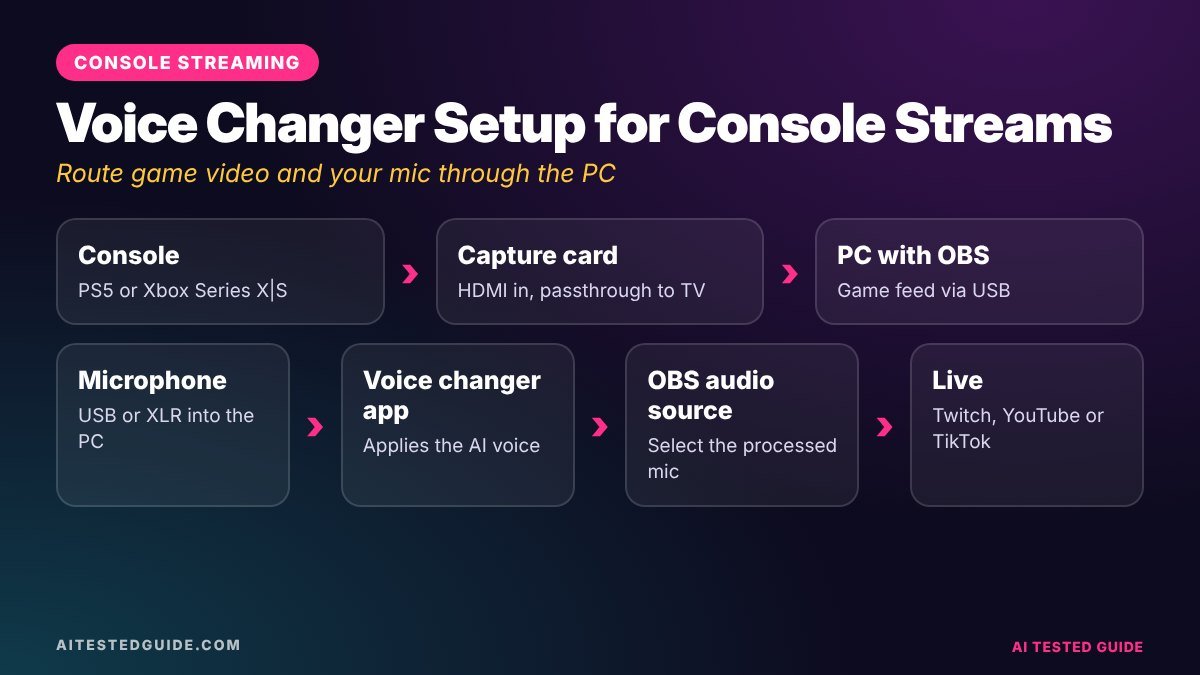
How to set up a voice changer for GTA 6 on console
Voice changers run on a computer, so console players need a slightly different setup.
- Connect your console to a PC with a capture card, so your gameplay goes into OBS.
- Plug your microphone into the PC, not the controller.
- Install your voice changer and pick it as the microphone input in OBS.
- Test your levels so the changed voice sits clearly above the game audio.
- For party chat, use Discord on your PC with the voice changer as your input, rather than the console’s party chat.
This setup also gives you separate audio tracks for game and voice, which makes editing far easier.
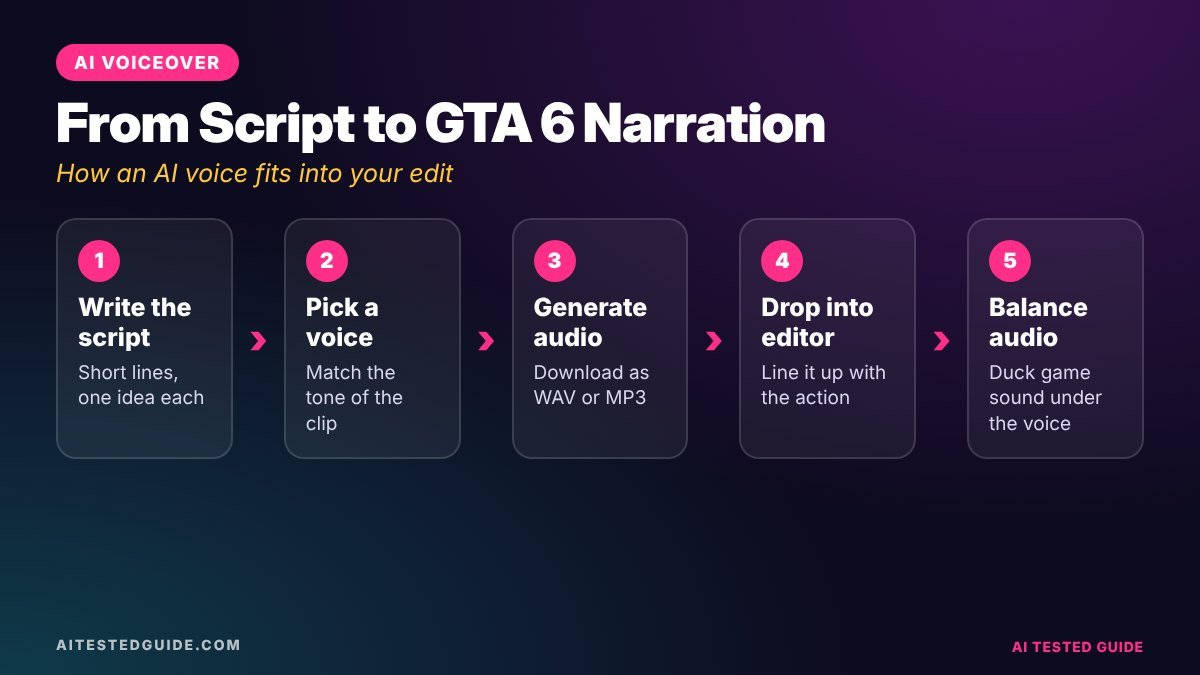
How to make an AI-narrated GTA 6 video
Here’s a simple workflow for a faceless narrated video, like “10 GTA 6 details you missed”.
- Record your gameplay showing each detail.
- Write the script with AI help. Ask a chatbot for a structure, then write it in your own words, with your own opinions.
- Generate the voiceover in ElevenLabs or CapCut, one section at a time.
- Edit to the voice. Line up gameplay with each narrated section.
- Add captions, since many viewers watch without sound.
- Mix the audio: voice clearly on top, game audio low underneath, and no licensed music.
Script prompt to try:
“Write a 60-second YouTube Shorts script about 3 small details in GTA 6 that make Vice City feel real. Short sentences, conversational, with a hook in the first line. Leave placeholders where I’ll add what I found in-game.”
Tips for AI voices that don’t sound robotic
- Write for the ear. Short sentences, contractions and natural reactions like “wait, what?”
- Use punctuation to control pacing. Commas and full stops create pauses.
- Generate in short sections rather than one long block, and regenerate any line that sounds off.
- Pick one voice and keep it. A consistent narrator becomes part of your brand.
- Add real reactions where you can. Even a faceless channel benefits from a personality.
Rules for using AI voices safely
AI voice tools are powerful, which is why the rules matter.
- Never clone a real person’s voice without permission. That includes GTA 6 cast members, celebrities, other streamers and your friends.
- Don’t use AI voices to impersonate or mislead. Fake announcements or fake quotes can get your channel removed.
- Label AI-generated audio where platforms require it, especially if it sounds realistic.
- Check each tool’s commercial-use terms before monetising content made with it.
- Follow platform rules on “reused” content. Low-effort, mass-produced AI narration over generic footage may struggle to get monetised.
Can AI-voiced channels get monetised?
Often, yes, as long as the content is original and adds value. Platforms tend to reject channels that look mass-produced: the same AI voice reading generic scripts over reused footage. To stay safe:
- Use your own gameplay footage.
- Write original scripts with real opinions and findings.
- Add editing, captions and structure that show effort.
- Check each platform’s current monetisation policies.
Audio basics that make any voice sound better
Even the best AI voice tool can’t fix a bad audio setup. Get these basics right first.
For real-time voice changers, your microphone matters most. The voice changer reshapes what your mic picks up, so a noisy or muffled mic gives a noisy, muffled character voice.
| Setup level | Microphone | Result |
|---|---|---|
| Starter | Headset or controller mic | Usable, but thin and noisy |
| Recommended | Basic USB microphone | Clear, much better for voice changers |
| Advanced | XLR microphone with an audio interface | Studio quality, with more control |
Mixing tips for gameplay videos:
- Keep your voice or narration clearly louder than the game, roughly 2 to 3 times as prominent.
- Lower the game audio under speech, then bring it back up for big moments like explosions and crashes.
- Use a noise suppression filter in OBS to remove background hum and keyboard noise.
- Keep the in-game radio off to avoid copyright claims.
- Listen back on phone speakers. Most viewers watch on phones, not studio headphones.
Voice ideas for GTA 6 roleplay characters
GTA roleplay is huge, and a distinctive voice makes a character memorable. If you use a voice changer for roleplay streams, build a character around the voice rather than just picking a random effect.
| Character idea | Voice style | Personality notes |
|---|---|---|
| Retired Vice City cop | Deep, gravelly, slow | Grumpy, seen it all, secretly kind |
| Beach-town influencer | Bright, fast, upbeat | Films everything, terrible in a crisis |
| Swamp-country tour guide | Warm, drawling | Tells tall tales about alligators |
| Nervous getaway driver | High, quick, shaky | Brilliant behind the wheel, panics on foot |
| Mysterious club owner | Smooth, quiet, low | Never raises their voice, always has a deal |
Tips for roleplay voices:
- Practise off-stream so the voice stays consistent for hours.
- Pick a voice you can sustain. Extreme effects get tiring for you and for viewers.
- Respect server rules. Many roleplay servers have rules on voice changers, so check before you join.
Common mistakes with AI voice tools
- Using the default voice everyone else uses. Viewers recognise it instantly, and it makes your channel feel generic.
- Pasting one huge script at once. Generate in short sections so you can fix awkward lines.
- Ignoring pronunciation. Check how the AI says names like Lucia, Leonida and Vice City, and spell them phonetically if needed.
- Letting narration drown the game. Viewers came for the gameplay, so let big moments breathe.
- Skipping disclosure. If a platform asks you to label AI audio, do it.
Which tool should you choose?
| You are… | Choose |
|---|---|
| A roleplay streamer | Voicemod |
| A faceless YouTube channel | ElevenLabs |
| A Shorts creator on a budget | CapCut text to speech |
| A creator using your own voice | Descript, for cleanup |
| Making content in several languages | ElevenLabs |
A sample 30-second narrated script you can adapt
Here’s a short script in the style that works best with AI voices: short sentences, natural reactions and pauses built in with punctuation. Swap in what you actually found in the game.
“Okay. This is the most realistic thing in GTA 6 so far. Watch the people at the bus stop. I crash into the pole… and nobody runs. They film it. Every single one of them. Three phones up, instantly. Rockstar really built a whole city of content creators. Follow for more GTA 6 details nobody’s talking about.”
Generate it one or two sentences at a time, regenerate any line that sounds flat, and leave half a second of silence before the payoff line. For a wider comparison of narration voices, see our Best AI Voice Generators in 2026 (Tested).
FAQ
What’s the best AI voice changer for GTA 6 streams?
Voicemod is one of the most popular choices for streamers, and works with OBS and Discord.
Do voice changers work on PS5 and Xbox?
Not directly. They run on a PC, so stream through a PC with a capture card to use them.
Is ElevenLabs free?
It has a free tier with limits. Heavy use needs a paid plan, so check current pricing.
Can I use an AI voice and still get monetised?
Usually yes, if the content is original and adds value. Mass-produced, low-effort videos risk rejection.
Can I clone a GTA 6 character’s voice?
No. Cloning real voices without permission breaks most tools’ rules and can violate the performers’ rights.
Does an AI voice hurt engagement?
It can if it sounds robotic. Natural-sounding voices with good scripts can perform well, especially on faceless channels.
Keep reading
This post is part of our GTA 6 creator series. Start with the hub guide, How to Make GTA 6 Content with AI: The Complete Creator Guide, then go deeper:
- Best AI Tools for GTA 6 Creators
- How to Add AI Captions to GTA 6 Clips
- How to Make GTA 6 YouTube Shorts in 10 Minutes with AI
- How to Turn GTA 6 Gameplay into Viral TikToks and Shorts with AI
Related tested reviews on AI Tested Guide:
- Best AI Voice Generators in 2026 (Tested)
- 10 Best AI Tools for Content Creators in 2026
- Riverside Agents Review: Can AI Really Produce Your Podcast?
Sources and official links
- ElevenLabs
- Voicemod
- Descript
- CapCut
- OBS Studio (free recording software)
- YouTube Partner Program overview and eligibility
Pair your voiceover with ready-made clips
The fastest faceless workflow is AI clips plus an AI voice. Clipping Factory turns your long GTA 6 sessions into vertical clips automatically, so all you add is the narration. It’s a one-time payment, and we set it up for you.