
Disclosure: AI Tested Guide may earn a commission from some links on this page, at no extra cost to you. Clipping Factory is made by Clipping Joint, which is owned by AI Tested Guide’s founder.
GTA 6 style art with AI: the quick answer
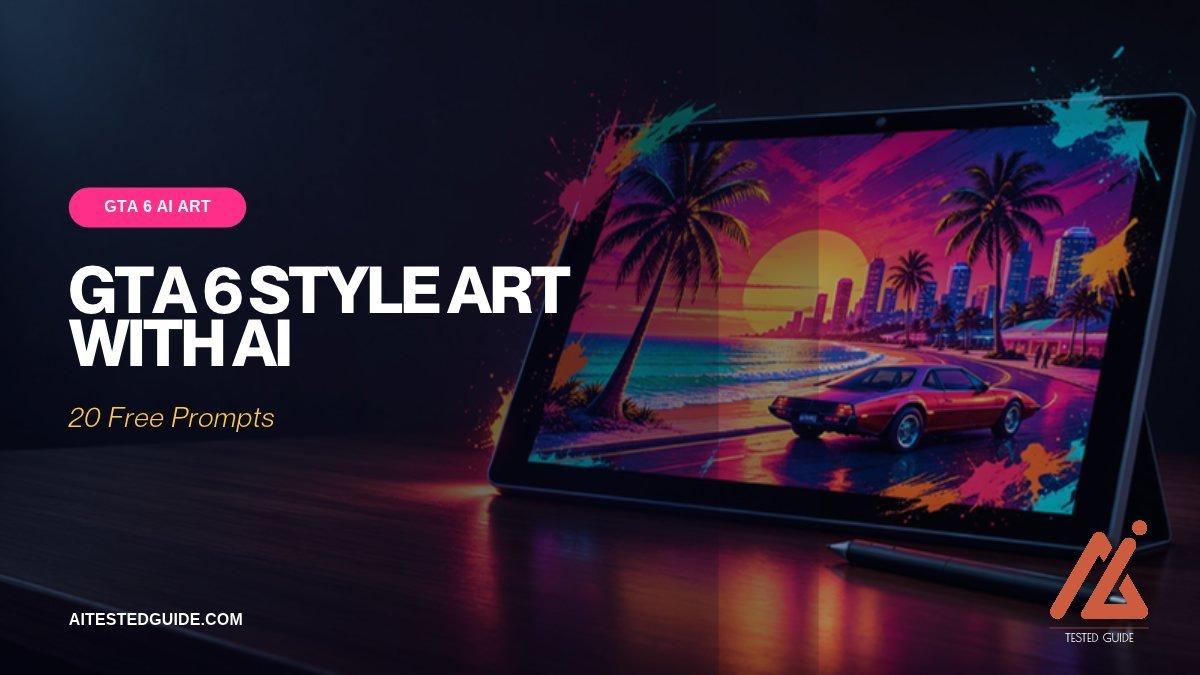
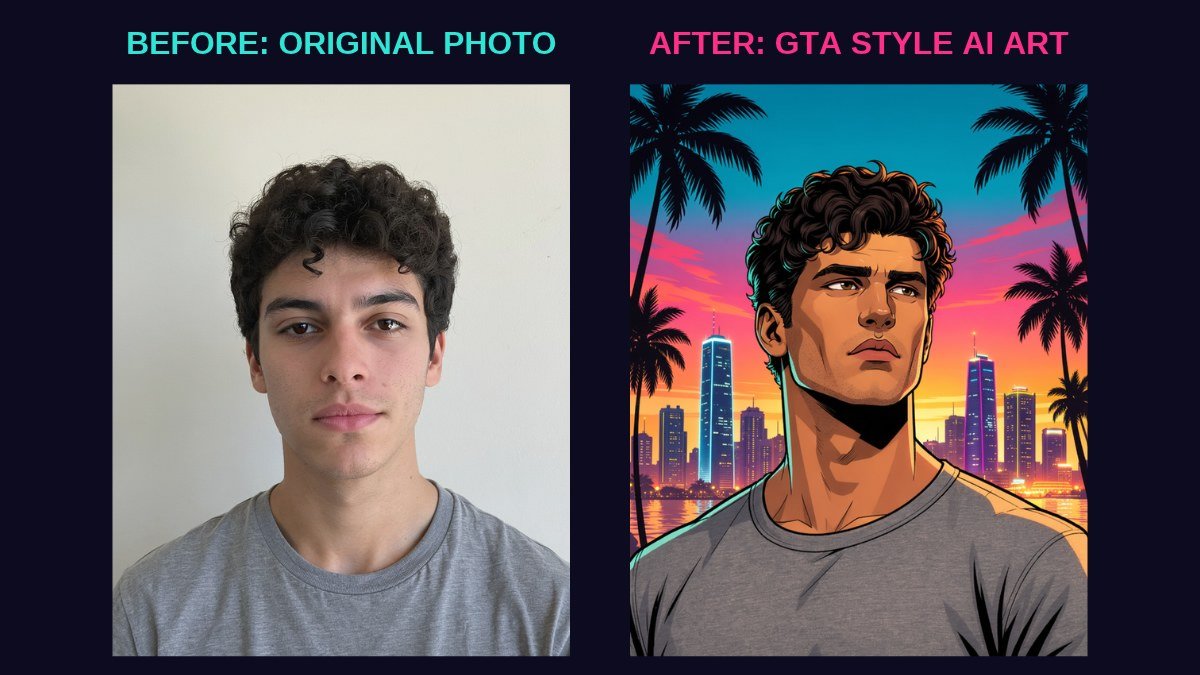
You can make GTA 6 style art with AI in a few minutes, even with zero design skills. Upload a clear photo of yourself to an AI image tool, then describe the look: bold black outlines, comic-book shading, saturated sunset colours, palm trees and a neon city. In seconds you’ll get artwork inspired by GTA’s famous loading-screen style, with no design skills needed. Finish it in Canva with your name, crop it to the right size, and you’ve got a profile picture, poster or wallpaper.
This guide covers what makes the style recognisable, which tools work best, 20 prompts you can copy, how to fix common problems, and how to stay on the right side of Rockstar’s rights.
Why GTA-style art is everywhere right now
Every Grand Theft Auto release brings a wave of fan art, and GTA 6 is the biggest yet. People want profile pictures, stream banners, posters and phone wallpapers that match the launch excitement. AI image tools have made this style achievable for anyone in minutes, which is why “GTA style” edits are trending across TikTok, Instagram and X.
For creators, these edits are also great content. Before-and-after transformations of friends, pets and celebrities, done with permission, get shared widely.
What makes the GTA art style recognisable
Understanding the style helps you write better prompts. GTA’s promotional and loading-screen art has a few clear signatures:
| Element | What it looks like | Prompt words to use |
|---|---|---|
| Line work | Thick, confident black outlines | “bold black outlines”, “inked” |
| Shading | Flat colour areas with hard comic-style shadows | “comic book shading”, “cel shading” |
| Colours | Saturated pinks, oranges, teals and purples | “sunset palette”, “neon pink and teal” |
| Setting | Beaches, palm trees, sports cars, city skylines | “Miami beach”, “palm trees”, “neon skyline” |
| Framing | Close crops, confident poses, characters filling the frame | “close-up portrait”, “confident pose” |
| Mood | Glamorous, a little dangerous, very sunny | “crime drama”, “vacation glamour” |
GTA 6’s Vice City setting leans heavily into Florida-style sunsets, beaches, swamps and nightlife, so lean into that palette.
The best AI tools for GTA-style art
| Tool | Best for | Uses your photo? | Free option? |
|---|---|---|---|
| ChatGPT image generation | Turning your own photo into art with plain-English instructions | Yes | Limited |
| Google Gemini image tools | Quick edits and restyles of photos | Yes | Limited |
| Canva AI image tools | Fast posters with text built in | Yes | Limited |
| Midjourney | The most detailed, artistic results from text prompts | Image references | No |
We tested it: same photo, same prompt
To see which tool actually works best, we gave Canva AI, ChatGPT and Google Gemini the same photo and the base prompt from Step 2 below, and kept the first result from each. We skipped Midjourney because it has no free plan.
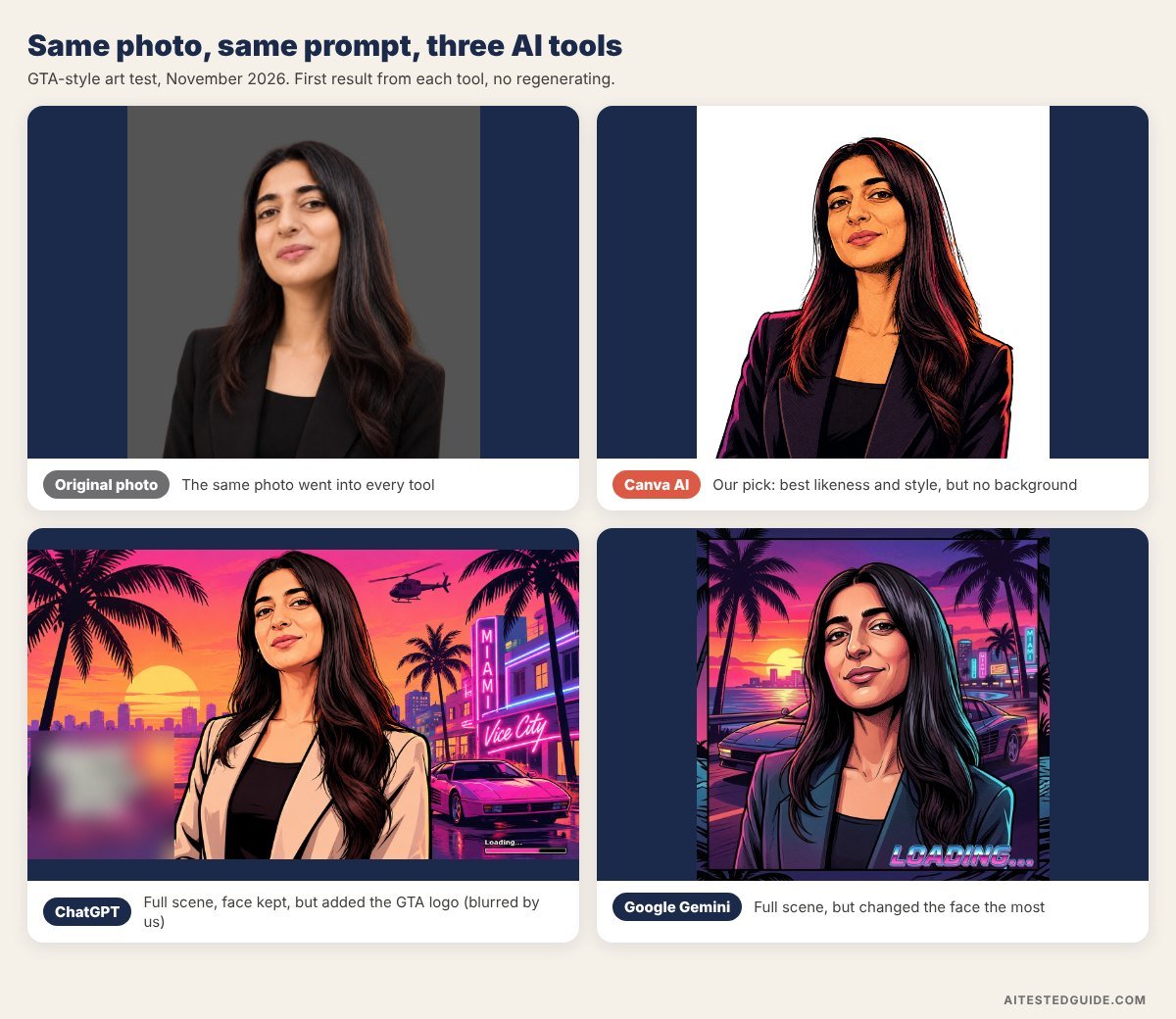
| Tool | Kept the face? | Followed the prompt? | Watch out for |
|---|---|---|---|
| Canva AI | Yes, the closest likeness | Partly: strong comic style and colours, but no sunset, palm trees or car | You add the background yourself in Canva |
| ChatGPT | Yes | Yes: sunset, palm trees, neon city and a sports car | Added the official GTA Vice City logo without being asked, and changed the black blazer to beige |
| Google Gemini | Least: the face looked noticeably different | Yes: full scene with a sports car | Added “LOADING…” text, and the likeness suffers |
| Midjourney | Not tested | Not tested | No free plan |
Our pick: Canva AI. It kept the face closest to the original and gave the cleanest illustration style. It skipped the background, but that’s easy to add in Canva (see Step 4). Choose ChatGPT if you want the whole scene in one go, but check the result for official logos before you post it. Gemini followed the prompt, but changed the face too much for a profile picture. Midjourney is still worth a look if you want detailed original artwork and don’t need it to look like a specific person.
Step 1: Choose the right photo
The photo you start with matters more than the prompt. Pick one that has:
- Good lighting, ideally daylight, with your face clearly visible
- A simple background, which the AI will replace anyway
- A confident pose, like leaning, arms crossed or looking over sunglasses
- High resolution, not a blurry crop from a group photo
Only use photos of yourself, or of people who have given you permission.
Step 2: Write a strong prompt
A good prompt has four parts: what to transform, the style, the setting and what to keep.
Base prompt to copy:
“Turn this photo into a 1980s Miami crime-game loading-screen illustration. Bold black outlines, comic-book shading, a sunset pink and orange sky, palm trees, neon city lights and a sports car in the background. Keep my face, hairstyle and expression recognisable.”
20 prompts you can copy
Profile pictures
- “Close-up portrait in crime-game loading-screen style, aviator sunglasses, sunset behind, bold outlines.”
- “Comic-book illustrated headshot, neon pink rim lighting, Miami nightclub background.”
- “Illustrated portrait leaning on a convertible, beach at golden hour, saturated colours.”
- “Confident pose with arms crossed, city skyline at dusk, inked comic style.”
Posters
- “Movie-poster layout with two characters back to back, palm trees, a helicopter overhead, sunset sky.”
- “Getaway scene, characters jumping from a speedboat, ocean spray, bold illustrated style.”
- “Heist crew of four in a line, cash bags, armoured truck behind, comic poster style.”
- “Character on a motorbike on a coastal highway, sunset, speed lines, illustrated.”
Wallpapers
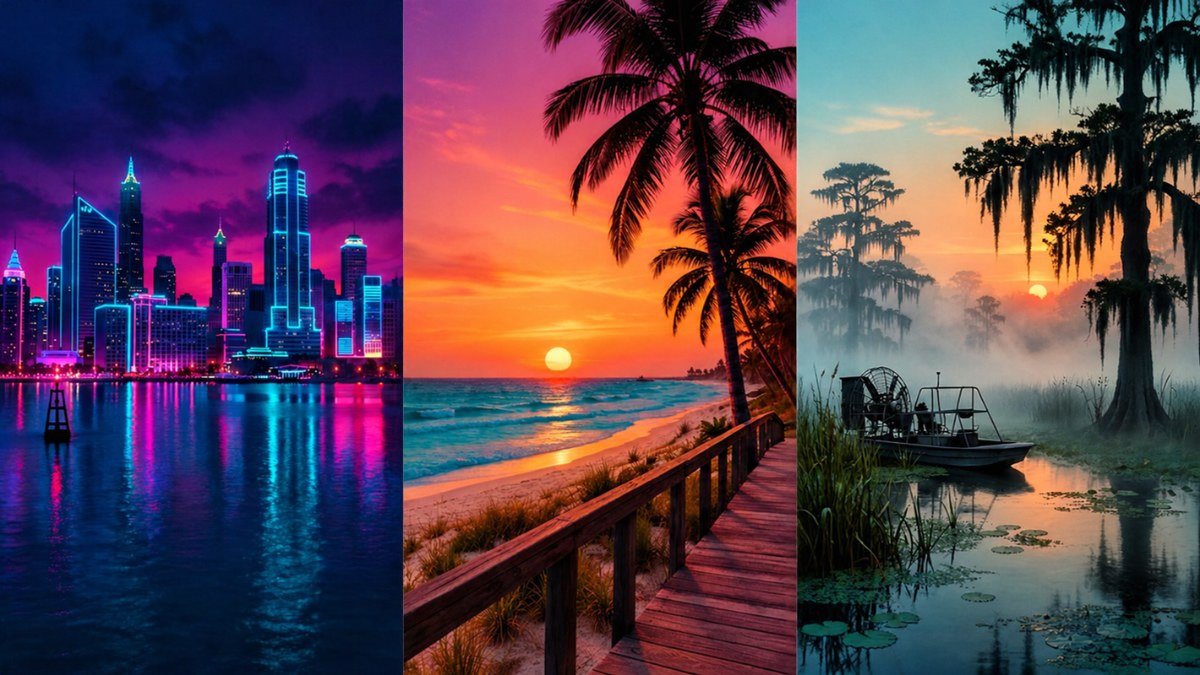
- “Neon city skyline at night, wet streets, reflections, illustrated crime-game style, no people.”
- “Beach boardwalk at sunset, palm silhouettes, retro pink and teal palette.”
- “Swamp at dawn with an airboat, mist, illustrated Florida landscape.”
- “Rooftop pool party overlooking a city at night, comic illustration.”
Fun and shareable
- “Turn my dog into a crime-game character wearing sunglasses and a gold chain.”
- “My grandparents as a stylish getaway duo in a convertible, comic illustration.”
- “Me as a beach-town police officer in illustrated crime-game style.”
- “Me as a nightclub owner standing in front of a neon sign.”
Creator assets
- “Stream banner, wide format, illustrated city skyline with space on the left for text.”
- “YouTube channel icon, illustrated face, simple bold background, readable at small sizes.”
- “Thumbnail background, explosion behind a sports car, empty space at the top for text.”
- “Emote-style illustration of a shocked face, thick outlines, plain background.”
Avoid putting official names, logos or characters like Jason and Lucia into prompts. Describe the style instead.
Step 3: Fix common problems
AI art rarely comes out perfect on the first try. Here’s how to fix the usual issues.
| Problem | Fix |
|---|---|
| Your face doesn’t look like you | Add “keep facial features identical” and use a clearer, front-facing photo |
| Too realistic, not illustrated enough | Add “flat comic shading, thick ink outlines, no photorealism” |
| Colours look dull | Add “highly saturated sunset palette, neon pink and teal” |
| Hands or fingers look strange | Ask for “hands in pockets” or “arms crossed”, or crop them out |
| Text in the image is garbled | Don’t ask AI for text. Add it later in Canva |
| Background is too busy | Ask for “simple background, a few palm trees, a sunset gradient” |
Generate several versions and pick the best rather than trying to perfect one.
Step 4: Finish it in Canva
AI does the art, and Canva makes it usable.
- Upload your AI image to Canva.
- Add your name or channel name in a bold, condensed font. Avoid copying Rockstar’s exact logo lettering.
- Crop to the size you need (see the table below).
- Add a subtle colour grade or vignette to match your other posts.
- Export as a PNG for the best quality.
The right sizes
| Use | Aspect ratio | Recommended size |
|---|---|---|
| Profile picture | 1:1 | 1080 x 1080 |
| Instagram post | 4:5 | 1080 x 1350 |
| Story or phone wallpaper | 9:16 | 1080 x 1920 |
| YouTube thumbnail | 16:9 | 1280 x 720 |
| Desktop wallpaper | 16:9 | 3840 x 2160 |
| Stream banner (Twitch) | Wide | Check Twitch’s current banner size |
If your AI image is too small, run it through an AI upscaler before cropping. See Best AI Upscalers for GTA 6 Screenshots.
Turning GTA-style art into content
These edits make strong posts on their own:
- Before-and-after transformations: show the original photo, then reveal the art.
- “I turned my friends into GTA characters”: with their permission, these get shared in group chats.
- Tutorial clips: screen-record your prompt and the result in 20 seconds.
- Pet transformations: consistently popular, and nobody objects.
- Followers’ requests: ask followers to send photos, and transform the best ones on stream.
Stay on the right side of the rules
AI makes this easy, but rights still matter.
- Make art inspired by the style, not copies of Rockstar’s official artwork.
- Don’t use the official GTA VI logo, or present your art as official.
- Check every AI result for official logos before posting. In our test, ChatGPT added the GTA Vice City logo without being asked.
- Don’t recreate Rockstar’s characters like Jason and Lucia for commercial use.
- Use only photos you have the right to use, of yourself or people who agreed.
- Check each AI tool’s terms on commercial use of generated images.
Can you sell GTA-style art?
Be careful. Selling anything that uses Rockstar’s logos, characters, names or official artwork risks takedowns and legal trouble. Original artwork in a similar colour palette and comic style, with your own characters, is far safer. A useful test: if someone could mistake it for official GTA merchandise, don’t sell it.
Commissions are a safer middle ground: people pay you to turn their own photo into a stylised illustration, without official branding.
A 10-minute GTA-style art workflow
Once you’ve done it a couple of times, the whole process takes about ten minutes.
| Minutes | Step | Tool |
|---|---|---|
| 0 to 1 | Pick a clear, well-lit photo | Your camera roll |
| 1 to 4 | Generate 3 to 4 versions with the base prompt | ChatGPT, Gemini or Midjourney |
| 4 to 5 | Pick the best and ask for one round of fixes | Same tool |
| 5 to 6 | Upscale if needed | Upscayl or Canva |
| 6 to 9 | Add text, crop and colour-grade | Canva |
| 9 to 10 | Export and post, with the before-and-after | Canva, then your social app |
Ideas for a GTA-style art series
One good edit is a post. A series builds a following. Try one of these:
- “Turning my followers into GTA characters”, picking one follower photo a day, with permission
- “Every member of my family, GTA style”, one per day for a week
- “Pets of Vice City”, using follower-submitted pet photos
- “Real places, GTA style”, turning photos of your own city into Vice City-style art
- “Rating AI tools on GTA art”, testing one tool a day with the same photo
Series give people a reason to follow rather than just like one post.
The prompt formula behind every good result
All 20 prompts above follow the same structure. Once you know it, you can write your own for any idea:
| Part | What to write | Example |
|---|---|---|
| Subject | Who or what, and what to keep | “Me, keep my face and hairstyle” |
| Style | The illustration style words | “crime-game loading-screen art, bold outlines, comic shading” |
| Setting | Where the scene takes place | “Miami-style beach at sunset, palm trees” |
| Props | One or two objects that tell a story | “convertible, aviator sunglasses” |
| Colour and light | The palette and mood | “saturated pink and teal, neon glow” |
| Framing | Shot type and aspect ratio | “close-up portrait, square” |
Put the parts in that order, keep it to two or three sentences, and change only one part at a time when you refine. Our How to Make GIFs in ChatGPT (Step by Step) guide uses the same approach if you want to animate your art afterwards.
FAQ
Is it free to make GTA-style art with AI? Most tools give you a few free generations a day. Heavy use needs a paid plan.
Which AI tool is best for GTA-style profile pictures? Canva AI kept the face most faithfully in our test. ChatGPT is the better pick if you want a full scene in one go. Both work from your own photo.
Why doesn’t my AI art look like me? Use a clear, well-lit, front-facing photo, and ask the AI to keep your facial features identical.
Can I use GTA-style art as my YouTube thumbnail? Yes, as long as it doesn’t use official Rockstar artwork or logos. Real gameplay frames often perform better for gameplay videos, though.
Can AI make art of the actual GTA 6 characters? Avoid it. Recreating Rockstar’s characters can break both AI tool rules and Rockstar’s rights.
What size should a GTA-style wallpaper be? 1080 x 1920 for phones and 3840 x 2160 for 4K desktops.
Keep reading
This post is part of our GTA 6 creator series. Start with the hub guide, How to Make GTA 6 Content with AI: The Complete Creator Guide, then go deeper:
- Best AI Upscalers for GTA 6 Screenshots and 4K Wallpapers
- How to Make GTA 6 YouTube Thumbnails with AI
- How to Build a GTA 6 Fan Page with AI Tools
- 25 GTA 6 Clip Ideas That Go Viral
Related tested reviews on AI Tested Guide:
- Is Canva AI Good? Canva AI Review 2026
- Best AI Design Tools in 2026: 12 Tools Worth Using
- How to Make GIFs in ChatGPT (Step by Step)
Sources and official links
- ChatGPT
- Google Gemini
- Midjourney
- Canva
- Rockstar Games: Policy on posting copyrighted Rockstar Games material
Turn your GTA 6 gameplay into content too
Art gets attention, but clips keep people following. Clipping Factory by Clipping Joint automatically cuts your long GTA 6 sessions into ready-to-post vertical clips. It’s a one-time payment, and we set it up for you.