
Disclosure: AI Tested Guide may earn a commission from some links on this page, at no extra cost to you. Clipping Factory is made by Clipping Joint, which is owned by AI Tested Guide’s founder.
How to make GTA 6 YouTube thumbnails: the quick answer
Great GTA 6 YouTube thumbnails follow a simple formula: one clear subject, one emotion, three words of text or fewer, and strong contrast. Grab the most dramatic frame from your own gameplay, sharpen it with an AI upscaler, separate the subject from the background, and add bold text in Canva. The whole process takes 10 to 15 minutes once you have a template.
The thumbnail and title together decide whether anyone clicks. During GTA 6 launch season, hundreds of videos will compete for the same searches, and a strong thumbnail is often the difference between a video that takes off and one nobody sees.

The thumbnail formula
| Element | Rule | Why it works |
|---|---|---|
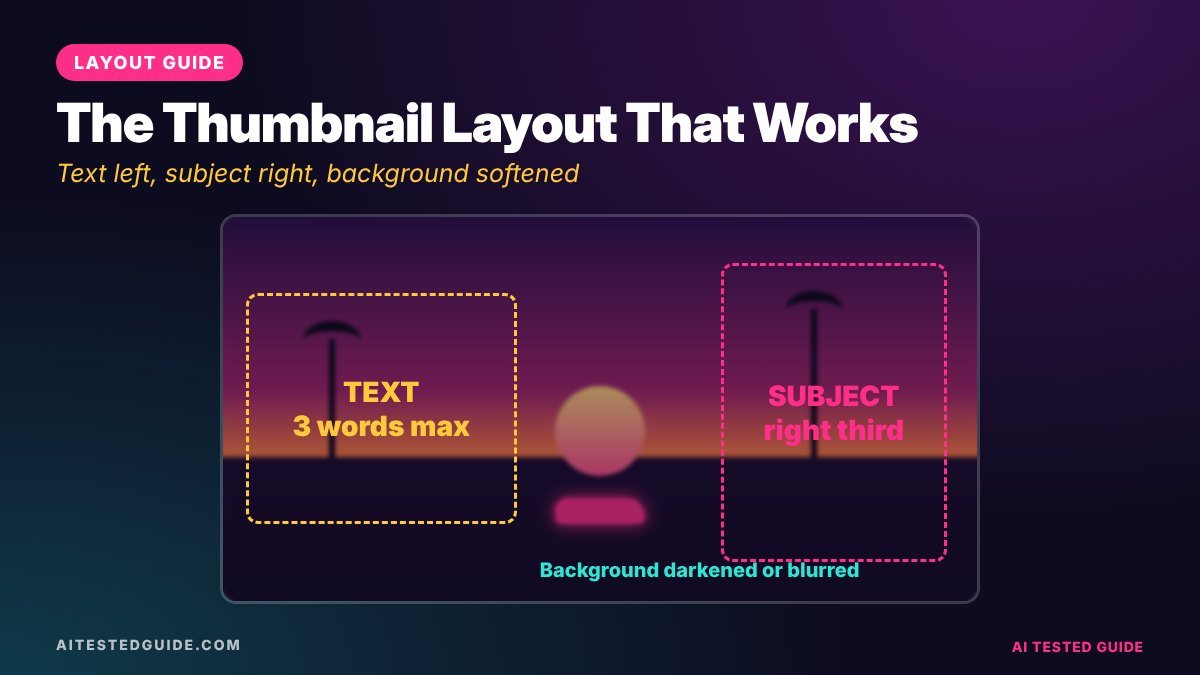
| Subject | One car, character or explosion, filling about a third of the frame | The eye needs one thing to land on |
| Emotion | A shocked face, a dramatic moment or an obvious “uh oh” | Emotion creates curiosity |
| Text | Three words or fewer, very large | Thumbnails are tiny on phones |
| Contrast | Bright subject on a darker or blurred background | Stands out in a busy feed |
| Size | 1280 x 720 pixels, 16:9 | YouTube’s standard thumbnail size |
Step 1: Grab the best frame
- Scrub to the peak of the action: the moment before impact, mid-jump, or the explosion’s first frame.
- Export a still at full resolution. Most editors have a “save frame” option.
- If the game offers a photo mode, use it to hide the HUD and frame the shot properly.
- Grab three or four options, so you can test more than one.
Real gameplay frames are more honest than AI-generated scenes, and viewers trust them more.
Step 2: Sharpen and enhance with AI
Frames taken from video are often soft. Run your chosen frame through an AI upscaler like Upscayl or Canva’s enhancer to sharpen edges and add detail. Our Best AI Upscalers for GTA 6 Screenshots and 4K Wallpapers guide covers the settings.
Step 3: Separate the subject
Use Canva‘s background remover (or a similar AI tool) to cut out the car or character. Then:
- Blur or darken the original background behind it, or
- Place the cut-out over a simple gradient in a Vice City palette: sunset orange, pink or teal.
- Add a subtle outline or glow around the subject so it pops.
Our Is Canva AI Good? Canva AI Review 2026 explains which of Canva’s AI tools are worth using for this.
Step 4: Add text that teases
Text should add curiosity, not describe the video. The title already does that.
| Describes (weak) | Teases (strong) |
|---|---|
| GTA 6 police chase | NO WAY |
| Hidden details in GTA 6 | YOU MISSED THIS |
| GTA 6 money guide | $10M FAST |
| Funny NPC moments | WHY?! |
Use a heavy, condensed font, white or yellow with a thick black outline, and place it where it doesn’t cover the subject’s face or the key action. Leave the bottom-right corner clear, because YouTube shows the video length there.
Step 5: Check it at phone size
Most viewers see your thumbnail at about the size of a postage stamp. Shrink it to 20% on your screen. If you can’t read the text or tell what’s happening, simplify: fewer words, bigger subject, more contrast.
AI prompts for thumbnail ideas
Use a chatbot to brainstorm before you design:
- “Give me 10 thumbnail text ideas, 3 words maximum, for a GTA 6 video called [title]. Make them create curiosity without lying.”
- “Describe 3 thumbnail compositions for a GTA 6 video about [topic]: where the subject goes, the emotion, and the text.”
- “Suggest a colour palette for GTA 6 thumbnails that feels like a Vice City sunset and stands out against YouTube’s white and dark backgrounds.”
Thumbnail styles that work for GTA 6
| Style | What it looks like | Best for |
|---|---|---|
| Action freeze | The exact moment before a crash or jump | Chases, stunts, fails |
| Arrow and circle | A red circle around a small detail | Hidden details and secrets |
| Before and after | Split screen with two states | Comparisons, upgrades, then vs now |
| Reaction face | Your face beside the game moment | Personality-led channels |
| Big number | A huge money amount or count | Money guides, “25 things” lists |
Mistakes to avoid
- Using Rockstar’s official artwork or the GTA VI logo. Make your own, from your own gameplay.
- Too much text. If it takes more than a second to read, cut it.
- Promising something the video doesn’t show. Misleading thumbnails get clicks and then lose viewers fast, which hurts the video.
- Cluttered backgrounds. Blur them so the subject stands out.
- Spoilers. Don’t put major story reveals in thumbnails.
Test your thumbnails, don’t guess
The only way to know which thumbnail works is to compare. YouTube Studio offers thumbnail testing on many channels, where it shows different versions to viewers and reports which one earns more watch time. Check whether the feature is available on your channel in YouTube Studio.
If it isn’t, test manually: change the thumbnail after 48 hours and compare click-through rate over the next 48. Change only one thing at a time, such as the text or the subject, so you know what made the difference.
| Test idea | Version A | Version B |
|---|---|---|
| Text vs no text | “NO WAY” | No text, bigger subject |
| Face vs no face | Your reaction beside the moment | Game moment only |
| Colour | Orange sunset background | Teal night background |
| Framing | Close-up of the car | Wide shot showing the chase |
Build a reusable template in Canva
- Create a 1280 x 720 design.
- Add a placeholder image area on the right two-thirds.
- Set your text style on the left: font, size, colour and outline.
- Add a small, consistent brand mark in one corner, away from the duration badge.
- Save it as a template, and duplicate it for every new video.
A consistent template makes your channel recognisable in search results and cuts each thumbnail down to a few minutes.
Click-through rate: what to watch
YouTube Studio shows your thumbnail click-through rate (CTR) for each video. There’s no universal “good” number, because CTR depends on where the video is shown. Compare your own videos instead: if one GTA 6 video’s CTR is well below your channel average, try a new thumbnail. A rising CTR with steady watch time is a strong sign the new version works.
Thumbnail ideas for 10 GTA 6 video types
| Video | Thumbnail idea | Text |
|---|---|---|
| Hidden details | Red circle around a tiny detail, arrow pointing at it | YOU MISSED THIS |
| Police chase | Car mid-air with police lights behind | 5 STARS |
| Money guide | Stack of in-game cash, character looking smug | $10M FAST |
| Best cars | One hero car, low angle, sunset behind | BEST CAR? |
| First impressions | Your shocked face beside a Vice City skyline | WOW. |
| Fails compilation | The worst crash frame, frozen mid-impact | WHY?! |
| NPC behaviour | Crowd filming the player on their phones | THEY SAW |
| Then vs now | Split screen: old Vice City and GTA 6 | 20 YEARS |
| Challenge | Character with one odd condition, like no car | NO CAR? |
| AI test | Chatbot window beside the game | AI PLANNED IT |
Pair the thumbnail with the title
The thumbnail and title should work as a team, not repeat each other. The title tells people what the video is about. The thumbnail makes them feel something about it. If your title is “GTA 6’s Police Are Smarter Than You Think”, the thumbnail shouldn’t say “SMART POLICE”. Show a police helicopter spotlight on a hiding car, with the text “THEY FOUND ME”. Together they tell a mini story that only the video can finish.
Colour and contrast with GTA 6’s palette
GTA 6’s sunsets and neon are beautiful, but they can make thumbnails muddy if everything is bright. A few tips:
- Pick one dominant colour for the background, such as orange, pink or teal, and keep the subject in a contrasting tone.
- Darken the background slightly so white or yellow text stands out.
- Avoid red text on orange skies. It disappears.
- Check on dark and light mode, since YouTube shows thumbnails on both.
How long each thumbnail should take
| Step | Time with a template |
|---|---|
| Grab 3 or 4 frames | 3 minutes |
| Upscale the best one | 1 minute |
| Remove background, place subject | 3 minutes |
| Add text from AI shortlist | 2 minutes |
| Phone-size check and export | 1 minute |
Ten minutes is a good target. If thumbnails take you an hour, your template needs simplifying.
Clickable without clickbait
There’s a line between a thumbnail that sparks curiosity and one that misleads. Curiosity says “something surprising happens here” and the video delivers it. Clickbait shows something that never happens, like a crash that isn’t in the video or a secret that turns out to be nothing. Clickbait might win the click, but viewers leave quickly, and early drop-off tells YouTube to stop recommending the video. Before you publish, ask one question: will someone who clicks feel the video paid off what the thumbnail promised? If the answer is yes, you’re on the right side of the line.
One more habit worth building: keep a swipe file. Every time a GTA video thumbnail makes you want to click, screenshot it into a folder. After a few weeks, you’ll see patterns in the layouts, colours and text that work in this niche, and you can adapt them to your own style without copying anyone.
FAQ
What size should GTA 6 YouTube thumbnails be?
1280 x 720 pixels in a 16:9 ratio. Check YouTube’s current file size limit when you upload.
Should I use AI-generated images in thumbnails?
Use AI to enhance your real gameplay frames, not to fake moments that aren’t in the video. Viewers notice, and it can hurt trust.
Can I use the GTA VI logo in my thumbnails?
Avoid it. Rockstar’s logo and artwork are its property, and using them can make your content look official.
How many words should a thumbnail have?
Three or fewer, large enough to read on a phone.
Do thumbnails matter for YouTube Shorts?
Much less, because Shorts mostly play in a swipe feed. Focus thumbnail effort on long videos.
What’s the fastest tool for GTA 6 thumbnails?
Canva with a saved template. Swap the frame and text, and you’re done in minutes.
How often should I change a thumbnail?
Only when the data says so. If a video’s click-through rate is well below your channel average after a couple of days, test a new version.
Should every GTA 6 thumbnail include my face?
No. Faces can help personality-led channels, but many GTA channels do well with gameplay-only thumbnails. Test both.
Can AI make a whole thumbnail for me?
AI can enhance frames, remove backgrounds and suggest text, but the best results still come from picking a strong real moment yourself.
Keep reading
This post is part of our GTA 6 creator series. Start with the hub guide, How to Make GTA 6 Content with AI: The Complete Creator Guide, then go deeper:
- Best AI Upscalers for GTA 6 Screenshots and 4K Wallpapers
- How to Make GTA 6 Style Art with AI
- How to Make GTA 6 YouTube Shorts in 10 Minutes with AI
- How to Turn GTA 6 Gameplay into Viral TikToks and Shorts with AI
Related tested reviews on AI Tested Guide:
- Is Canva AI Good? Canva AI Review 2026
- Best AI Design Tools in 2026: 12 Tools Worth Using
- 10 Best AI Tools for Content Creators in 2026
Sources and official links
- Canva
- Upscayl (free, open-source upscaler)
- YouTube Studio
- Rockstar Games: Policy on posting copyrighted Rockstar Games material
Got thumbnails? Now get clips
Clipping Factory by Clipping Joint turns your long GTA 6 sessions into vertical clips automatically, so you have Shorts to post alongside your long videos. It’s a one-time payment, and we set it up for you.