

Disclosure: AI Tested Guide may earn a commission from some links on this page, at no extra cost to you. Clipping Factory is made by Clipping Joint, which is owned by AI Tested Guide’s founder.
The quick answer
A GTA 6 fan page wins on speed and variety: news the moment it drops, clips, memes, polls and tips, posted several times a day. AI tools make that pace possible for one person. A chatbot handles ideas and captions, an auto-clipper turns gameplay into videos, a design tool makes graphics, and a scheduler posts while you sleep.
GTA 6 launches on November 19, 2026, and launch season is the best window a new fan page will ever get. This guide covers how to set the page up, what to post, a daily plan, the AI stack and the rules that keep your page safe.
Why a GTA 6 fan page is worth starting now
- Huge built-in demand. Years of trailers built one of the biggest pre-launch audiences in gaming. People want somewhere to follow the conversation.
- Fresh content every day. A new open world means constant discoveries, glitches, secrets and debates to post about.
- Long life. Updates, online modes and the eventual PC version will keep the topic alive for years.
- Multiple ways to earn. Once a page grows, it can earn from platform monetisation, sponsorships and affiliate links.
Step 1: Pick your platform and angle
Start on one or two platforms, not five. Pick based on the content you can make most easily:
| Platform | Best content type | Good for |
|---|---|---|
| Reels, polls, memes, discussion posts | Broad reach and comment-heavy communities | |
| Reels, carousels, polished graphics | Visual pages and wallpaper drops | |
| TikTok | Short clips and trends | Fastest growth from zero followers |
| YouTube Shorts | Searchable short clips | Clips people find by search for months |
| X | News, quick takes, screenshots | Breaking news and conversation |
Then pick an angle. “GTA 6 everything” competes with thousands of pages. A clear angle stands out: funniest NPC moments, hidden details, cars, money tips, Vice City then vs now, or GTA 6 news in under a minute.
Step 2: Set the page up properly
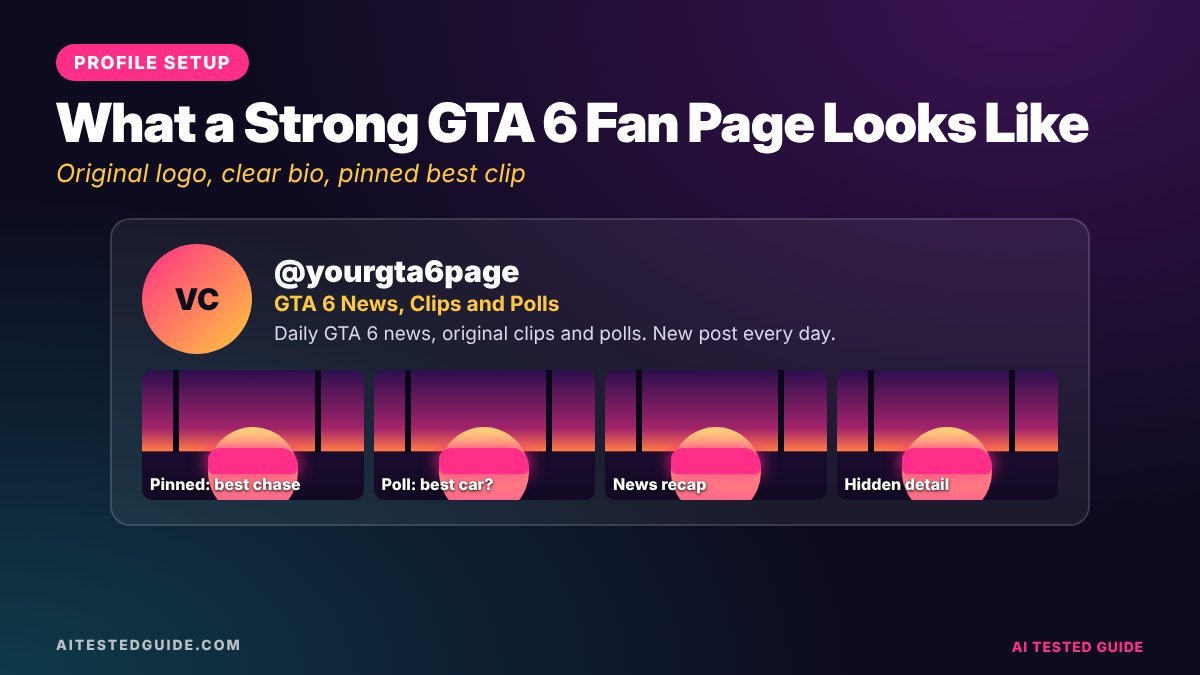
- Name: clear and searchable, such as “Vice City Daily” or “GTA 6 Details”. Avoid names that look official, like “GTA 6 Official”.
- Profile picture: your own original logo. Don’t use Rockstar’s GTA VI logo or official artwork.
- Bio: one line on what you post and how often, such as “Daily GTA 6 secrets and funny moments. Fan page, not affiliated with Rockstar.”
- Cover or banner: made in Canva with your page name and posting promise.
- Pinned post: your best clip, or a welcome post asking what followers want to see.
Adding “fan page, not affiliated with Rockstar” to your bio is a simple habit that protects you from looking like an impersonator.
Step 3: Build your AI stack
| Job | Tool type | Examples |
|---|---|---|
| Post ideas, captions, news summaries | AI chatbot | ChatGPT, Claude, Gemini |
| Video clips from gameplay | Auto-clipper | Clipping Factory, Opus Clip |
| Captions on clips | Video editor | CapCut |
| Graphics, memes, thumbnails | Design tool | Canva |
| Scheduling | Scheduler | Meta Business Suite, TikTok’s scheduler, YouTube Studio |
Our Is Canva AI Good? Canva AI Review 2026 explains which of Canva’s AI features are worth using for page graphics.
Step 4: What to post
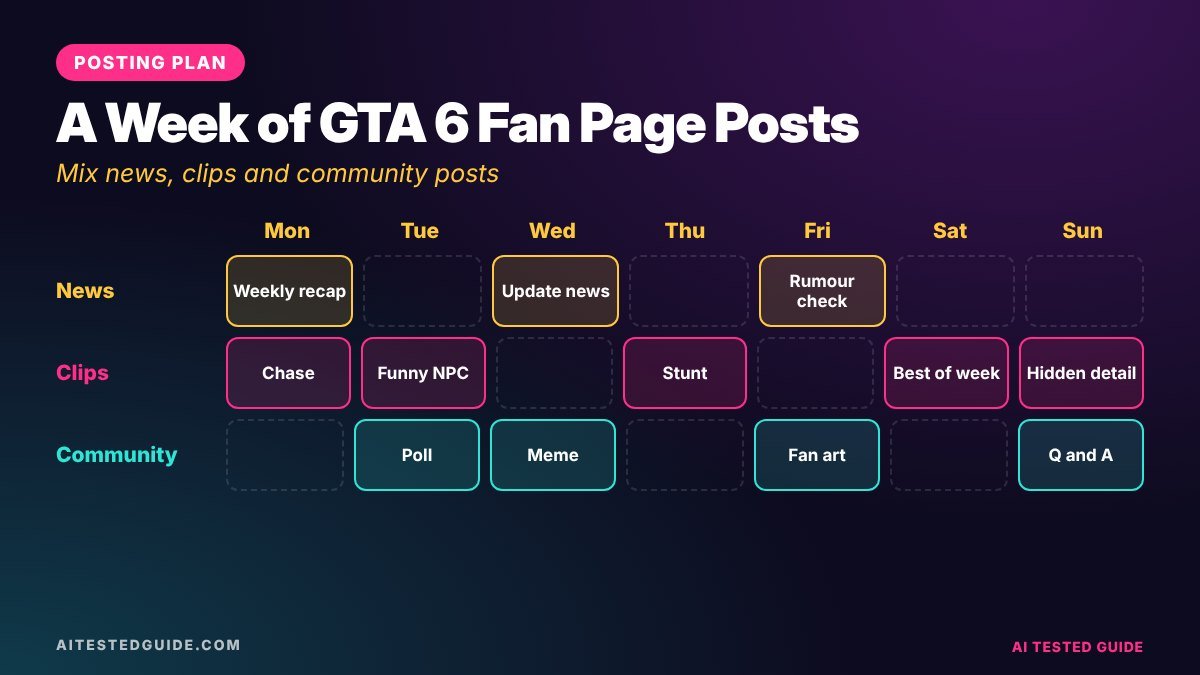
Successful fan pages rotate between five content types. Each one does a different job:
| Content type | Job it does | Example |
|---|---|---|
| News | Makes your page the place to check first | “Rockstar just confirmed…” with the source linked |
| Clips | Drives reach and new followers | Funny NPC reactions, chases, crashes |
| Polls and questions | Drives comments, which boost reach | “Jason or Lucia: who’s the better driver?” |
| Tips | Earns saves and loyal followers | “3 early money methods” |
| Memes | Gets shared in group chats | Original memes about launch-week life |
Step 5: Use AI to plan a week in 15 minutes
Once a week, give a chatbot your angle and ask for a full plan:
“I run a GTA 6 fan page focused on hidden details and funny NPC moments, posting on Facebook and TikTok. Give me a 7-day posting plan with 4 posts a day: one news-style post, two clip ideas and one poll or meme. Include a caption for each, under 30 words.”
Then edit the plan with what’s actually happening in the game. AI can draft ideas fast, but it won’t know this week’s discoveries until you tell it.
For captions on a specific clip:
“Write 5 Facebook captions for a GTA 6 clip where [describe it]. Each should end with a question that makes people comment.”
Step 6: A daily posting plan
| Time | Post |
|---|---|
| Morning | News or a tip |
| Midday | One clip |
| Afternoon | Poll or question |
| Evening | Your strongest clip of the day |
| Night | Meme or a light, shareable post |
Check your page insights after a week and move your strongest posts to the times your followers are most active.
Step 7: Handle news responsibly
News drives a lot of fan page growth, and it’s also where pages lose trust fastest. A few rules:
- Only post confirmed news as news. Link to the source, ideally Rockstar’s own channels.
- Label rumours as rumours, in the first line, every time.
- Never post leaked pre-release footage. Rockstar’s policy says it will be taken down.
- Mark story spoilers clearly, especially in the first weeks after launch.
Step 8: Grow it with engagement, not just posts
- Reply to comments in the first hour after posting. Early conversation tells platforms the post is worth showing.
- Ask followers to send clips, with credit, and feature the best ones.
- Run weekly series, like “Detail of the Day” or “Fail Friday”, so followers have a reason to come back.
- Collaborate with similar pages on shared posts or shout-outs.
Rules that keep your page safe
- Don’t use the official GTA VI logo as your profile picture, or present the page as official.
- Never repost other creators’ clips without credit and permission.
- Avoid licensed music in clips, including in-game radio.
- If you post sponsored content or affiliate links, disclose it clearly. The FTC’s influencer disclosure guide explains how.
How a GTA 6 fan page makes money
| Route | How it works | When it fits |
|---|---|---|
| Platform monetisation | Payouts on eligible videos and Reels | Once you meet each platform’s requirements in your country |
| Sponsorships | Brands pay for posts or mentions | Once you have consistent reach and engagement |
| Affiliate links | Commission on products you recommend | Gaming gear, tools and software your followers use |
| Selling services | Clipping or editing for streamers | If you’re good at making clips |
Launch week plan for a brand-new GTA 6 fan page
| Day | Focus | Posts |
|---|---|---|
| Launch day (Nov 19) | First impressions | First-hour clip, “what do you think so far?” poll, launch-day meme |
| Day 2 | Discoveries | 2 hidden-detail clips, 1 tip, 1 question |
| Day 3 | Chaos | Police chase and NPC reaction clips, “worst getaway” poll |
| Day 4 | Community | Feature 2 follower clips with credit, ask for more |
| Day 5 | Tips | Money methods and best early cars, with screenshots |
| Day 6 | Series | Start a daily series, such as “Detail of the Day” |
| Day 7 | Review | Check insights, double down on the top 2 content types |
Mistakes that stall fan pages
- Posting only reposts. Pages built on other people’s clips struggle to grow and to get monetised.
- Sharing rumours as facts. One fake “confirmed” post can cost you followers’ trust for good.
- Ignoring comments. Comments are free reach. Reply early and often.
- No consistent angle. If followers can’t say what your page is about in five words, it’s too broad.
- Disappearing after launch week. Pages that keep posting through weeks two to six often pass the ones that burned out.
The numbers to track each week
| Metric | What it tells you | What to do |
|---|---|---|
| Followers gained per post | Which content builds the page | Make more of the top type |
| Shares | What people send to friends | Turn shared formats into a weekly series |
| Comments per post | How engaged your community is | Ask better questions in captions |
| Watch time on clips | Whether clips hold attention | Shorten intros, strengthen hooks |
Paste your top and bottom posts into an AI chatbot once a week and ask it to spot the pattern. It’s a quick way to see what your audience actually wants.
Three fan page post templates you can reuse
The detail post: “Most players will never notice this in GTA 6 👀 [one-line description]. Did you spot it? Comment where you found it.”
The debate post: “Settle this: [option A] or [option B]? Wrong answers only in the comments.” Pair it with a clip or a side-by-side image.
The news post: “CONFIRMED: [what happened], per [source]. What does this mean for [players or the PC version]? Link in comments.” Use it only for news from official sources, and swap “CONFIRMED” for “RUMOUR” when that’s what it is.
Ask a chatbot to write ten variations of each template so your captions don’t all sound the same.
A final word on consistency: the pages that grow fastest in a launch window are rarely the ones with the best single post. They’re the ones that show up every day with something useful, funny or new. Build a routine you can actually keep for 60 days, then let AI handle the parts that slow you down, like captions, clip-finding and scheduling.
FAQ
Can a GTA 6 fan page make money? Yes, through platform monetisation, sponsorships and affiliate links, once you meet each platform’s requirements. Some programmes are only available in certain countries, so check yours.
Can I use the GTA VI logo on my fan page? Avoid it. Using Rockstar’s official logo or artwork as your branding can make your page look official and risks takedowns.
How often should a GTA 6 fan page post? During launch season, 3 to 5 posts a day across content types is a strong pace if quality stays high.
Which platform is best for a new GTA 6 fan page? TikTok usually grows a new page fastest from zero. Facebook is strong for comments and community.
Do I need to play GTA 6 to run a fan page? It helps a lot. Original clips and screenshots from your own play are what make a page stand out.
Can AI run my fan page for me? AI can plan, draft captions, cut clips and schedule posts, but you still need to check facts, pick the best content and reply to your community.
How long does it take to grow a GTA 6 fan page? It varies widely. Consistent daily posting with a clear angle gives a new page its best chance, and launch season is the easiest time to start.
Keep reading
This post is part of our GTA 6 creator series. Start with the hub guide, How to Make GTA 6 Content with AI: The Complete Creator Guide, then go deeper:
- How to Turn GTA 6 Gameplay into Viral TikToks and Shorts with AI
- How to Grow a GTA 6 Clip Page from Zero
- How to Auto-Post GTA 6 Clips to TikTok, YouTube and Facebook
- 25 GTA 6 Clip Ideas That Go Viral
- How to Make GTA 6 YouTube Thumbnails with AI
Related tested reviews on AI Tested Guide:
- 10 Best AI Tools for Content Creators in 2026
- Is Canva AI Good? Canva AI Review 2026
- Is ChatGPT Plus Worth It in 2026? Honest Review
Sources and official links
- Rockstar Games: Policy on posting copyrighted Rockstar Games material
- Meta Business Suite
- ChatGPT
- Canva
- FTC: Disclosures 101 for social media influencers
Get clips on autopilot
Clips are what grow a fan page, and finding them in hours of gameplay is the slow part. Clipping Factory by Clipping Joint gives your page a steady supply of vertical clips from long sessions. It’s a one-time payment, and we set it up for you.