

Disclosure: AI Tested Guide may earn a commission from some links on this page, at no extra cost to you. Clipping Factory is made by Clipping Joint, which is owned by AI Tested Guide’s founder.
Best AI video editors for GTA 6: the quick verdict
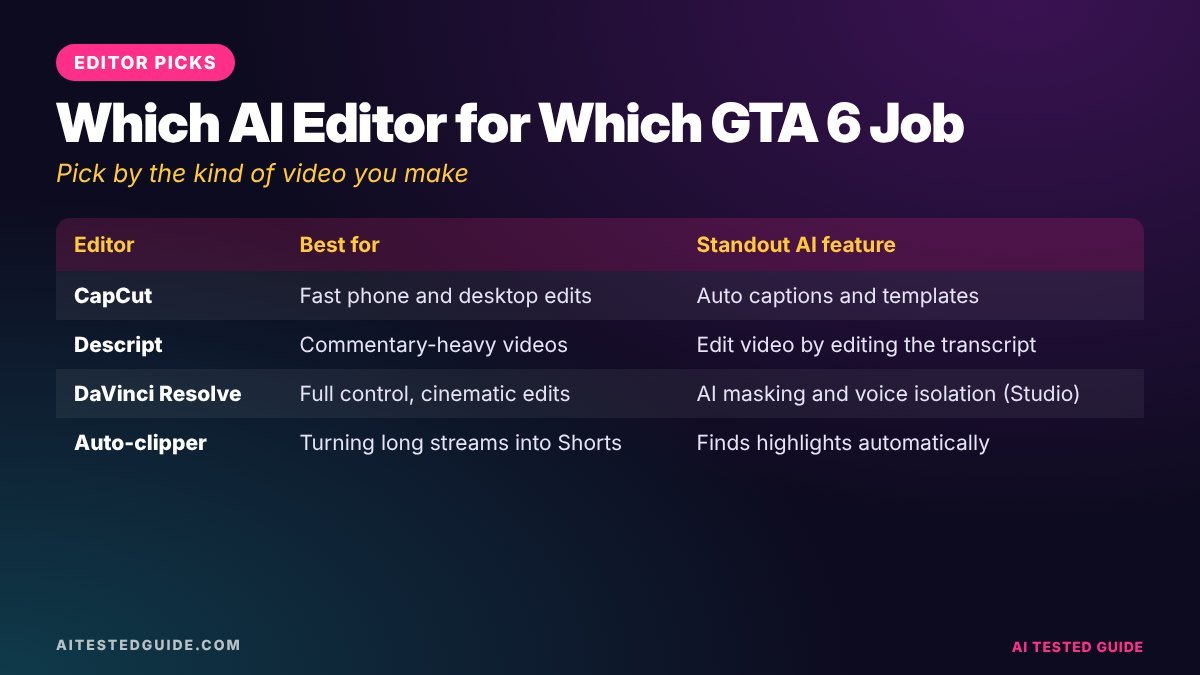
The best AI video editors for GTA 6 depend on what you’re making. For short clips, a fast mobile-friendly editor with auto-captions wins. For long YouTube videos, you want a full desktop editor. And if your bottleneck is finding moments in hours of footage, the most useful “editor” is an AI clipper that does the first cut for you.
| If you mainly make… | Best pick | Why |
|---|---|---|
| TikToks and Shorts | CapCut | Free, fast, excellent auto-captions |
| High volume from long sessions | Clipping Factory | Finds and cuts the moments for you, set up done for you |
| Self-serve clips from long videos | Opus Clip | Upload a long video, get suggested clips |
| Commentary and talking-heavy videos | Descript | Edit the video by editing its transcript |
| Long, polished YouTube videos | DaVinci Resolve | Professional editor with a generous free version |
Plans and prices change often, so check each tool’s site before you commit. We focus here on what each editor is genuinely good at for GTA 6 content.
What makes an editor good for GTA 6 content?
Gaming footage is different from podcasts or vlogs, so judge editors on the things that matter for it:
- Vertical reframing. Most GTA 6 clips get posted as 9:16 Shorts and TikToks. Auto-reframe that keeps the car or character centred saves a lot of manual work.
- Auto-captions that you can fix fast. AI captions will misspell Lucia, Jason, Leonida and Vice City. A good editor makes fixing them quick.
- Handling long files. A two-hour recording should open without crashing your phone or laptop.
- Speed from footage to posted clip. If a 20-second clip takes an hour, you won’t keep up during launch season.
- Audio control. You need to lower game audio under your voice and mute anything copyrighted, like in-game radio.
1. CapCut: best all-rounder for short clips
CapCut is the default editor for short-form creators, on phone and desktop. For GTA 6 clips, its strengths are speed and captions.
- Best features: auto-captions with animated styles, auto-reframe, quick effects, text-to-speech, templates.
- Best for: Shorts, TikToks and Reels from clips you’ve already picked.
- Weak spot: it doesn’t find the best moments for you. You still have to scrub through long footage.
GTA 6 tip: make a saved caption style (font, outline, colour, position) and reuse it on every clip. A consistent look makes your page recognisable in the feed.
2. Clipping Factory: best for high volume, done for you
Clipping Factory, from Clipping Joint, automatically finds the best moments in long videos and cuts them into vertical clips. It’s a one-time payment, and the team sets it up for you, so there’s no subscription to manage.
- Best for: streamers and pages recording hours of GTA 6 every day who want a steady supply of clips.
- How it fits: use it for the first cut, then add hooks and captions in CapCut.
- Weak spot: like any auto-clipper, review its picks before posting. AI is great at finding loud, fast moments, and you’re better at spotting the subtle funny ones.
3. Opus Clip: best self-serve auto-clipper
Opus Clip takes a long video and suggests short clips, with captions and reframing. It’s popular with podcasters and streamers.
- Best for: creators who want to run clipping themselves and like a web app workflow.
- Weak spot: it leans on speech to find moments, so pure gameplay with little talking may give weaker suggestions. Talk while you play and it improves.
We compare it head-to-head in Opus Clip vs CapCut vs Clipping Factory for GTA 6 Clips.
4. Descript: best for commentary videos
Descript transcribes your video, then lets you edit by editing the text. Delete a sentence in the transcript and it disappears from the video.
- Best for: reaction videos, “GTA 6 first impressions”, news commentary and podcast-style content where talking matters most.
- Useful AI features: filler-word removal, audio clean-up, captions.
- Weak spot: less suited to action-heavy edits where timing to the gameplay matters more than words.
5. DaVinci Resolve: best for long, polished YouTube videos
DaVinci Resolve is a professional editor with a generous free version, used for everything from YouTube to film.
- Best for: 10 to 20-minute videos, cinematic GTA 6 edits, colour grading your footage and detailed audio mixing.
- Weak spot: a steeper learning curve and a more demanding computer. Overkill if you only post Shorts.
Side-by-side comparison
| CapCut | Clipping Factory | Opus Clip | Descript | DaVinci Resolve | |
|---|---|---|---|---|---|
| Finds moments automatically | No | Yes | Yes | No | No |
| Auto-captions | Yes | Check with Clipping Joint | Yes | Yes | Paid version |
| Vertical reframing | Yes | Yes | Yes | Yes | Manual |
| Learning curve | Easy | None, set up for you | Easy | Easy to medium | Steep |
| Free option | Yes | One-time payment | Limited | Limited | Yes |
| Best for | Short clips | Volume, hands-off | Self-serve clipping | Commentary | Long-form |
How to choose in 30 seconds
- Posting fewer than 3 clips a week? CapCut alone is enough.
- Posting daily from long sessions? An auto-clipper plus CapCut.
- Making 10+ minute YouTube videos? DaVinci Resolve or Descript.
- Don’t want to edit at all? Clipping Factory for the cuts, CapCut for a final caption pass.
A simple editing workflow that uses two tools
Most creators get the best results by pairing a clipper with an editor rather than forcing one tool to do everything:
- Record a long GTA 6 session with the in-game radio off. Our How to Record GTA 6 Gameplay on PS5 and Xbox guide covers the settings.
- Auto-clip the session and keep only the moments you’d send to a friend.
- Open the keepers in CapCut, trim the first second hard, and add your hook as on-screen text.
- Run auto-captions, fix the names, and apply your saved style.
- Export at 1080 x 1920 and schedule across platforms.
Export settings for GTA 6 clips
| Platform | Aspect ratio | Resolution | Frame rate |
|---|---|---|---|
| TikTok, Shorts, Reels | 9:16 | 1080 x 1920 | 30 or 60 fps |
| YouTube long-form | 16:9 | 1920 x 1080 or higher | 60 fps for gameplay |
| Facebook feed video | 4:5 or 1:1 | 1080 wide | 30 fps |
Platforms re-compress uploads, so export at a high bitrate and let the platform do the shrinking. Upload the file directly rather than sending it through a messaging app first.
Mistakes to avoid when editing GTA 6 videos
- Keeping the loading screen. Start on the action.
- Over-editing. Too many zooms and effects make clips harder to watch, not easier.
- Leaving in licensed music. In-game radio songs can get clips muted or blocked.
- Skipping caption checks. Misspelled character names look careless.
- Using story cutscenes on their own. Rockstar’s policy says isolated cutscene videos will be removed.
Editing recipes for four types of GTA 6 video
Different clips need different treatment. Here’s how to edit the four formats that work best for GTA 6, and which tool to reach for.
1. The funny NPC moment (10 to 20 seconds)
Tool: CapCut. Recipe: start one second before the reaction, add a hook like “watch the guy at the bus stop”, punch in with a quick zoom on the NPC, caption any dialogue, and end on the reaction so it loops. Keep game audio, because the sound is usually half the joke.
2. The police chase montage (25 to 40 seconds)
Tool: an auto-clipper for the first cut, then CapCut. Recipe: speed up the quiet stretches, keep the near-misses at normal speed, add a wanted-level counter as on-screen text, and finish with a slow-motion replay of the crash or escape.
3. The “10 details you missed” video (8 to 12 minutes)
Tool: Descript or DaVinci Resolve. Recipe: record each detail as its own short capture, script the narration with an AI chatbot, then edit to the voiceover. Add chapter markers so YouTube shows each detail in search.
4. The cinematic edit (30 to 90 seconds)
Tool: DaVinci Resolve. Recipe: capture sunsets, drives and city scenes with the HUD hidden, colour grade for a consistent look, and cut to royalty-free music you have the rights to use. These perform well on Instagram and as YouTube Shorts.
AI prompts that speed up editing
AI chatbots won’t edit your video, but they remove the thinking that slows editing down. Try these:
- “Here’s a transcript of my GTA 6 session with timestamps. List the 10 moments most likely to work as 20-second TikToks, with a hook for each.”
- “Write 10 on-screen hooks under 7 words for a GTA 6 clip where [describe it].”
- “Turn these notes into a 10-minute YouTube script with timestamps for chapters: [paste notes].”
- “Suggest a consistent caption style for a GTA 6 page: font type, colours that match a Vice City sunset palette, and placement.”
Which editor fits your device?
| Your setup | Best fit | Notes |
|---|---|---|
| Phone only | CapCut | Transfer clips with the PlayStation App or Xbox app |
| Laptop, light editing | CapCut desktop or Descript | Comfortable for Shorts and commentary |
| Gaming PC | DaVinci Resolve plus an auto-clipper | Handles long 4K timelines |
| No time to edit | Clipping Factory | Set up for you, clips arrive ready for captions |
For more on AI video tools beyond editing, see our Runway vs Kling vs Veo vs Pika: The Best AI Video Generators comparison and our FlexClip Review: Is This AI Video Generator Worth It?.
FAQ
What’s the best free AI video editor for GTA 6?
CapCut, because it covers trimming, reframing and auto-captions in one free app on phone and desktop.
Can AI edit a whole GTA 6 video for me?
AI can find moments, cut clips, reframe and caption them. You’ll still get the best results by choosing hooks and checking the final cut yourself.
Is CapCut good enough for gaming content?
For short-form clips, yes. For long YouTube videos, a desktop editor like DaVinci Resolve gives more control.
Do I need a powerful PC to edit GTA 6 footage?
Not for short clips, which phones handle well. Long 4K edits in a desktop editor need a stronger computer.
What’s the difference between an AI clipper and an AI editor?
A clipper finds and cuts the best moments from long footage. An editor is where you polish them with hooks, captions and effects. Most creators use both.
Which editor is best for faceless GTA 6 channels?
Pair an auto-clipper with CapCut for captions, and add an AI voiceover if you want narration.
Should I edit GTA 6 clips on my phone or computer?
Phones are fine for Shorts and TikToks. Use a computer for long videos, heavy colour work or anything over a few minutes.
How long should editing one GTA 6 clip take?
With a clipper and a saved caption style, many creators get a short clip done in 10 to 15 minutes. Without them, it can take much longer.
Keep reading
This post is part of our GTA 6 creator series. Start with the hub guide, How to Make GTA 6 Content with AI: The Complete Creator Guide, then go deeper:
- Best AI Tools for GTA 6 Creators
- How to Auto-Clip GTA 6 Highlights with AI
- How to Add AI Captions to GTA 6 Clips
- Opus Clip vs CapCut vs Clipping Factory for GTA 6 Clips
- AI vs Manual Editing for GTA 6 Videos
Related tested reviews on AI Tested Guide:
- Runway vs Kling vs Veo vs Pika: The Best AI Video Generators
- FlexClip Review: Is This AI Video Generator Worth It?
- Riverside Agents Review: Can AI Really Produce Your Podcast?
Sources and official links
- CapCut
- Descript
- DaVinci Resolve
- Opus Clip
- Rockstar Games: Policy on posting copyrighted Rockstar Games material
Skip the editing
Clipping Factory by Clipping Joint turns long GTA 6 sessions into ready-to-post vertical clips. It’s a one-time payment, and we set it up for you.