
No—Grok’s image generator is practically locked behind a paywall in 2026, blocking even brand-new free accounts from generating a single test image. If you want high-resolution AI visuals without entering a credit card, you need genuinely free alternatives that actually deliver on their free-tier promises.
Quick Verdict: Is Grok Image Generator Free in 2026?
What Is Grok AI Image Generator (Grok Imagine 2.0)?
Grok Imagine 2.0 is xAI’s built-in text-to-image and photo-editing model integrated directly into grok.com and the X social platform. Unlike earlier versions that relied on basic prompt-to-image generation, the Grok Imagine 2.0 architecture supports 1K and 2K resolution across 15 aspect ratios alongside precision post-generation editing tools.
Beyond still graphics, xAI pairs the image suite with Grok Imagine Video 1.5, allowing paid subscribers to animate static images into 6 to 15-second clips. While the technology itself is fast and capable, accessing it without a paid subscription has become nearly impossible.
Comparison Summary
| Feature | Grok Imagine 2.0 (xAI) | Midjourney (v7 / Web) | ChatGPT Images (OpenAI) |
| Starting Price | $8/month (Plus) / $30/month (Premium) | $10/month (Basic Plan) | $0 Free / $8/month (Go) / $20/month (Plus) |
| Max Resolution | 1K and 2K across 15 aspect ratios | Up to 2K+ with built-in upscalers | High-res square, landscape & portrait |
| Free Tier Access | Heavily restricted (often 0 images) | No permanent free tier | Yes (generous daily free image limits) |
| Editing Tools | Magic Wand, Smart Resize, 1-click BG removal, 5-image reference | Vary Region (inpainting), Pan, Zoom, Retexture | Conversational inpainting & selection brush |
| Best Use Case | Fast social visuals for existing X subscribers | Fine-art aesthetics, lighting & cinematic depth | Everyday marketing graphics & clean typography |
What Actually Happened When I Tested Grok’s Free Plan?
To verify whether casual users can still generate images for free in 2026, I created a brand-new account on grok.com and entered a basic photorealistic portrait prompt. Instead of rendering an image, Grok immediately blocked the request and displayed a “You have reached the limit / Upgrade your plan” notice.
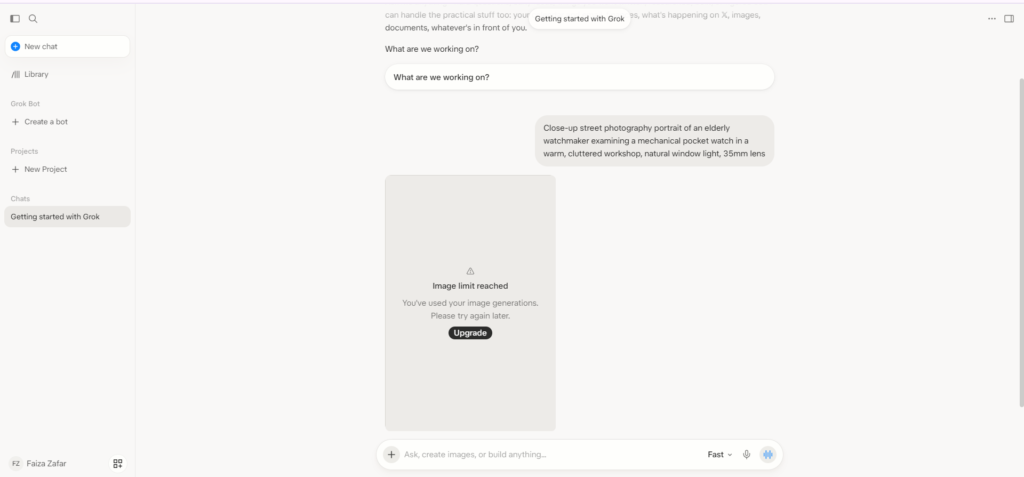
This happens because xAI reserves its GPU cluster for paying X subscribers during normal traffic hours. Rather than offering a predictable daily credit allowance, Grok’s free tier treats image generation as a restricted preview that routinely locks out free users before their first prompt even runs.
How to Use Grok Image Generator: Features & Editing Tools
For users on paid X plans, using Grok Imagine 2.0 happens directly inside the main chat window without needing separate design software. You simply describe your scene, pick an aspect ratio (1:1, 16:9, 9:16, or 4:5), and refine the output using four built-in editing tools.
| Tool / Feature | What It Does | Practical Use Case |
| Magic Wand | Lets you brush over a specific object or area to rewrite it without altering the rest of the photo. | Swapping a subject’s jacket color or replacing an object on a desk. |
| Smart Resize | Expands and recomposes an existing image into a new aspect ratio using generative outpainting. | Turning a 1:1 Instagram post into a 9:16 vertical Reel without cropping off heads. |
| 1-Click Background Removal | Automatically isolates the foreground subject and exports a transparent PNG file. | Creating clean YouTube thumbnail cutouts or e-commerce product stickers. |
| Multi-Reference Blending | Accepts up to 5 uploaded reference images to guide character consistency and style. | Placing the same brand mascot or product into multiple scenes. |
Grok Image Generator Pricing Breakdown (2026)
xAI bundles Grok Imagine 2.0 inside its X subscription tiers rather than selling a standalone consumer image plan. If you do not want a monthly subscription, developers can access the model via the xAI API at $0.04 to $0.08 per image, though consumer web users must choose from the tiers below.
| Plan Name | Monthly Cost | Image Generation Access | Who It Is For |
| Grok Free | $0/month | Heavily restricted (often 0 images before paywall) | Users who only need basic text Q&A |
| X / Grok Plus | $8/month | Light daily image quotas | Casual X users needing occasional graphics |
| X / Grok Premium | $30/month | Full Grok Imagine 2.0, Magic Wand & Video 1.5 | Active X creators and social media marketers |
| Heavy / Super Tier | $100+/month | Priority queue and high-volume generation | Agencies and high-output content teams |
3 Better Free Alternatives to Grok Image Generator (Tested)
Because Grok blocks free users at the door, I tested three 100% free AI image generators that require zero credit card details. Below is how they compare before diving into the actual test outputs from each platform.
| Free Tool | Daily Free Allowance | Watermark | Credit Card Required? | Standout Strength |
| Google Gemini | Generous daily image limits | No | No | Best all-around photorealism & fast edits |
| Ideogram (Free Plan) | Free daily/weekly slow-queue credits | No | No | Best typography, posters & accurate spelling |
| Microsoft Designer | Free daily AI boosts with Microsoft account | No | No | Social templates & 1-click background removal |
1. Google Gemini — Best Free All-Around Replacement
Google Gemini is the closest free replacement to Grok Imagine for fast, conversational image generation. Using a standard free Google account, I ran the exact portrait prompt that Grok blocked and Gemini rendered a detailed, well-lit image in under 10 seconds with zero paywalls.
Test 1: I entered the same prompt in Gemini after logging into my account simply, and this is the result.

Prompt: Close-up street photography portrait of an elderly watchmaker examining a mechanical pocket watch in a warm, cluttered workshop, natural window light, 35mm lens.
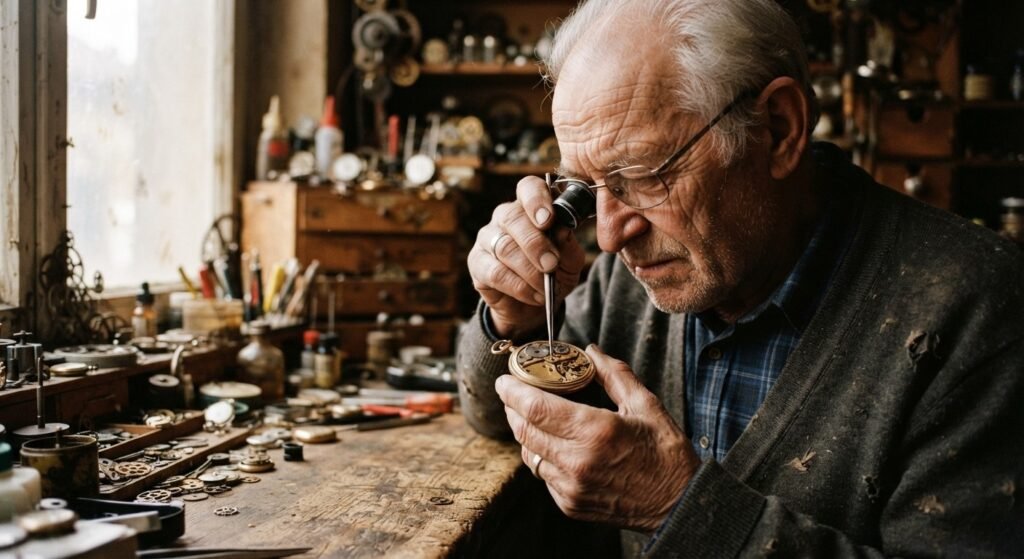
What makes Gemini especially practical for budget creators is conversational follow-up editing. If you want to change the background lighting or adjust a subject’s outfit, you simply type your correction in plain English without burning through a strict 2-image limit.
2. Ideogram Free Tier — Best Free Tool for Logos & Text
When your visual needs accurate spelling, such as a YouTube thumbnail, event poster or brand logo—Ideogram’s free tier outperforms almost every paid generator on the market. I tested Ideogram using its free credit allowance with a multi-word typography prompt, and it rendered every letter cleanly on the first attempt.
Test 2: I entered the prompt to create High-contrast YouTube thumbnail background graphic, futuristic dark studio desk with glowing neon blue and purple accents, sharp edges, cinematic lighting and no clutter.
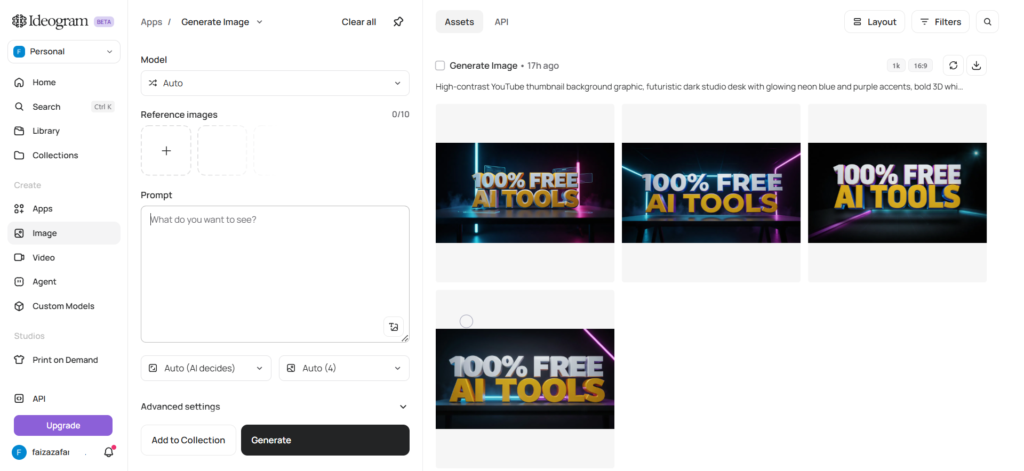
Prompt: High-contrast YouTube thumbnail background graphic, futuristic dark studio desk with glowing neon blue and purple accents, bold 3D white and yellow block text in the center reading “100% FREE AI TOOLS”, sharp edges, cinematic lighting, no clutter.
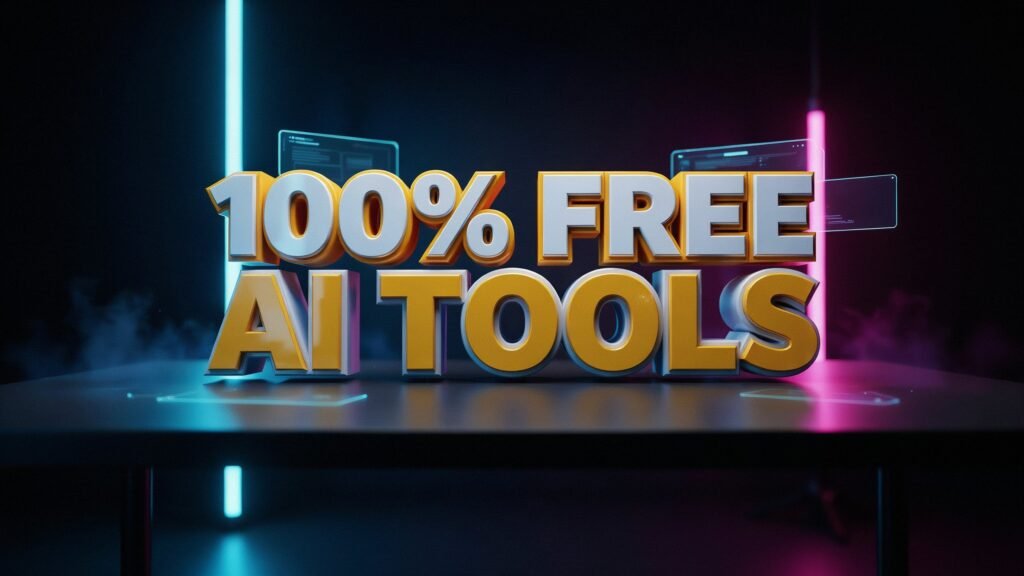

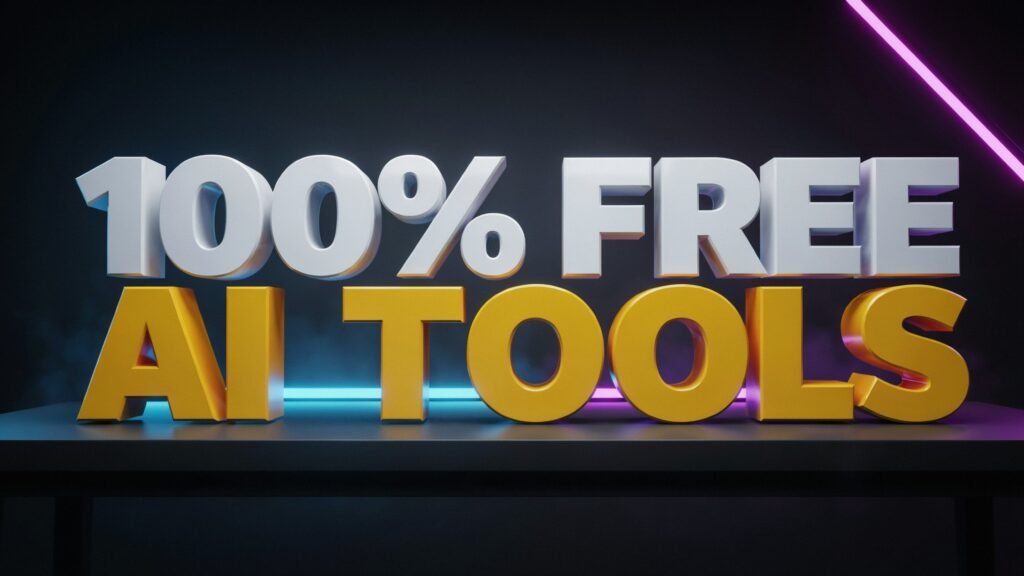
While free users wait slightly longer in a standard generation queue compared to paid subscribers, you still get full-resolution downloads without visual watermarks. For anyone designing text-heavy graphics on a $0 budget, Ideogram easily beats paying $30/month for Grok.
3. Microsoft Designer — Best Free Tool for Editing & Social Graphics
If you were specifically excited about Grok Imagine 2.0’s background removal and social resizing tools, Microsoft Designer gives you those exact features for free. Logging in with a free Outlook or Microsoft account unlocks daily AI image boosts alongside a full drag-and-drop canvas.
Test 3: I generated a square social graphic and tested Microsoft Designer’s one-click Background Colour replacement tool on the output. It isolated the clear glass and replaced the entire cafe backdrop with a clean solid beige background in seconds, proving you do not need an X Premium subscription to get pro-level e-commerce editing tools.
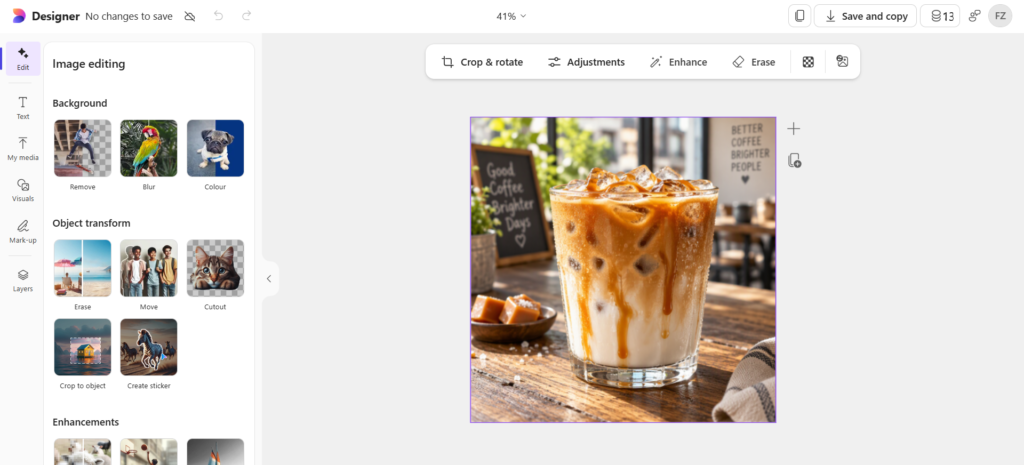

Prompt: Close-up commercial food photography of an iced caramel latte in a clear glass cup with condensation droplets, sitting on a rustic wooden table, blurred sunny cafe background, natural morning light, 1:1 square format.

After that I opened the Canvas to check the background remove option and changed the background colour.

I generated a square social graphic and tested Microsoft Designer’s 1-Click Remove Background button on the output. It isolated the main subject cleanly in seconds, proving you do not need an X Premium subscription to get pro-level editing tools.
Final Verdict: Should You Pay for Grok or Use Free Tools?
Unless you already pay for X Premium ($30/month) to grow an active X account, paying specifically for Grok’s image generator does not make financial sense in 2026. The free tier is far too restrictive for everyday creators, while free tools deliver comparable quality without a subscription.
For the best $0 workflow, use Google Gemini for photorealistic scenes, Ideogram whenever your image needs crisp text or logos, and Microsoft Designer for instant background removal and social media resizing. You can explore about more design tools here.
Frequently Asked Questions
Why does Grok say “You have reached the limit” on a brand-new free account?
xAI prioritizes GPU capacity for paying subscribers, placing free accounts into a tightly capped rolling pool. During normal traffic hours, free users frequently hit the upgrade prompt immediately without generating a single image.
How many free images can you generate on Grok in 2026?
xAI no longer guarantees a fixed daily number of free images on grok.com or X. Depending on server demand, free accounts receive anywhere from 0 to 2 image generations before hitting a paywall.
What is the cheapest paid plan to unlock Grok Image Generator?
The cheapest consumer option is X / Grok Plus at $8/month, which unlocks light image generation limits. Full access to Grok Imagine 2.0 editing tools like Magic Wand and Smart Resize requires the $30/month Premium plan.
What is the best free alternative to Grok Image Generator without a credit card?
Google Gemini is the best all-around free alternative for photorealistic images, while Ideogram is the top free choice for logos and accurate text rendering.