The short answer
Yes, Synthesia is worth it in 2026 if you make training, onboarding, course or explainer videos and you don’t want to be on camera. It’s not worth it for ads, brand stories or anything that needs a real human to build trust.
Synthesia also got cheaper this year. Starter is now $14 a month,and Pro is $49 for the first month if you pay monthly; if you plan to pay yearly, Starter is $18 per month and Pro is $64 per month.
Our verdict at a glance
| Best for | Training videos, SOPs, course lessons, product walkthroughs, multilingual updates |
| Skip it for | Ads, testimonials, brand storytelling, cinematic or social-first content |
| Free plan | Yes, 10 minutes a month with a watermark |
| Best value plan | Starter, yearly ($14/mo). Cheapest per minute if you use all your credits |
| Pick Pro if | You need personal avatars of your team, interactive videos or more than ~20 minutes a month |
| Main catch | One credit pool covers video, dubbing and AI extras, so dubbing eats your video minutes |
| Score | 8/10 for training content, 5/10 for marketing |
If you’re a freelancer or small business owner who needs to explain things on video every week, Synthesia saves real hours. If you just want scroll-stopping social clips, HeyGen or one of the tools in our best AI video generators guide will serve you better. Keep reading for the real cost per minute, what our test showed, and where the tool falls short.
What Synthesia is (and who it’s built for)
Synthesia turns a written script into a video of an AI presenter reading it. You type or paste your script, pick an avatar and a voice, and it renders a 1080p video. No camera, no mic, no editing timeline.
It started as a tool for big company training teams, and that DNA still shows. The features that stand out on the pricing page are all about explaining things clearly and at scale:
- 140+ languages and voices for creating videos, with local accents
- 125+ stock avatars on Starter, 180+ on Pro, and the full 240+ only on Enterprise
- PowerPoint import, so an existing slide deck becomes a narrated video
- AI Video Assistant that drafts a script from a prompt
- AI Dubbing that translates a video you upload, including YouTube links
- Interactive videos on Pro, with clickable buttons, branching and quizzes
- Dialogue, which puts two or more avatars in one scene
- Syren, a new AI video agent where you describe a video and it builds it (up to 3 minutes)
Who actually uses it: HR and training teams, course creators, SaaS companies making help videos, agencies making explainers for clients, and anyone who needs the same video in five languages.
Who it isn’t for: TikTok and Reels creators, video editors who want full creative control, and brands whose videos depend on emotion and personality. If that’s you, our list of AI tools for content creators is a better starting point.
Synthesia pricing in November 2026
Synthesia has four plans: Basic (free), Starter, Pro and Enterprise. Yearly billing saves 26% on Starter and 34% on Pro. These are the prices on Synthesia’s pricing page as of November 4, 2026.
| Plan | Monthly billing | Yearly billing | Video per month (max) | Avatars | Key extras |
|---|---|---|---|---|---|
| Basic | $0 | $0 | 10 min + 500 credits | 9 | Watermark on every video, share link only, 1 editor |
| Starter | $14/month | $18/month | ~22 min | 125+ | Downloads, no watermark, AI Video Assistant, 1 editor + 3 guests |
| Pro | $49/month | $64/month | ~70 min | 180+ | 5 personal avatars, interactive videos, branded pages, API, priority support, 1 editor + 5 guests |
| Enterprise | Custom | Custom | Unlimited | 240+ | 140+ translation languages, SSO, SCORM export, Brand Kits, dedicated CSM |
How credits work, in plain words
Every plan gets a free 10 minutes of video or dubbing each month. Paid plans then add credits on top: 1,250 a month on Starter, 6,000 on Pro. Synthesia says that’s up to about 12 extra minutes of video on Starter and 60 on Pro, which works out to roughly 100 credits per minute of video.
The catch is that one credit pool pays for everything. Video, dubbing, surveys and the Syren agent all draw from the same balance. A few things cost much more than a normal video:
- Lip-sync on dubbed videos uses 2x credits
- Syren, the AI agent, uses 1,000 to 2,000 credits for a one-minute video. That’s 10 to 20 times more than a normal studio video, so one Syren video can wipe out a month of Starter credits
- Customizable avatar b-roll clips with action cost 230 credits each
- A Studio Express-1 avatar (the premium version of you) is a $1,000/year add-on, annual plans only, and takes up to 10 days to make
Worked example: a freelance trainer makes four 5-minute lessons a month. That’s 20 minutes, so Starter covers it. Now add a Spanish dub of each lesson. That’s another 20 minutes of dubbing, roughly 1,500 more credits, which Starter doesn’t have. She needs Pro.
Credit-based pricing trips people up across AI tools, not just Synthesia. Our guide on how not to waste your AI agent credits covers the common traps.
What you really pay per finished minute
This is the number that matters, and no other review we found calculates it. We assumed you use every credit on standard video.
| Plan and billing | Price | Max video | Cost per minute |
|---|---|---|---|
| Starter, yearly | $168/yr | ~270 min/yr | ~$0.62 |
| Pro, yearly | $708/yr | ~840 min/yr | ~$0.84 |
| Starter, monthly | $19/mo | ~22 min/mo | ~$0.86 |
| Pro, monthly | $89/mo | ~70 min/mo | ~$1.27 |
Two surprises here. First, Starter yearly is cheaper per minute than Pro, so only upgrade for Pro’s features, not for value. Second, monthly Pro is the worst deal on the page. If you’re sure you’ll use Synthesia for a year, pay yearly.
For comparison, a freelance video editor or presenter usually costs far more than $1 per finished minute, so even the worst plan here is cheap next to a real shoot.
Our hands-on test: we made a real onboarding video
We tested Synthesia ourselves on the free Basic plan on November 4, 2026. Our goal was the kind of video our readers actually need: a 2-minute onboarding video for a small online store, showing new support staff how to submit a support request in 3 steps.
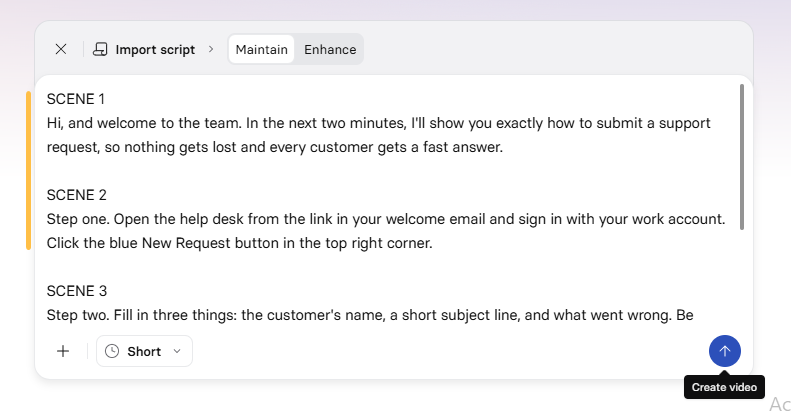
Step 1: We described the video instead of writing a script
After sign-up, Synthesia opens on a simple prompt box asking what your video is about. We pasted one paragraph describing the video, the 3 steps, a friendly tone and an ending that tells new staff to message their team lead if they get stuck.
Step 2: The AI built a full outline in about 10 seconds
In roughly 10 seconds, the AI Assistant picked a template (Stylish Dynamic), chose a presentation style and wrote a 4-scene outline. That’s genuinely fast. Going from a blank page to a structured plan normally takes us much longer than that.
But the first scene opened with a line we never asked for: “by day 7 you’ll be able to file a complete support request in under 2 minutes.” Nothing in our prompt mentioned day 7. The AI invented it, and it even became the video’s title.
Step 3: We fixed the script in the editor
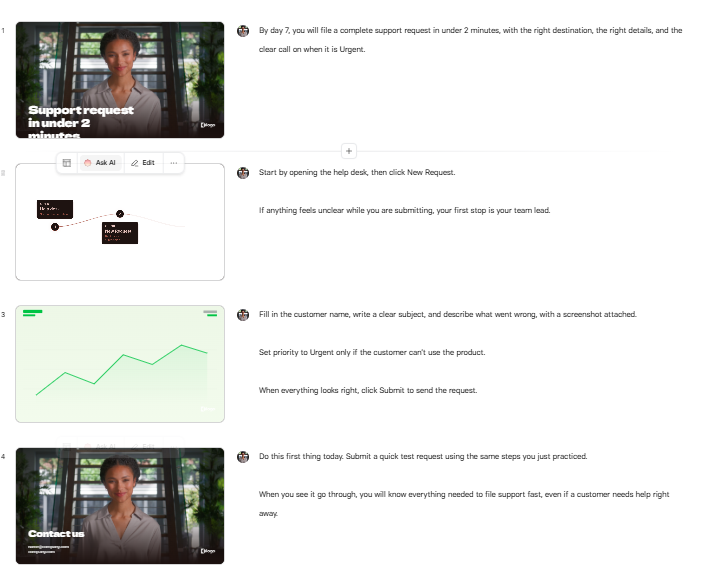
The editor shows each scene as a slide on the left with the avatar’s script on the right. Reading through it, we found four problems:
- The invented “day 7” line in scene 1, and a title that ran off the bottom of the frame
- A green growth chart in scene 3, which has nothing to do with filling in a support form
- A “Contact us” slide with a placeholder email address and a placeholder “logo”
- The team lead line placed in the middle of the video, not at the end where we asked for it
We rewrote the script lines in 2 minutes 45 seconds. We left the visuals as the AI made them, to keep the test fair.
[Screenshot 3: the editor with all 4 scenes as the AI built them, showing the growth chart in scene 3. Alt text: Synthesia video editor with AI-generated scenes]
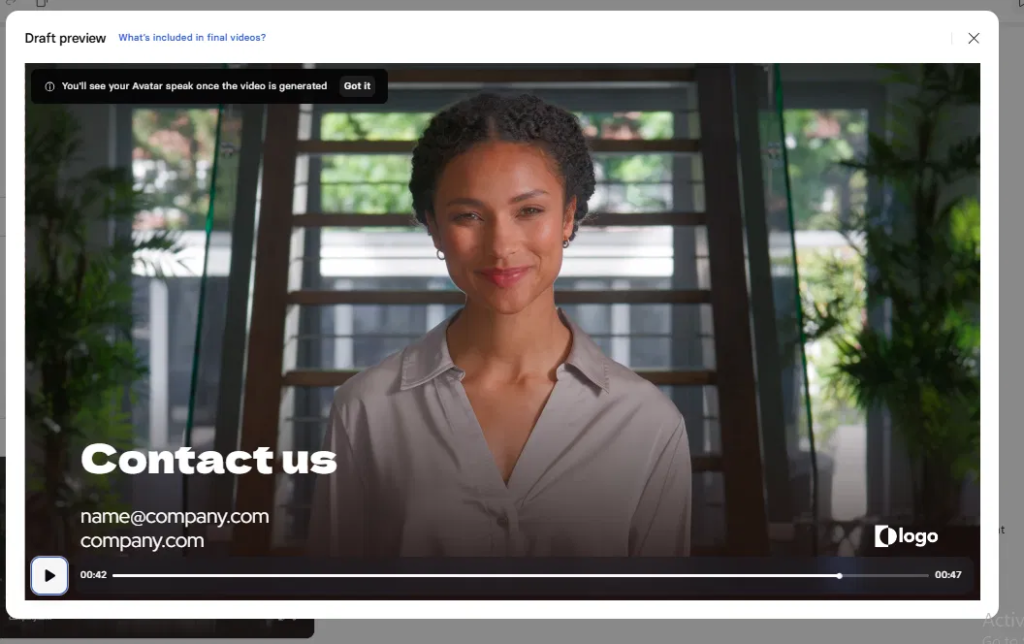
Step 4: The draft preview doesn’t show the avatar talking
The draft preview plays the audio over the slides, but the avatar doesn’t move until the video is generated. A small banner explains this, but it’s easy to miss, and the preview buffered a lot for us. Many first-time users will think it’s broken.
Step 5: The finished video
We clicked Generate. The finished video was ready in 4 minutes, and 22 seconds.
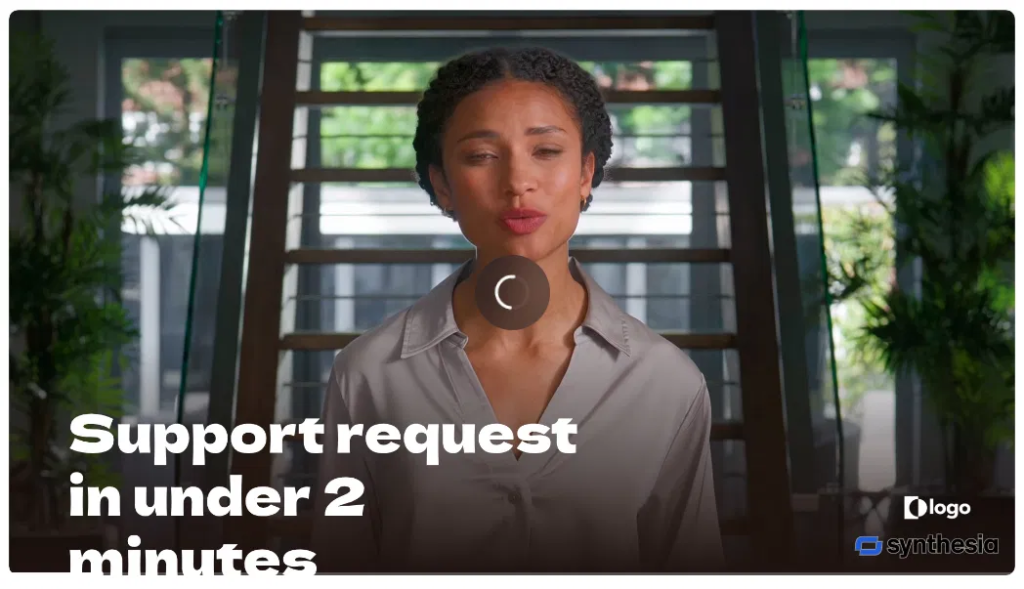
The result was a 47-second video, not the 2 minutes we asked for. The AI had trimmed our content heavily. The avatar was Zola and the voice was Noa.
- Avatar realism: 8/10
- Voice: 8/10
- Playback: the generated video stopped and buffered several times while we watched it
- Visuals: the title still overflowed the frame (the word “minutes” was cut off), and the placeholder “logo” and Synthesia watermark both showed in the bottom right corner
Step 6: No download on the free plan
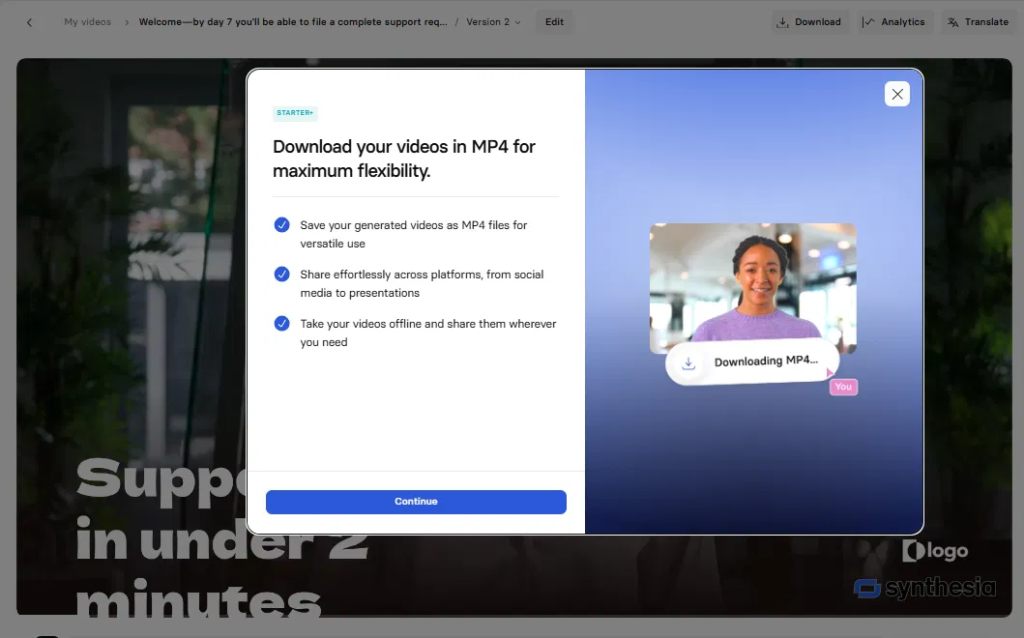
When we clicked Download, Synthesia showed an upgrade screen. MP4 downloads start on the Starter plan, so on the free plan you can only share your video through a Synthesia link.
Our test results
| What we measured | Result |
|---|---|
| Prompt to full outline | ~10 seconds |
| Script editing time | 2 min 45 sec |
| Render time | 4 min, and 22 sec |
What impressed us: the speed. The AI turned one paragraph into a structured, 4-scene video with a template, avatar and voice in seconds, with no design or video skills needed. For a small business that has never made a training video, that removes the biggest hurdle.
What annoyed us: the AI doesn’t follow instructions closely. It made up a detail, ignored the length we asked for, moved our ending to the middle, picked an unrelated chart and left placeholder text on screen. Playback also stalled repeatedly, both in the preview and the final video.
Bottom line from our test: Synthesia got us from a blank page to a finished video faster than we could have set up a camera. But the first draft wasn’t ready to show a real new hire. Treat the AI’s output as a first draft, and budget time to check the script, visuals and length before you share it.
Where Synthesia shines
1. Training and onboarding videos
This is the job Synthesia was built for. Training viewers care about the steps, not the presenter’s charm, so a slightly AI-looking avatar doesn’t hurt. The real win is updates: when a process changes, you edit one line of the script and regenerate. No reshoot, no booking the person who recorded it last time.
For small businesses, this means you can finally have proper SOP videos for new hires, support staff or virtual assistants without hiring a video team.
2. Turning slides into lessons
PowerPoint import is underrated. Upload a deck, and each slide becomes a scene you add narration to. Course creators and consultants who already have slide decks can turn them into narrated lessons in an afternoon.
3. The same video in many languages
You can create videos in 140+ languages and voices on every plan, including free. Translating a finished video with 1-click translation covers 70+ output languages on Basic, Starter and Pro, and the full 140+ only on Enterprise. Check your target languages before you buy, because most reviews blur these two numbers together.
4. Staying off camera
Plenty of freelancers and founders avoid video because they hate being on camera. Synthesia removes that blocker completely. If you want the videos to look like you, Starter includes 3 personal avatars and Pro includes 5, and you can pair one with a clone of your own voice.
5. Speed
The workflow is script, avatar, generate. For a short explainer, the slow part is writing the script, not making the video.
Where Synthesia falls short
It still looks like AI. Synthesia’s newer avatars move their hands and bodies more naturally, but most viewers will still notice something is off within a minute. That’s fine for a training module. It’s a problem for an ad or a founder’s personal message.
It can’t act. You can pick voice styles, but you can’t direct a performance the way you’d coach a person. Persuasion, humor and emotion all fall flat.
Credits disappear faster than you expect. Dubbing, lip-sync and especially the Syren agent share your video credits. Starter’s ~22 minutes a month is the best case, not the typical case.
The best features sit behind Enterprise. The full avatar library, 140+ translation languages, SCORM export for course platforms, SSO and Brand Kits are Enterprise only. Small training teams that need SCORM will hit this wall fast.
One editor seat on self-serve plans. Starter and Pro both include just 1 editor plus guests who can comment. If two people need to build videos, you’re looking at Enterprise.
Template-first design. You get scenes, layouts and an avatar. For fast cuts or social-first edits, use a real editor like Descript or CapCut. For cinematic AI clips, see our Kling 4 review.
Watermark on free. Every Basic plan video carries the Synthesia logo, so the free plan is only for testing.
Synthesia vs HeyGen (and other alternatives)
HeyGen is the closest rival, and it now wins on avatar count, languages and price for teams. Synthesia wins on entry price and on its training-first workflow. Prices below were checked on each vendor’s pricing page on November 4, 2026.
| Synthesia | HeyGen | |
|---|---|---|
| Free plan | 10 min/month, watermark | 3 videos/month up to 1 min each, watermark |
| Cheapest paid plan | Starter: $14/mo yearly, $19 monthly | Creator: $24/mo yearly, $29 monthly |
| Mid plan | Pro: $59/mo yearly, $89 monthly | Pro: $49/mo, adds 4K export |
| Stock avatars | 125+ (Starter), 180+ (Pro), 240+ (Enterprise) | 500+ free, 700+ paid |
| Translation languages | 70+ on self-serve, 140+ on Enterprise | 30+ free, 175 on paid plans |
| SCORM export for course platforms | Enterprise only | Business plan ($149/mo + $20 per extra seat) |
| Team seats | 1 editor + guests until Enterprise | Shared workspace from Business |
| Best for | Cheap entry, training, slide-to-video lessons | Marketing, social, more realistic avatars, global localization |
Sources: Synthesia pricing, HeyGen pricing.
Our take: if you’re a solo trainer or course creator on a budget, start with Synthesia Starter. If you need SCORM, more languages or a shared team workspace without an Enterprise contract, HeyGen Business is the cheaper path. If avatar realism is what matters most, test both on the free plans with your own script.
Other alternatives worth a look:
- Colossyan: built for learning teams, with quizzes and multi-avatar scenes. Worth testing if you’re choosing for an L&D team.
- Descript: for people who are fine on camera and want to edit their own recordings by editing text.
- FlexClip: a cheaper template-based editor with AI video features. See our FlexClip review.
- ElevenLabs: if you only need a voiceover over screen recordings, skip avatars entirely. See our best AI voice generators list.
- Gamma or Canva: if your “video” is really a presentation. See our Gamma AI review, Canva AI review and best AI presentation tools.
For the full ranking, see our best AI video generators guide and our comparison of Runway, Kling, Veo and Pika.
Is Synthesia worth it for you?
| You are… | Worth it? | Best plan |
|---|---|---|
| A small business making SOP or onboarding videos | Yes | Starter, yearly |
| A course creator turning slides into lessons | Yes | Starter, then Pro if you pass ~20 min/month |
| A freelancer making explainers for clients | Yes, if clients accept AI presenters | Pro, for branded pages and personal avatars |
| A team that needs the same video in many languages | Yes | Pro, or Enterprise for 140+ translation languages |
| A training team that needs SCORM for an LMS | Only on Enterprise | Compare HeyGen Business first |
| A brand making ads or testimonials | No | Film real people |
| A TikTok, Reels or YouTube Shorts creator | No | Use CapCut or HeyGen |
Final verdict
Synthesia is worth it in 2026 for one clear job: turning scripts and slides into clean, updatable training and explainer videos without a camera. The 2026 price cut makes Starter at $14 a month (yearly) one of the cheapest ways to get watermark-free avatar videos, at about $0.62 per finished minute if you use all your credits.
It’s not a marketing tool, and its best team features are locked behind Enterprise. Start on the free plan, make one real video from your own script, and only then pick a plan. Pay yearly if you’re sure, and stay on Starter unless you need Pro’s personal avatars or interactive videos.
Frequently asked questions
Is Synthesia free?
Yes. The Basic plan is free and gives you 10 minutes of video or dubbing a month plus 500 credits and 9 avatars. Every video carries a Synthesia watermark and you can’t download it, so it’s only good for testing.
How much does Synthesia cost in 2026?
As of November 4, 2026, Starter costs $19 a month or $14 a month billed yearly ($168). Pro costs $89 a month or $59 a month billed yearly ($708). Enterprise is custom priced. New monthly subscribers pay $9 for the first Starter month or $49 for the first Pro month.
How many minutes of video do you get?
All plans get 10 free minutes a month. Starter adds about 12 more minutes and Pro about 60 more, if you spend every credit on standard video. Dubbing, lip-sync and the Syren agent use the same credits, so you’ll often get less.
Is Synthesia better than HeyGen?
Synthesia is cheaper to start and better for slide-based training. HeyGen has more avatars, more translation languages and offers SCORM export on its $149 Business plan instead of Enterprise. Test both free plans with your own script before choosing.
Can I make an AI avatar of myself?
Yes. Starter includes 3 personal avatars and Pro includes 5. The premium Studio Express-1 avatar is a $1,000/year add-on for annual plans and takes up to 10 days to process.
Can Synthesia videos be used commercially?
Paid plans let you download videos without the watermark for business use. Check Synthesia’s terms for your specific use, especially for ads.
Do Synthesia credits roll over?
No, Synthesia credits do not roll over to the next billing period. If you are on a monthly plan, any unused credits expire at the end of your billing cycle and reset to your standard monthly allowance. For annual subscriptions, the entire allocation is provided upfront and expires on your yearly renewal date. Furthermore, if you upgrade your subscription mid-cycle, your remaining credits are completely replaced by the new plan’s balance rather than carried forward.
Sources
- Synthesia pricing page, checked November 4, 2026
- HeyGen pricing page, checked November 4, 2026
- Competitor pages analyzed: AI Worth It, Wyzowl, VideoDubber