
Disclosure: AI Tested Guide may earn a commission from some links on this page, at no extra cost to you. Clipping Factory is made by Clipping Joint, which is owned by AI Tested Guide’s founder.
The 10-minute GTA 6 YouTube Shorts workflow
You can make GTA 6 YouTube Shorts in about ten minutes once you have footage, even with no editing experience. AI does the slow parts: finding the moment, adding captions and brainstorming titles. You make the choices that decide whether people keep watching.
| Minutes | Step | Tool |
|---|---|---|
| 0 to 2 | Pick the moment from your recording, or let an AI clipper find it | Auto-clipper or your notes |
| 2 to 4 | Trim it and reframe to vertical 9:16 | CapCut |
| 4 to 6 | Add auto-captions and fix names | CapCut |
| 6 to 8 | Write the title and on-screen hook with AI | ChatGPT or Claude |
| 8 to 10 | Upload with title, description and settings | YouTube app or YouTube Studio |
The first few Shorts will take longer. By the end of launch week, ten minutes is realistic.
Why YouTube Shorts are worth it for GTA 6
- Search. Unlike most short-form platforms, YouTube is a search engine. A well-titled Short about a GTA 6 detail can keep getting found for months.
- Channel growth. Shorts bring subscribers who then find your long videos.
- Monetisation path. The YouTube Partner Program includes eligibility routes based on Shorts views. Check the current requirements and whether it’s available in your country.
- Launch timing. GTA 6 launches November 19, 2026. Early Shorts on fresh topics face less competition than they will in a month.
Step 1: Pick the right moment
The moment decides most of the result. Good GTA 6 Shorts usually have one clear thing happening:
- A surprising NPC reaction
- A chase or crash with a payoff
- A hidden detail most players won’t notice
- A quick, useful tip, like a money method or a hidden car
- A fail that’s funny even to people who don’t play GTA
If you record long sessions, an AI clipper can shortlist moments for you. See How to Auto-Clip GTA 6 Highlights with AI for the full workflow.
Step 2: Trim and reframe
- Import the clip into CapCut.
- Set the canvas to 9:16.
- Use auto-reframe, or position the frame manually so the car or character stays centred.
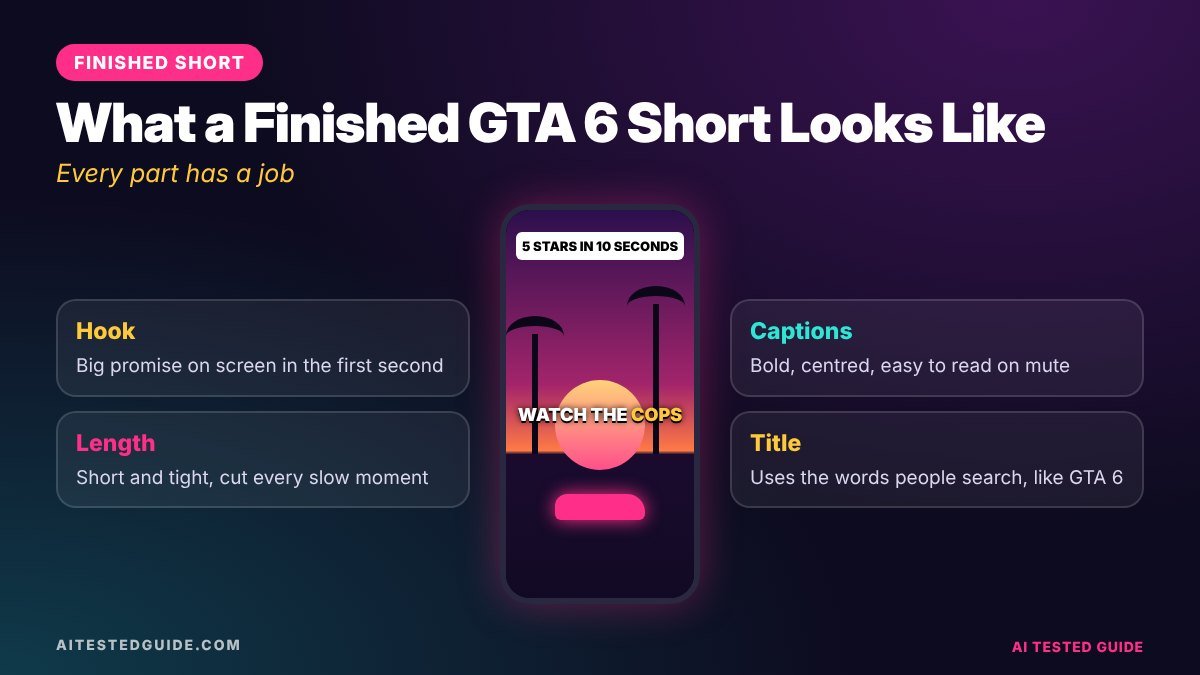
- Cut the start until something is already happening in the first second.
- End right after the payoff, or on a frame that loops back to the start.
Aim for 15 to 35 seconds for most GTA 6 Shorts. Longer works for tips and story-style clips, as long as every second earns its place.
Step 3: Add captions
- In CapCut, tap Text > Auto captions.
- Choose a bold style with a thick outline so it reads over bright GTA scenes.
- Place captions in the middle of the screen. YouTube’s buttons sit on the right and the title sits at the bottom.
- Fix names: Lucia, Jason, Leonida and Vice City are often misspelled.
Our How to Add AI Captions to GTA 6 Clips guide covers caption styles in detail.
Step 4: Write the title and hook with AI
Shorts titles matter more than titles on most short-form platforms, because they help YouTube understand and surface your video in search. Use AI to brainstorm, then choose the most specific option.
Title prompt:
“Write 10 YouTube Shorts titles under 60 characters for a GTA 6 clip where [describe the moment]. Include ‘GTA 6’ near the start. Curious, not clickbait.”
On-screen hook prompt:
“Write 10 on-screen hooks under 7 words for the same clip. They should make someone want to see what happens next.”
| Weak title | Strong title |
|---|---|
| GTA 6 gameplay #12 | GTA 6 Police Are Smarter Than You Think |
| Funny moment lol | GTA 6 NPCs Film Everything You Do |
| Car jump | GTA 6: I Landed a Car on a Moving Boat |
Step 5: Upload with the right settings
- Title: your chosen title, with “GTA 6” near the start.
- Description: one or two natural sentences about the clip, plus a few hashtags such as #GTA6 and #Shorts.
- Audience: set whether it’s made for kids honestly. GTA 6 content generally isn’t.
- Related video: link a longer video if you have one, to send Shorts viewers to your main content.
- Schedule: use YouTube Studio to spread uploads through the day.
Shorts that perform: the checklist
- Something happens in the first second
- One clear moment, not three
- Captions readable on a phone
- No licensed music, including in-game radio
- A title that describes the specific moment
- An ending that loops or pays off
Faceless GTA 6 Shorts: three formats that work
| Format | How it works | AI’s role |
|---|---|---|
| Gameplay plus captions | The moment speaks for itself | Clipper and auto-captions |
| Narrated details | Short voiceover explains what to look at | Script with a chatbot, voice with an AI voice tool |
| Text-led tips | Big on-screen text walks through a tip | Chatbot writes the steps, CapCut adds text |
For narrated Shorts, our Best AI Voice Tools for GTA 6 Streams and Commentary guide covers voices that don’t sound robotic.
Rules to stay safe
- Follow Rockstar’s policy on posting game material. It removes isolated cutscenes, story spoilers and leaked footage.
- Mark spoilers in the title or first second.
- Never reupload other creators’ Shorts.
- Label realistic AI voices or images where YouTube asks you to.
10 GTA 6 Shorts ideas you can film on launch day
- “The first thing I did in GTA 6” – your opening minutes, cut to the best 20 seconds.
- NPC reaction test – do something odd in a crowd and show how people respond.
- First police chase – from first star to escape or arrest.
- Then vs now – a Vice City location next to how it looked in older games, using your own captures.
- The detail nobody noticed – one small touch of realism, explained in a line.
- Physics check – a crash, fall or jump that shows off ragdoll physics.
- Weather and time of day – the same street at noon and midnight.
- First car rating – rate the first car you steal out of 10.
- Worst getaway – a plan that goes wrong in the funniest way.
- Quick tip – one useful thing new players should know, shown in 20 seconds.
Avoid story cutscenes and big plot moments in launch week. They count as spoilers, and isolated cutscene videos can be removed under Rockstar’s policy.
How to read your Shorts analytics
Open YouTube Studio after 48 hours and look at these for each Short:
| Metric | What it means | If it’s low |
|---|---|---|
| Viewed vs swiped away | How many people stayed past the start | Strengthen the first second and the on-screen hook |
| Average percentage viewed | How much of the Short people watched | Cut it shorter, remove slow moments |
| Subscribers gained | Whether the Short builds your channel | Make a series viewers want more of |
| Traffic from search | Whether people find it by searching | Make titles more specific |
Compare your best and worst five Shorts each week. Paste their titles and numbers into a chatbot and ask what the strong ones have in common, then make more of that.
Batching: a week of Shorts in one sitting
Ten minutes per Short gets even faster when you batch. Once a week, do each step for every clip at once: pick all the moments, then trim them all, then caption them all, then write all the titles in one AI prompt, then schedule the week in YouTube Studio. Switching between tasks is what eats time, so doing the same task several times in a row can cut your total time dramatically.
Mistakes that hold GTA 6 Shorts back
- Vague titles. “GTA 6 moment” tells YouTube nothing. Name the thing that happens.
- Horizontal footage with black bars. Always reframe to full vertical.
- Slow starts. If nothing happens in the first second, people swipe away.
- Music claims. In-game radio can get Shorts muted or blocked.
- Giving up after a week. Shorts channels often take several weeks of steady posting to find their audience.
How Shorts and long videos work together
Shorts are great at bringing new people to your channel. Long videos are better at keeping them, and at earning more per viewer. The strongest GTA 6 channels connect the two:
- Cut Shorts from your long videos. Every 10-minute “details you missed” video holds several standalone Shorts.
- Link back. Use the related video option on each Short to point viewers at the full video.
- Tease, don’t spoil. End a Short with “full list in the video” when there’s genuinely more to see.
- Reuse what works. When a Short takes off, make a long video that goes deeper on the same topic.
Turn your best Short into a series
When one format works, repeat it with a number: “GTA 6 detail #1”, “#2”, “#3”. Series give viewers a reason to subscribe, because they know more is coming. Good series formats for GTA 6 include a daily detail, a car rating, a weekly fail compilation and “Can you survive…” challenges. Ask a chatbot for 30 episode ideas for whichever format wins, and you have a month planned in minutes.
FAQ
How long should GTA 6 YouTube Shorts be? Most work best at 15 to 35 seconds. Tips and story-style Shorts can run longer if they hold attention.
How many Shorts should I post per day? During GTA 6 launch season, 1 to 3 a day is a strong pace if quality stays high.
Do hashtags matter on YouTube Shorts? A few relevant ones help, like #GTA6. The title and the clip itself matter far more.
Can I monetise GTA 6 Shorts? YouTube’s Partner Program includes Shorts, but check the current eligibility rules, your country, and Rockstar’s policy, which is written for non-commercial fan use.
Should I post the same clip on TikTok and Shorts? You can post your own clip on both. Upload a clean file without another app’s watermark, and adapt the title and caption.
Do I need to show my face? No. Many successful GTA Shorts channels use gameplay with captions or an AI voiceover.
What’s the best time to post GTA 6 Shorts? Check when your own audience is active in YouTube Studio. Until you have data, spread uploads across the afternoon and evening.
Can AI make the whole Short for me? AI can find the moment, caption it and suggest titles. You still choose the moment worth posting and check the result.
Should GTA 6 Shorts include my face? Only if you want to. A small webcam bubble can add personality, but gameplay-only Shorts with strong captions do well too.
Keep reading
This post is part of our GTA 6 creator series. Start with the hub guide, How to Make GTA 6 Content with AI: The Complete Creator Guide, then go deeper:
- How to Turn GTA 6 Gameplay into Viral TikToks and Shorts with AI
- How to Auto-Clip GTA 6 Highlights with AI
- How to Add AI Captions to GTA 6 Clips
- How to Make GTA 6 YouTube Thumbnails with AI
- How to Auto-Post GTA 6 Clips to TikTok, YouTube and Facebook
Related tested reviews on AI Tested Guide:
- 10 Best AI Tools for Content Creators in 2026
- Is ChatGPT Plus Worth It in 2026? Honest Review
- Runway vs Kling vs Veo vs Pika: The Best AI Video Generators
Sources and official links
- YouTube Partner Program overview and eligibility
- YouTube Studio
- CapCut
- ChatGPT
- Rockstar Games: Policy on posting copyrighted Rockstar Games material
Make it 2 minutes, not 10
Clipping Factory by Clipping Joint handles finding and cutting the clips, so you only add titles and upload. It’s a one-time payment, and we set it up for you.