Canva AI is one of the easiest ways to turn an idea into a finished visual, but is it actually good enough to replace other AI design tools?
I tested Canva AI with that question in mind.
Rather than judging it only on how impressive its AI features look in a demo, this review focuses on something more useful: how well Canva AI works when you actually need to create something.
That means looking at its AI design generation, image creation, writing tools, photo editing, presentations, Canva Code, brand controls, ease of use, pricing, limitations, and overall value.
The short answer?
Canva AI is not the best AI tool for every individual creative task. But it may be one of the best AI platforms for turning multiple creative tasks into one workflow.
That distinction is important.
If you want the absolute best AI image generator, there are specialist tools that can go further. If you want advanced video editing, professional design software gives you considerably more control.
But if you want to go from idea → design → image → copy → presentation → social post without constantly switching between different applications, Canva AI becomes much more interesting.
Canva AI Review: My Verdict
Overall rating: 4.5/5
Canva AI is best for marketers, small businesses, content creators, entrepreneurs, educators, social media managers, and teams that need to produce good-looking content quickly.
Its biggest advantage isn’t that every AI feature is the most powerful in its category.
It’s that Canva puts so many useful AI capabilities inside an editor that is already extremely easy to use.
What I like
- Extremely easy to learn
- Excellent for fast visual content
- AI-generated designs remain editable
- Strong combination of AI and traditional design tools
- Useful image generation and editing
- Good brand-management capabilities
- Canva AI can handle multiple types of creative work
- Canva Code expands the platform beyond static design
- Excellent for marketers and content teams
What I don’t like
- AI-generated designs still need human editing
- Specialist AI tools can produce better results for certain tasks
- Creative control is more limited than professional design software
- AI usage limits can become important for heavy users
- Some AI-generated content can feel generic
- It isn’t designed to replace professional tools for advanced creative work
My overall take: Canva AI is an excellent productivity tool and one of the strongest all-in-one AI design platforms available. I would recommend it to most people who regularly create visual content, but I wouldn’t recommend abandoning specialist tools simply because Canva now has AI.
What Is Canva AI?
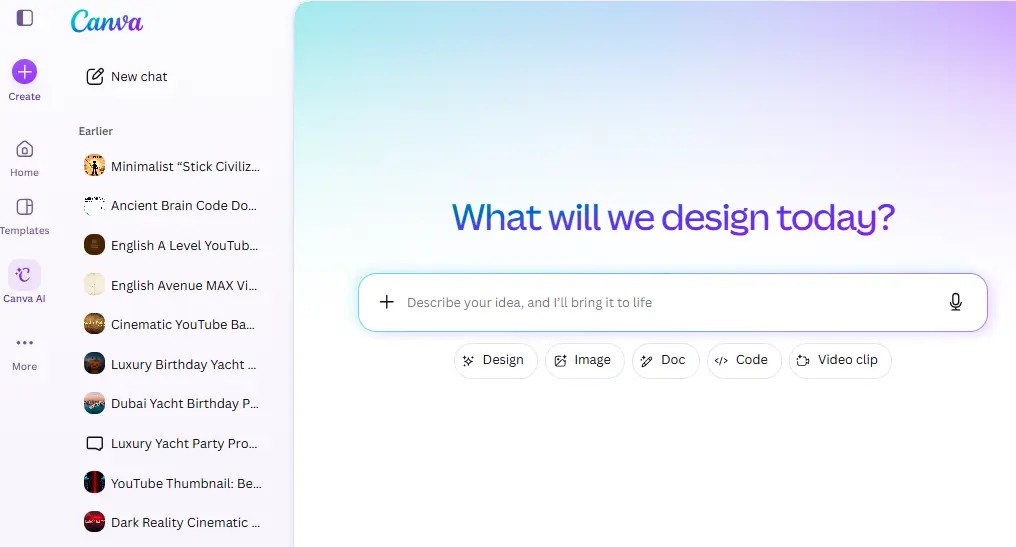
Canva AI is Canva’s conversational AI-powered creative system that helps users create designs, images, text, documents, and other visual content from natural-language instructions.
It has evolved considerably beyond Canva’s earlier collection of individual AI features.
Canva introduced its larger Canva AI experience alongside major AI launches including Canva Code, AI-powered Canva Sheets, upgraded photo editing, and Magic Studio at scale. Canva describes Canva AI as an all-in-one creative partner capable of working with designs, images, documents, and interactive experiences.
In practical terms, you can start with an idea such as:
“Create a modern Instagram campaign for a premium skincare brand.”
Instead of opening a blank canvas, searching for templates, finding stock photography, writing copy, and manually arranging everything, Canva can give you a starting point.
You can then edit the result using Canva’s normal drag-and-drop editor.
And that last part is important.
Canva AI isn’t just about generating content. It’s about generating content that you can continue editing inside Canva.
That’s where Canva has an advantage over many standalone AI generators.
How I Tested Canva AI
For this Canva AI review, I looked at the platform from a practical marketing and content-production perspective rather than judging it only from a feature list.
The main questions were:
- How easy is Canva AI to use?
- How good are its generated designs?
- How useful are its image-generation tools?
- Can AI-generated designs actually be edited?
- How useful is Magic Write?
- How well does Canva handle brand consistency?
- Can it speed up social media production?
- Is Canva Code genuinely useful?
- How much human editing is still required?
- Is Canva Pro or Business worth paying for?
- Who should use Canva AI instead of a specialist AI tool?
That approach matters because an AI feature can look impressive in a product demo but still be frustrating when you use it for actual work
Canva AI Features: What Can It Actually Do?
Canva has turned its AI capabilities into a much broader ecosystem than simple text-to-image generation.
Some of the most useful features include Canva AI, Magic Design, Magic Media, Magic Write, AI photo editing, Magic Layers, Canva Code, and AI-powered workflows across Canva’s Visual Suite.
Let’s look at the features that matter most.
1. Canva AI
Canva AI is the conversational starting point for creating content.
Instead of manually deciding which Canva tool you need, you can describe what you want and let Canva help generate a starting point.
For example:
“Create a LinkedIn carousel explaining five common SEO mistakes made by small businesses.”
The idea is to move from a blank screen to a usable creative direction much faster.
Canva says its AI system combines its own models with technologies and partnerships including OpenAI, Anthropic, and Leonardo.Ai, alongside Canva’s template and content ecosystem.
Why this matters
The biggest advantage isn’t simply generation.
It’s context.
You’re generating something inside the same environment where you can immediately change fonts, images, layouts, colors, animations, and other elements.
That makes Canva AI particularly useful for people who don’t want to become experts in prompting.
2. Magic Design
Magic Design is probably one of Canva’s most useful AI features for everyday marketers.
Instead of searching through thousands of templates and trying to find one that is “close enough,” you can describe what you’re trying to create and Canva can generate design directions for you.
For example:
“Create a minimalist Instagram post promoting a 20% summer sale for a premium furniture company.”
The generated design gives you a starting point.
You can then change the:
- Headline
- Images
- Fonts
- Colors
- Layout
- CTA
- Brand elements
This is where Canva’s approach becomes different from a traditional AI image generator.
The objective isn’t necessarily to produce a final image that you can’t touch.
The objective is to get you into an editable design faster.
That makes Magic Design particularly useful for social media managers, small businesses, marketers, and anyone who needs to produce multiple variations quickly.
My verdict on Magic Design
Excellent for speed.
Don’t expect it to understand your brand strategy perfectly from one sentence. But as a way of getting from a blank canvas to a strong starting point, it’s one of Canva AI’s strongest features.
3. AI Image Generation and Magic Media
Canva also provides AI-powered image and media generation.
You can describe an image and generate visual concepts without leaving Canva.
This is useful when you need something specific for a design but can’t find the right stock image.
For example:
“A luxury modern kitchen with dark walnut cabinets, warm ambient lighting and premium Japanese appliances, editorial photography style.”
The generated image can then be incorporated directly into your design.
That’s a much smoother workflow than:
- Generate image in another AI tool
- Download it
- Open Canva
- Upload it
- Resize it
- Design around it
With Canva, the generation and design workflow happen together.
Is Canva’s image generator the best?
No.
And I don’t think you should expect it to be.
Specialist image-generation platforms can offer more control or stronger results for particular artistic styles and advanced image-generation workflows.
Canva’s advantage is integration.
If you need an image for a social post, presentation, advertisement, flyer, or blog graphic, being able to generate and immediately use that image is incredibly convenient.
4. Magic Write
Magic Write is Canva’s AI writing assistant.
It can help generate:
- Headlines
- Captions
- Product descriptions
- Social media copy
- Short-form marketing copy
- Ideas and outlines
- Presentation content
- Other short-form text
This is one area where I would set realistic expectations.
Canva isn’t the tool I’d choose for producing a long, research-heavy article from scratch.
For serious long-form writing, dedicated AI writing and research tools are generally better suited to the job.
But for visual content, Magic Write makes sense.
If you’re creating a social media graphic and need five headline options, a CTA, and a short caption, it’s convenient to have the writing assistant sitting directly beside the design workflow.
My verdict
Good supporting feature, not a reason by itself to buy Canva.
Its real value comes from the combination of copy + design.
5. AI Photo Editing
This is one of the areas where Canva’s AI capabilities become particularly practical.
Canva has added AI-powered photo-editing capabilities that can help users modify images without needing advanced Photoshop skills.
Depending on the task, you can use AI-assisted features for things such as:
- Removing backgrounds
- Expanding images
- Removing or modifying elements
- Generating backgrounds
- Making targeted edits
- Adjusting images for different formats
The background remover, in particular, is the type of feature that sounds simple but can save a surprising amount of time.
Instead of sending an image to another application, removing the background, exporting it, and uploading it again, the entire process can happen within the same design.
Canva also continues to expand its AI photo editing capabilities. Its current AI platform highlights tools such as Magic Layers and AI-assisted editing alongside its broader Canva AI experience.
6. Magic Layers
Magic Layers is an interesting addition because it addresses one of the biggest problems with AI-generated images.
AI-generated visuals often look great until you want to edit something specific.
Magic Layers is designed to turn a flat design into an editable layout, allowing users to move objects, modify text, and make changes to individual elements.
That moves Canva AI closer to a more useful concept:
AI doesn’t just generate the visual. It helps you recover control over the visual.
For marketers, this can be much more valuable than generating another image.
Imagine receiving an AI-generated advertisement and being able to change the headline, reposition the product, adjust the layout, and modify individual elements instead of starting over.
That’s the direction I want to see more AI design platforms move toward.
7. Canva Code
Canva Code is one of the features that makes the newer Canva AI considerably more interesting.
It allows users to describe an interactive experience and have AI build it without requiring traditional coding skills.
For example, you could ask for:
- A pricing calculator
- A quiz
- An interactive widget
- A mini-game
- An interactive component for a website
Canva says these interactive creations can work across designs, presentations, documents, and websites. The company has also said Canva Code was built using Anthropic’s Claude 3.7 Sonnet model.
This isn’t just another image generator.
It represents Canva’s larger strategy of becoming a platform where people can create things, not simply design static graphics.
Is Canva Code useful?
For non-developers, absolutely.
For professional developers, it isn’t a replacement for a full development environment.
But that’s not really the target.
If you’re a marketer who needs a simple interactive calculator for a landing page or a quiz for a campaign, being able to describe the concept rather than build it from scratch can be extremely useful.
8. AI-Powered Canva Sheets
Another major development is Canva’s integration of AI with data and spreadsheets.
Canva Sheets allows users to work with data while applying Canva’s visual design capabilities.
Its AI capabilities include tools such as Magic Insights for identifying patterns and trends and Magic Formulas for helping with spreadsheet calculations.
Canva has also connected Sheets with Magic Studio so users can create content at scale from spreadsheet data.
For marketers, this could be particularly useful.
Imagine having a spreadsheet containing:
- 100 products
- Product names
- Prices
- Images
- Promotional messages
Instead of designing 100 graphics manually, Canva can connect structured data with its content-generation and design workflows.
That’s a much bigger productivity improvement than generating one AI image.
Canva AI for Social Media Marketing
This is probably where Canva AI makes the most sense.
A social media manager may need to create:
- Instagram posts
- Instagram Stories
- LinkedIn graphics
- Facebook posts
- YouTube thumbnails
- Reels
- Promotional graphics
- Carousel posts
- Advertisements
Normally, each asset requires some combination of copywriting, design, image sourcing, resizing, and editing.
Canva brings much of that into one platform.
And its AI tools reduce the amount of manual work involved.
For a small business, this can be significant.
You don’t necessarily need a separate:
- AI image generator
- Copywriting tool
- Background remover
- Template library
- Design application
- Presentation platform
Canva can handle many of those tasks in one ecosystem.
This is where I think Canva AI’s strongest competitive advantage lies.
Canva AI for Presentations
Canva has always been strong for presentations, and AI makes the initial creation process faster.
You can use AI to help with:
- Presentation concepts
- Slide layouts
- Written content
- Images
- Visual elements
- Formatting
- Branding
The biggest advantage is that the presentation doesn’t have to remain a generic AI-generated deck.
You can continue editing it inside Canva.
This makes Canva particularly useful for:
- Sales presentations
- Marketing proposals
- Pitch decks
- Training materials
- Internal presentations
- Educational presentations
- Business reports
However, there is an important limitation.
Good presentation design is not the same as good presentation storytelling.
AI can help create attractive slides, but you still need to understand your audience, structure the argument, and decide what information actually belongs on each slide.
Canva AI for Branding
Brand consistency is another area where Canva is particularly strong.
Canva’s Brand Kit allows businesses to organize important brand assets such as:
- Logos
- Brand colors
- Fonts
- Templates
- Other visual elements
Canva’s newer AI tools can then work within that broader brand ecosystem.
Canva says its AI can apply Brand Kit information so designs can start with brand consistency already built into the workflow.
This is particularly valuable for businesses producing content at scale.
A marketing team doesn’t want every employee creating a completely different-looking social post.
The more Canva can combine AI generation with brand controls, the more useful it becomes for organizations.
Canva AI Pricing: Is It Free?
Canva offers AI capabilities across its plans, but the amount of AI usage and access to different AI tools varies depending on the plan.
That means the simple answer isn’t:
“Is Canva AI free?”
It’s:
“How much Canva AI do you need?”
Canva currently offers plans including Free, Pro, Business, and Enterprise, with different capabilities and usage allowances. Canva also offers an optional AI Pass add-on for Pro and Business users who need substantially more AI usage.
Canva says AI Pass provides up to 40x more AI than Canva Pro and 20x more than Canva Business, depending on the applicable usage and tools. Importantly, Canva says you do not need AI Pass to access Canva’s AI features.
Canva Free
The free plan is useful for people who want to experiment with Canva and use AI occasionally.
If you only create designs occasionally, you may not need a paid subscription.
Canva Pro
Pro is aimed primarily at individual creators and gives access to premium content, brand features, and additional AI-powered capabilities. Canva currently promotes Pro as an all-in-one design solution for individual creators.
For freelancers, creators, marketers, and small business owners who use Canva frequently, Pro is likely the sweet spot.
Canva Business
Canva Business is designed for individuals, marketers, and small teams that need additional collaboration, brand, marketing, and AI capabilities.
Canva introduced Business as the bridge between individual Pro users and larger Enterprise organizations. The plan includes Pro capabilities plus additional team features, higher premium AI usage, and other business-focused tools.
AI Pass
AI Pass is an optional monthly add-on for Pro and Business subscribers who need significantly more AI usage.
This is worth paying attention to if you use Canva AI heavily because AI usage is no longer simply a matter of having a subscription.
Heavy users need to consider the AI allowance attached to their plan.
Is Canva AI Worth Paying For?
For occasional users?
Probably not. Start with Free.
For someone creating content several times a week?
Yes, Canva Pro is worth considering.
For a marketing team producing large amounts of branded content?
Canva Business becomes much more compelling.
For extremely heavy AI users?
You should also look at the AI allowance and whether an AI Pass makes financial sense.
The important point is that you shouldn’t buy Canva purely because it says “AI.”
Buy it because the combination of AI + templates + editing + brand management + collaboration saves you time.
That’s where the value comes from.
Canva AI Pros and Cons
Pros
Very easy to use: You don’t need years of design experience to start creating useful content.
Excellent workflow integration: AI generation, editing, templates, images, text, presentations, and other creative tasks live together.
Editable AI output: You’re not necessarily stuck with a flat generated image.
Strong for marketers: Canva is particularly useful for people who need to create large amounts of marketing content.
Good templates: Canva’s template ecosystem remains one of its biggest advantages.
Brand tools: Brand Kits make it easier to maintain visual consistency.
Wide range of formats: One platform can handle social media, presentations, documents, websites, videos, and more.
Canva Code: Adds interactive creation to a platform that traditionally focused on visual design.
Cons
Not best-in-class at everything: Specialist AI tools can outperform Canva in individual categories.
AI still needs supervision: Generated designs and copy often need human editing.
Creative control has limits: Professional designers may find Canva restrictive for advanced work.
AI usage limits: Heavy users need to pay attention to plan allowances.
Some outputs feel generic: AI-generated designs can require additional work to develop a distinctive brand identity.
Not a replacement for professional software: Advanced video editing, illustration, motion design, and high-end image workflows still benefit from specialist applications.
Canva AI vs Other AI Design Tools
The most important thing to understand is that Canva isn’t really competing with every AI tool in exactly the same way.
It is competing on workflow.
A specialist image generator might produce a better image.
A specialist writing tool might produce better long-form content.
A professional design application might provide more precise control.
But Canva asks a different question:
What if you could do all of those everyday creative tasks without leaving one platform?
That is its advantage.
Canva AI vs Midjourney
Choose Canva if you want:
- Editable designs
- Templates
- Social media content
- Presentations
- Brand management
- Image generation inside a design workflow
Choose Midjourney if your primary goal is advanced AI image generation and artistic exploration.
Canva AI vs ChatGPT
ChatGPT is stronger when your main task is:
- Research
- Long-form writing
- Brainstorming
- Complex reasoning
- Content strategy
- Conversational workflows
Canva is stronger when the final output needs to become a visual asset.
The two actually work very well together.
Canva AI vs Adobe
Adobe’s ecosystem offers much deeper professional creative controls.
Canva is considerably easier for non-designers and teams that need to move quickly.
If you need professional-level creative control, Adobe remains difficult to replace.
If you need a marketer to create a polished campaign asset in minutes, Canva is often the easier choice.
What Canva AI Is Actually Best At
After looking at the platform as a complete workflow rather than judging individual features in isolation, I think Canva AI is particularly strong in five areas.
1. Getting started quickly
The blank canvas is one of the biggest obstacles in design.
AI removes much of that friction.
2. Producing marketing content
Social posts, ads, presentations, thumbnails, flyers, and other everyday marketing assets are where Canva shines.
3. Combining AI with manual editing
You don’t have to accept the AI output exactly as it is.
You can generate, edit, regenerate, resize, and refine.
4. Keeping everything in one place
This is arguably Canva’s biggest competitive advantage.
5. Helping non-designers create professional-looking work
Canva’s entire philosophy is built around making design accessible, and AI makes that even more powerful.
Where Canva AI Still Falls Short
This is the part many Canva reviews don’t emphasize enough.
AI doesn’t eliminate the need for design judgment.
You can generate a beautiful layout and still have:
- Weak messaging
- Poor hierarchy
- Generic visuals
- Bad typography
- Too much text
- An ineffective CTA
- Inconsistent branding
Canva can make the production process faster.
It doesn’t automatically make the strategy better.
The same applies to AI-generated images.
You might get an image that looks impressive but doesn’t communicate the right idea.
Or a presentation that looks polished but tells a weak story.
That is why I wouldn’t describe Canva AI as a replacement for designers.
I’d describe it as a force multiplier for people who already know what they want to communicate.
Is Canva AI Good for Beginners?
Yes. This is probably its strongest audience.
Canva has always been designed around accessibility, and AI makes that even easier.
A beginner can start with a prompt instead of learning everything about:
- Layout
- Typography
- Image composition
- Templates
- Photo editing
- Presentation design
The user can then learn by editing the generated output.
That’s much less intimidating than opening professional design software for the first time.
Is Canva AI Good for Professionals?
Yes, but with a caveat.
Professionals shouldn’t necessarily use Canva as their only creative tool.
Instead, it works extremely well as a productivity layer.
A professional designer might use more advanced software for complex projects and Canva for:
- Quick social assets
- Internal presentations
- Marketing variations
- Client presentations
- Simple promotional materials
- Collaboration with non-designers
For marketers, the case is even stronger.
If your job requires producing content constantly, Canva AI can save a substantial amount of repetitive work.
Who Should Use Canva AI?
I would recommend Canva AI to:
Small business owners who need professional-looking marketing materials without hiring a designer for every asset.
Social media managers who need to create multiple formats quickly.
Marketers who want to turn campaigns into visual content faster.
Content creators who need thumbnails, social posts, presentations, and supporting graphics.
Entrepreneurs who need to create everything from pitch decks to advertisements.
Teachers and educators who create presentations and educational materials.
Small teams that need collaborative design without a steep learning curve.
Who Shouldn’t Rely on Canva AI?
Canva AI isn’t the ideal primary tool for:
Professional illustrators who require deep vector control.
Advanced video editors working with complex timelines and professional post-production.
Motion designers creating sophisticated animations and compositing.
Professional photographers requiring advanced image-processing workflows.
Designers working on highly specialized, pixel-perfect projects.
In those situations, Canva can still be useful, but it probably shouldn’t replace your specialist software.
Canva AI Review: Final Verdict
So, is Canva AI worth using?
Yes.
But not because Canva suddenly became the world’s best AI image generator, writing assistant, presentation tool, photo editor, and coding platform.
That’s the wrong way to evaluate it.
Canva’s real strength is the combination of all those capabilities inside one accessible creative platform.
You can start with an idea, generate a design, create an image, write the copy, edit the visual, apply your brand, turn the concept into another format, and continue refining everything without constantly switching tools.
That’s incredibly valuable.
The AI itself isn’t always perfect.
Some generated designs need editing. Some images won’t be exactly what you imagined. Magic Write isn’t going to replace a dedicated long-form writing workflow. And professional designers will eventually encounter limitations that don’t exist in more advanced software.
But for everyday content production, those limitations are often outweighed by speed and convenience.
My final score: 4.5/5
Ease of use: 5/5
AI features: 4.5/5
Design flexibility: 4/5
Image generation: 4/5
Marketing workflow: 5/5
Branding: 4.5/5
Value: 4.5/5
Professional creative control: 3.5/5
The bottom line
Canva AI is best thought of as an AI-powered creative workspace, not a replacement for every specialist creative tool.
If your priority is speed, accessibility, collaboration, and producing a lot of good-looking content without a complicated workflow, Canva AI is one of the easiest recommendations to make.
If your priority is maximum creative control or the absolute best AI output for one specific task, look at specialist tools instead.
For most marketers, creators, entrepreneurs, and small teams, however, Canva AI is absolutely worth trying.
And the biggest reason isn’t any individual AI feature.
It’s how quickly Canva can take you from “I have an idea” to “I have something I can actually use.”
Frequently Asked Questions About Canva AI
Is Canva AI free?
Canva provides AI features across its plans, although available tools and usage allowances vary. You can start using Canva AI without purchasing the optional AI Pass.
Is Canva AI worth it?
For people who regularly create social media posts, presentations, marketing graphics, videos, or other visual content, Canva AI is worth considering. Its biggest advantage is combining AI generation with Canva’s existing design and editing workflow.
Can Canva AI generate images?
Yes. Canva provides AI-powered image-generation capabilities that allow users to create visuals from text prompts and then incorporate those visuals into Canva designs.
Can Canva AI write content?
Yes. Magic Write can generate and refine text for different creative workflows. It is particularly useful for short-form marketing copy, captions, headlines, and content inside designs.
Is Canva AI better than Midjourney?
Neither is simply “better.” Canva is better as an all-in-one creative workflow, while Midjourney is more specialized around AI image generation. Your choice should depend on whether you need a complete design platform or primarily an image-generation tool.
Can Canva AI replace a graphic designer?
No. Canva AI can make design much faster and more accessible, but professional design still requires strategy, visual judgment, typography, composition, branding, and creative decision-making.
What is Canva Code?
Canva Code allows users to create interactive experiences from natural-language prompts without traditional coding. Canva says these experiences can be used across designs, presentations, documents, and websites.
Does Canva use my designs to train AI?
Canva provides privacy controls around AI-powered features. Canva states that content from Teams, Business, Enterprise, and Education users isn’t used to improve AI-powered features, while other accounts have controls governing AI improvement.
Related AI Tool Reviews
If you’re comparing Canva AI with other creative and productivity tools, see our other hands-on reviews on AITestedGuide:
Note: Replace the internal-link slugs above with the exact published AITestedGuide URLs before publishing.