
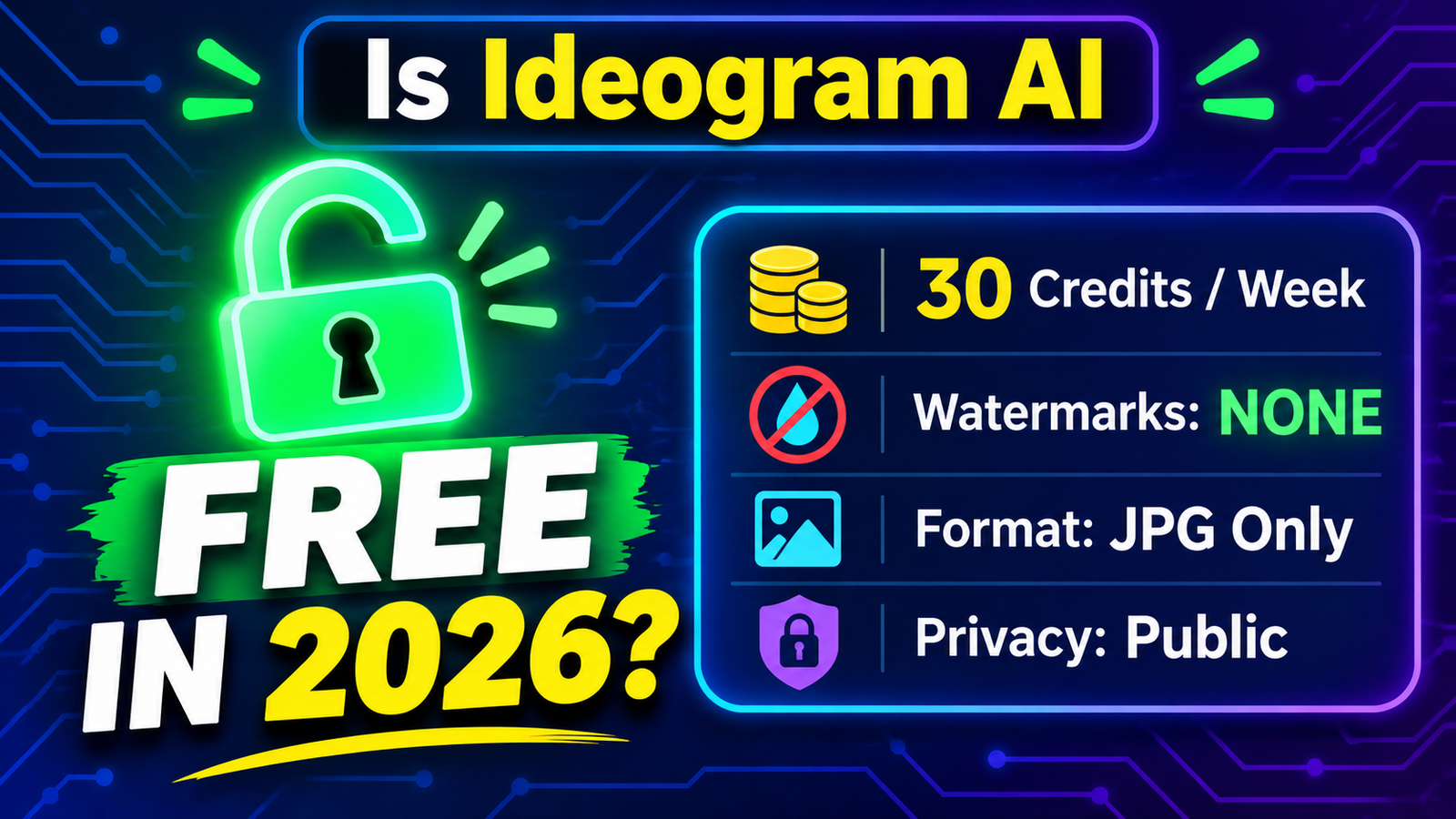
Ideogram AI remains the undisputed king of AI typography, yet strict compute limits have forced nearly every major image generator to tighten its free tier in 2026. After testing Ideogram’s free plan firsthand, we uncovered a surprising twist: you get completely watermark-free images, but hidden catches around privacy, file formats, and weekly credits dictate whether you can actually use them for real projects.
Quick Verdict: Is Ideogram AI Free in 2026? Yes, Ideogram AI offers a permanently free plan in 2026 with zero visible watermarks on downloaded images. Free users who sign in with a Google, Apple, or Microsoft account receive 30 slow-queue credits per week, standard-resolution JPG downloads, and full access to Ideogram’s text-rendering models. However, every free image is published publicly, and uncompressed PNGs, upscaling, and private generations are locked behind paid plans starting at $15/month (billed annually).
The Reality of Free AI Image Generators in 2026
The days of generating hundreds of high-resolution, private AI images for free are largely behind us. Rising GPU costs have pushed platforms like Midjourney to eliminate permanent free tiers altogether, leaving creators hunting for tools that still deliver usable results at $0.
Ideogram carved out its reputation by solving AI’s biggest weakness: spelling and graphic typography. Whether you are mocking up YouTube thumbnails, t-shirt graphics, or social media posters, Ideogram renders clean, legible text where other models produce gibberish.
Instead of relying on outdated pricing rumors, we logged into a standard free Ideogram account to test its exact 2026 rules. Below is everything you get—and everything you sacrifice—without pulling out a credit card.
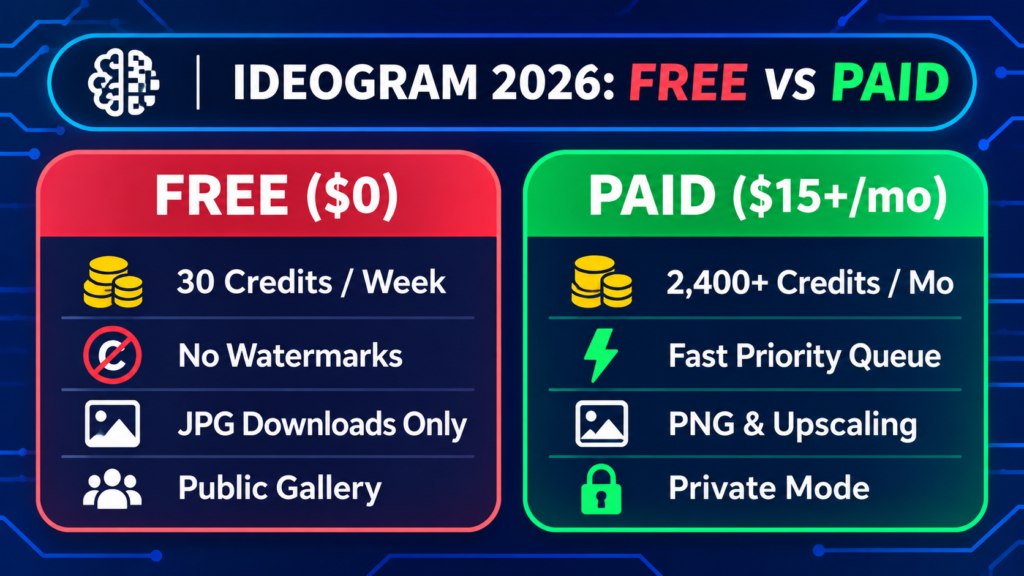
| Feature | Ideogram Free ($0/mo) | Ideogram Plus ($15/mo yearly) |
|---|---|---|
| Credit Allowance | 30 credits / week (Slow queue) | 2,400 priority credits / month + unlimited slow queue |
| Watermarks | None (Clean downloads) | None (Clean downloads) |
| Download Formats | JPG only (Standard resolution) | JPG, PNG, & WebP (Full resolution) |
| Privacy Settings | Public gallery only | Private generation mode included |
| Editing & Upscaling | Basic Remix & Canvas tools | Full Magic Fill, Upscaler & Batch Generation |
Part 1: Ideogram’s 2026 Free Tier Rules Explained
Ideogram transitioned away from its older daily-reset model to a weekly credit pool. Understanding how these credits burn and where the real restrictions hide will save you from wasting your weekly allowance.
1. The 30 Credits Per Week Limit
When you sign up using a verified Google, Apple, or Microsoft account (disposable email sign-ups are blocked from free credits), Ideogram grants you 30 credits every week. Unused credits do not roll over, so your balance resets cleanly every seven days.
- How credits are spent: Depending on the model version and rendering speed you select (such as Ideogram 4.0 or 4.5 Turbo/Default), a standard prompt typically consumes between 1 and 3 credits, generating a grid of up to four variations.
- Practical output: Expect roughly 10 to 15 full prompt runs per week (40 to 60 individual image variations). That is plenty for testing concepts, but tight if you are producing daily content.
2. The Watermark Myth: Are Free Downloads Clean?
Many creators assume free AI generators stamp an ugly logo across the corner of every image. During our hands-on test, downloaded free images contained zero visible watermarks.
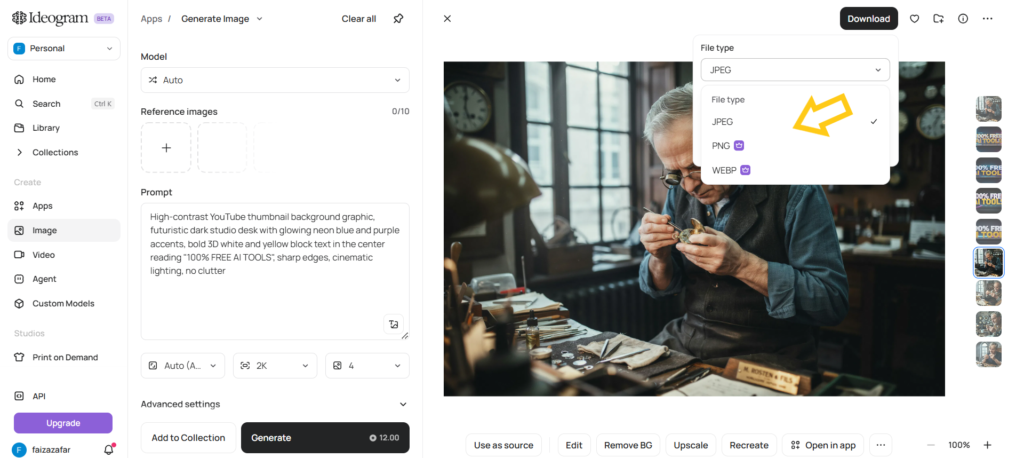
- The real catch is file format: While your image is visually clean, free accounts can only export compressed JPG files.
- What stays locked: Transparent backgrounds, lossless PNG downloads, and Ideogram’s built-in AI Upscaler are locked behind paid subscriptions. If you need print-ready 300 DPI files for Merch by Amazon or Etsy, a standard free JPG will require external upscaling.
3. Slow Queue Wait Times & Single-Job Cap
Free users generate exclusively in the slow queue and can only run one prompt at a time. Paid Plus and Pro subscribers jump to the front of the line and can queue multiple prompts simultaneously.
- Off-peak speed: Early mornings and mid-week afternoons yielded images in 20 to 40 seconds.
- Peak-hour bottlenecks: During high-traffic evenings, wait times stretched between 2 and 5 minutes per prompt. Patience is mandatory on the $0 tier.
4. Public Gallery Privacy Rules
Privacy is the biggest hidden trade-off on Ideogram’s free tier. Every prompt you enter and every image you generate on a free account is published to Ideogram’s public community feed.
- Zero stealth mode: Other users can view your prompt text, download your artwork, and click Remix to build variations off your work.
- No deletion option: Free users cannot hide or delete past generations from the public gallery. Never upload confidential client logos, unreleased product names, or personal photos on a free account.
Part 2: Which Ideogram Features Can You Use for Free?
Despite the weekly credit cap and public feed rules, Ideogram does not cripple its core AI engine for free users. You get access to the exact same flagship typography models as paying subscribers.
Magic Prompt & Typography Precision
Ideogram’s Magic Prompt assistant, which automatically expands a simple five-word idea into a richly detailed art direction prompt is completely free to use.
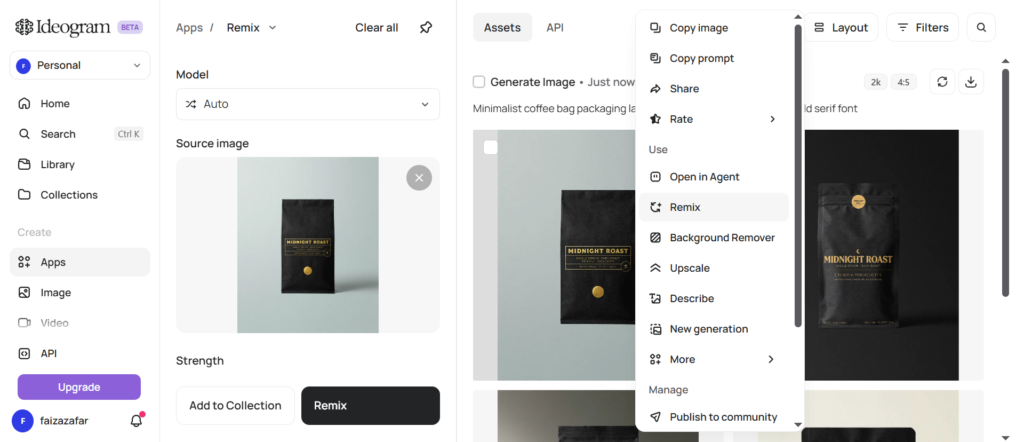
- Real-world test: Prompting “Minimalist coffee bag packaging labelled ‘MIDNIGHT ROAST’ in bold gold serif font” produced crisp, accurately spelled lettering on all four grid variations.
- Design control: You can freely toggle aspect ratios (1:1, 16:9, 9:16, 4:5), colour palettes, and style tags (Design, Typography, Realistic, 3D) without spending extra credits.
The Remix & Canvas Workflow
Even on a free plan, you can click Remix on any of your own generations or any public image in the community feed to tweak colours, layouts or text while keeping the original composition intact.
- Credit-saving hack: Browsing the public feed and remixing a proven layout saves you from burning 3 or 4 failed prompts trying to nail the composition from scratch.
Part 3: Ideogram vs. Best Free AI Image Alternatives in 2026
If 30 credits a week or public gallery visibility doesn’t fit your workflow, four major competitors offer distinct advantages in 2026. Here is how they stack up on pricing, resolution, free tiers, and editing tools.
Table 2: 2026 AI Image Generator Comparison (Free Tiers & Specs)
| AI Tool | Price (Entry Paid) | Max Resolution | Free Tier Allowance | Built-in Editing Tools |
| Ideogram AI | $15/mo (billed yearly) or $20/mo | Standard JPG (Free); up to 2K/Upscaled (Paid) | 30 credits/week (No watermark, public only) | Remix, Magic Prompt, Canvas Inpainting |
| Flux.1 (Schnell / Dev) | $0 (Open-weight local); ~$10/mo via cloud hosts | 1024×1024 native (scales higher via plugins) | Unlimited (if run locally on your own GPU) | Full ControlNet, Inpainting & Outpainting (via ComfyUI/Forge) |
| Grok Imagine 2.0 | $8/mo (X Plus) or $30/mo (X Premium) | 1K default / 2K (via Quality Mode & API) | Limited daily allowance (via free X/Grok account) | Multi-image reference editing (up to 5 inputs) |
| Midjourney (V8.2) | $10/mo (Basic); $30/mo (Standard) | 1024px native; 2x / 4x Creative Upscale | None (Paid subscription required; rare promo days) | Vary Region (Inpainting), Pan, Zoom Out, Style Reference |
| ChatGPT Images | $8/mo (ChatGPT Go) or $20/mo (Plus) | Up to 1536×1024 (high-detail aspect ratios) | Limited daily cap (Slower queue, watermark-free) | Conversational multi-turn edits & brush selection |
Which Free Alternative Should You Choose?
- Choose ChatGPT Images for Private, Conversational Edits: Unlike Ideogram, ChatGPT’s free tier keeps your generations private and lets you highlight a specific area of an image to change text or objects using plain English. Its typography rivals Ideogram, though daily free caps reset strictly every 24 hours.
- Choose Flux.1 for Unlimited, Offline Generation: If you own a PC with at least 8GB–12GB of VRAM, running Flux.1 locally through free interfaces like ComfyUI or Fooocus gives you unlimited, watermark-free, private images forever. If you lack hardware, free cloud spaces on Hugging Face offer occasional daily bursts.
- Choose Grok Imagine 2.0 for Fast Social Graphics: Accessible with a free X (Twitter) account, Grok Imagine 2.0 excels at photorealistic scenes and punchy social media visuals with fewer strict stylistic guardrails than ChatGPT.
- Skip Midjourney If Your Budget Is $0: Despite industry-leading artistic lighting and texture in V8.2, Midjourney has no standing free plan. You must spend at least $10/month to generate a single image.
Part 4: 4 Free Pro Tips to Stretch Your 30 Weekly Ideogram Credits
Because 30 credits disappear quickly, follow this zero-cost workflow to get maximum value out of every generation:
- Draft Your Prompts in a Free LLM First: Never waste Ideogram credits guessing wording. Ask ChatGPT or Claude to format a clean, descriptive prompt specifying font style, background contrast, and exact text inside quotation marks before pasting it into Ideogram.
- Use Turbo Mode for Layout Testing: Select the fastest/lowest-credit model setting first to verify that your text placement and composition look right. Save higher-credit quality runs only for your winning layout.
- Upscale Free JPGs Using Free External Tools: Since Ideogram locks its native upscaler behind paid plans, download your watermark-free JPG and run it through Upscayl (a 100% free, open-source desktop AI upscaler) to boost resolution 4x for crisp web or print use.
- Keep Sensitive Client Work on ChatGPT Free: Use Ideogram for public-safe concepts, YouTube thumbnails, and blog graphics, and switch to ChatGPT’s free image generator whenever you need private client mockups.
Frequently Asked Questions (FAQs)
Is Ideogram AI Free completely to use in 2026?
Yes, Ideogram AI offers a permanently free plan in 2026 with no credit card required. Signing in with a Google, Apple, or Microsoft account gives you 30 slow-queue credits per week, standard JPG downloads, and access to Ideogram’s core text-to-image models.
How many free images can you generate on Ideogram AI per week?
Free accounts receive 30 credits per week, which equals roughly 10 to 15 prompts (40 to 60 individual images). Each prompt generates a grid of up to four variations and costs between 1 and 3 credits depending on the model version and speed setting selected.
Does Ideogram AI put a watermark on free images?
No, Ideogram AI does not add a visible watermark to images downloaded on the free tier. You receive clean, unbranded JPG files, though high-resolution PNG exports, transparent backgrounds, and AI upscaling are restricted to paid plans.
Can I use Ideogram free images for commercial purposes like Etsy or Print-on-Demand?
Ideogram permits personal and general creative use of your outputs, but free JPGs come with practical limitations for commercial work. Because free images are public—meaning other users can legally remix your prompt—and capped at standard JPG resolution, businesses and print-on-demand sellers should upgrade to a paid plan for private ownership and high-res PNGs.
Are my free Ideogram AI images private?
No, all creations made on the free plan are public by default. Your creations appear in Ideogram’s community gallery where anyone can view, download or remix them; private generation requires upgrading to the Plus plan ($15/month billed annually).
What is the best free alternative to Ideogram AI for text in 2026?
ChatGPT Images (powered by DALL-E 3/GPT-4o) and Flux.1 are the best free alternatives to Ideogram AI in 2026 for accurate typography. ChatGPT Images offers watermark-free generations with strong text accuracy via a conversational interface, while Flux.1 provides unlimited, watermark-free generations if you run it locally on your own hardware.
Final Verdict: Is Ideogram AI Free Plan Worth Using in 2026?
Ideogram AI’s 2026 free tier is easily one of the most generous free typography tools on the market—as long as you don’t mind working in public. Getting watermark-free downloads with industry-leading text accuracy at $0 makes it a must-bookmark tool for bloggers, YouTubers, and students.
If you need private client workspace, transparent PNGs, or high-volume daily output, pair Ideogram’s 30 weekly credits with ChatGPT’s free image generator or upgrade to Ideogram Plus ($15/month billed yearly).